

Most agency owners start their search the same way. They watch a few demo reels, try a prompt or two, and judge each platform by how good the clips look. It's a natural place to begin, but it's also a trap.
Clip quality is only one part of the story. After the excitement fades, your team still has to plan campaigns, manage files, handle client feedback and deliver on deadlines. A platform that generates beautiful footage but makes those jobs harder will cost you more than it saves.
If you're comparing options, this guide will help you look past the demo. We'll cover the features that decide whether an AI video tool for advertising agencies actually works in daily practice, and how to test each one before you commit.
Why Generation Quality Alone Is a Poor Way to Compare Platforms
Every major platform can produce impressive results on a good day. Quality also changes quickly, because models improve every few months. A platform that leads today may be level with its rivals by next season.
What changes far more slowly is the structure around the generator. Things like how you organise assets, how editors work, and how a team shares projects tend to stay the same. So, when you compare platforms, it makes sense to spend less time on the sample clips and more time on the workflow behind them.
Here's a simple way to think about it. Generation answers the question, "Can this tool make a video?" Agencies need an answer to a different question: "Can this tool help us deliver ten videos to five clients this month without chaos?"
The Features That Matter Most
Let's go through the main areas to compare, one by one.
1. Model access and flexibility
Different video models have different strengths. One might handle realistic people well, while another suits stylised animation or product shots. Agencies work across many industries, so being locked into a single model can limit what you offer.
When comparing platforms, ask:
- Does it give access to more than one video model?
- Can you switch models within the same project without starting over?
- Does the platform add new models over time, or are you left waiting?
- Are the usage terms clear for each model, especially for commercial work?
Not every agency needs a long list of models. Still, having a few good options inside one workspace is far better than juggling separate accounts.
2. Scripting and planning support
Campaigns begin with ideas, not prompts. A platform that supports scripting, shot lists or storyboards helps your team move from brief to production in a smooth line.
Look for the ability to draft, edit and save scripts, and to link them to the visuals and clips that follow. If planning happens in a separate document, someone will eventually copy the wrong version into the wrong place.
3. Image generation and reference control
Many strong AI videos begin with approved still images. Being able to create key visuals, lock in a product's look and reuse a character across scenes is a huge advantage for brand work.
Ask whether the platform lets you upload brand references, such as logos, product photos and colour palettes, and whether it keeps them consistent across clips. Consistency is what separates a polished campaign from a collection of random clips.
4. Asset management
This feature isn't glamorous, but it matters a great deal. A busy agency creates hundreds of files every month, including scripts, images, clips, audio and exports.
A good platform should offer:
- Folders or projects organised by client and campaign
- Search that actually finds things
- Version history, so you can return to an earlier cut
- Clear naming and tagging
- Easy export in common formats
If assets are hard to find inside the platform, your team will end up storing them elsewhere, and the scattered-files problem returns.
5. Built-in editing
Raw AI output rarely goes straight to a client. It needs trimming, sequencing, captions, music, voice-over and branding. Some platforms include these tools, while others expect you to export everything to separate software.
Neither approach is wrong, but the more editing you can do in the same place, the fewer file transfers you'll face. At a minimum, check whether the platform supports common aspect ratios, since clients nearly always want vertical, square and widescreen versions.
6. Collaboration and permissions
Agency work is a team sport. Writers, designers, editors, producers and account managers all touch the same project at different points.
Check whether the platform allows:
- Multiple team members on one project
- Different access levels for staff, freelancers and clients
- Comments or feedback directly on drafts
- Clear status tracking, so everyone knows what's waiting for approval
Without these features, collaboration moves to chat apps and email, and details get lost along the way.
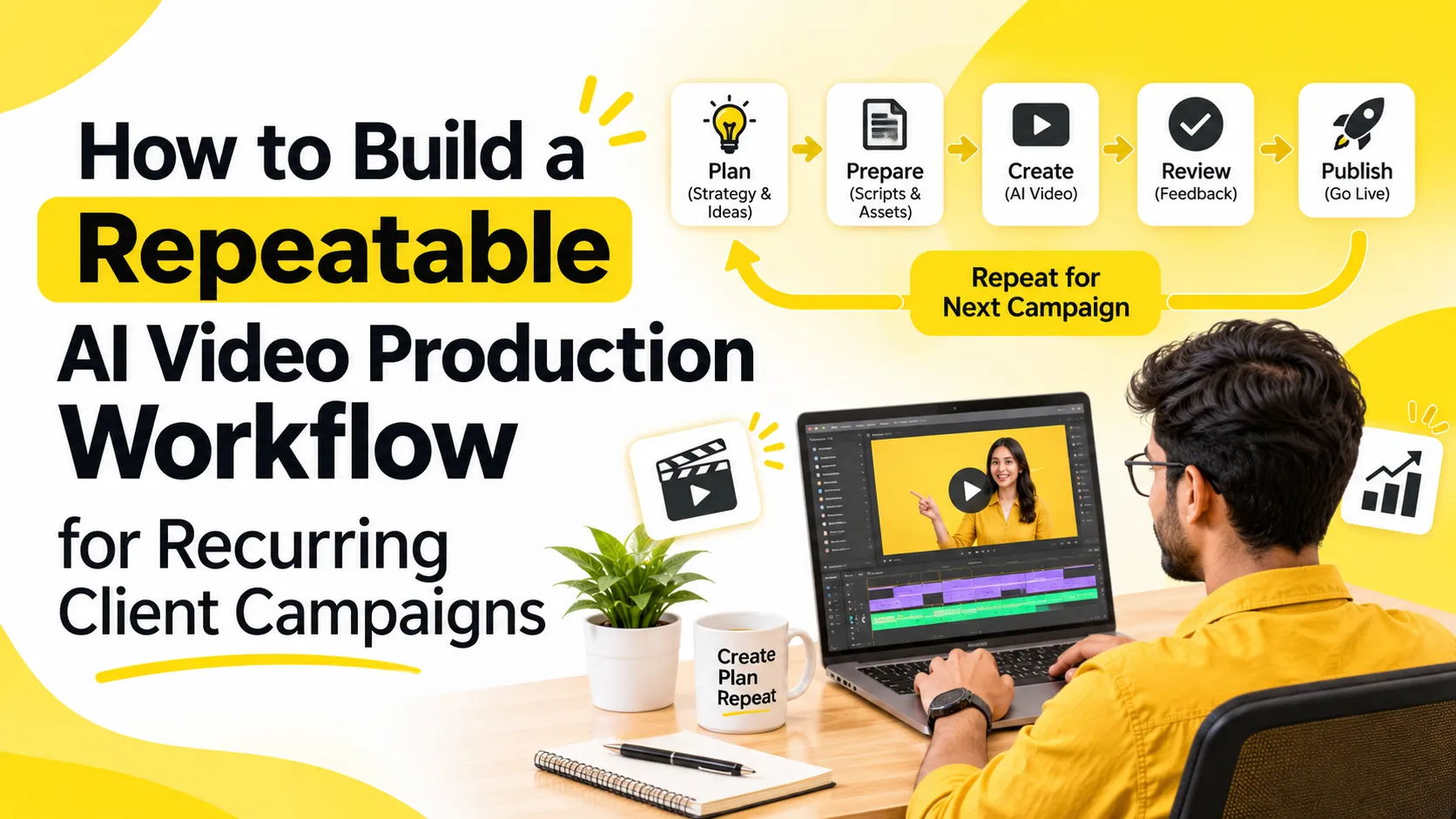
7. Reusable workflows and templates
Here's a feature that quietly decides whether a platform saves time over the long run. Reusable workflows let your team save a successful setup (the prompt style, reference images, edit structure and export sizes) and apply it again.
For agencies, this is how one good campaign turns into a repeatable service. If a platform treats every project as a blank slate, your team will keep repeating the same setup work, no matter how fast the generator is.
8. Speed, reliability and support
Deadlines don't wait for slow servers. Test how long generation takes at normal and busy times, and see how the platform handles failed or partial outputs. Also check what support is on offer, since a quick answer during a tight deadline is worth a lot.
9. Pricing and credit structure
Pricing for AI video can be confusing. Some platforms charge per clip, others use monthly credits, and a few combine both. Before committing, work out your likely monthly output and see what that costs in each model.
Watch for hidden costs, such as extra charges for higher resolution, longer clips, additional team seats or premium models. A platform that looks cheap at first can become costly once real client work begins.
10. Rights, privacy and security
Agencies handle confidential launches and unreleased products, so data handling matters. Read the terms carefully and look for answers to these questions:
- Can you use the outputs commercially?
- Is your uploaded material used to train models?
- Where is your data stored, and who can access it?
- Does the platform offer team-level security controls?
Some clients also have their own rules about AI-generated content, so it helps to know the platform's position before the question comes up.
A Side-by-Side View
The table below shows how a basic generator compares with a fuller workflow platform on the points above.
| Feature | Generation-Only Tool | Connected Workflow Platform |
|---|---|---|
| Model access | Usually one model | Often several models in one place |
| Scripting and planning | Not included | Built in or closely linked |
| Image and reference control | Limited | Stronger consistency tools |
| Asset management | Basic downloads | Organised by client and project |
| Editing | Separate software needed | Integrated or tightly connected |
| Collaboration | Mostly single-user | Shared projects and permissions |
| Reusable workflows | Rare | Core feature |
| Best suited for | Experiments, quick tests | Ongoing client campaigns |
Of course, not every agency needs every feature. A two-person studio doing occasional social clips may be happy with something simpler. However, once you manage several clients at once, the right-hand column starts to make more sense.
How to Test a Platform Before Committing
Demos are designed to impress. Your own test should be designed to reveal problems. Here's a practical approach.
- Choose a real past project. Pick a campaign you've already delivered, so you know what good looks like.
- Run it from brief to export. Don't skip any stage. Note every point where you had to leave the platform.
- Ask a teammate to join. See how easy it is to share the project and give feedback.
- Request a mid-project change. Swap a headline or a product colour and measure how long the update takes.
- Repeat the project in a new format. Create vertical and square versions, then check whether quality holds.
- Count the clicks and the time. Small delays seem harmless in a test, but they multiply across dozens of projects.
- Check the invoice logic. Estimate a full month of work and compare it with the pricing structure.
A trial like this takes a few days, but it can save months of regret.
Questions to Ask Before You Sign Up
If you're speaking with a sales team or reading documentation, these questions get to the point quickly.
- Which video models are available, and how often are new ones added?
- Can I save and reuse workflows across projects and clients?
- How are assets organised and backed up?
- What editing tools are included?
- How do team seats, permissions and client access work?
- What are the commercial usage terms for generated content?
- What happens to my data if I cancel?
- Is there a way to export my projects and assets at any time?
The last two questions are easy to forget, yet they protect you from being locked in.
Red Flags to Watch For
Some warning signs show up again and again when agencies compare platforms.
- Only polished showreels, no workflow demos. If you can't see how a real project is managed, ask why.
- Vague answers about rights. Commercial use should be explained clearly, not hinted at.
- No version history. Lost work and confusing revisions are almost guaranteed.
- Single-user design. If it can't handle a team, it will struggle with an agency.
- Pricing that's hard to predict. If you can't estimate monthly costs, budgeting will be painful.
Matching the Platform to Your Agency
Not every team has the same priorities. Here's a rough guide to help you decide where to focus.
- Small agencies with limited staff should lean toward a connected workflow, since fewer tools mean fewer handovers.
- Mid-sized agencies with many clients should focus on asset management, collaboration and reusable templates.
- Creative studios with a strong visual style may value model access and image control above all.
- Performance-focused agencies producing lots of ad variations should look closely at speed, batch production and format flexibility.
Most agencies will fit more than one category, so decide which two or three features would hurt most if they were missing.
Final Thoughts
Choosing an AI video tool for advertising agencies isn't just about who makes the nicest clip this month. It's about which platform supports your whole process, from the first idea to the final export, and keeps working as your client list grows.
Compare model access, scripting, image control, asset management, editing, collaboration and reusable workflows. Test with real projects, ask direct questions, and read the fine print on rights and pricing. Do that, and you'll end up with a platform that fits the way your agency actually works, not just the way a demo reel looks.
Frequently Asked Questions
1. What features should an AI video tool for advertising agencies have?
Beyond video generation, look for access to multiple models, scripting support, image generation with brand consistency, organised asset management, built-in editing, team collaboration and reusable workflows. These features help agencies manage several clients and deadlines without scattered files or repeated setup work.
2. How do I compare AI video platforms for my agency?
Test each platform with a real past project from brief to final export. Note where you need outside tools, how easily teammates can collaborate, how fast revisions happen, and what the monthly cost looks like at your normal output. Also review commercial usage terms and data privacy policies.
3. Is a generation-only tool enough for agency work?
It can work for quick experiments and mood boards. For ongoing client campaigns, though, most agencies need more, including planning tools, asset organisation, editing, collaboration and reusable workflows. Without these, teams usually spend extra time moving files and recreating approved looks.
















Sign in to leave a comment.