Could a 50-Inch Screen Be the Right Fit for Your Home?

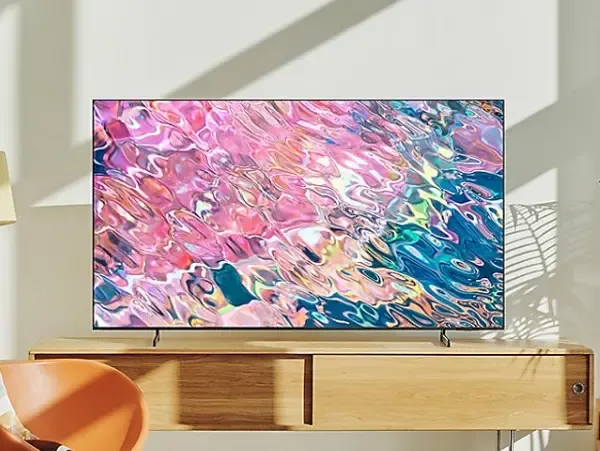
Choosing a television is about more than finding a screen that looks impressive in a showroom. You need a size that suits your room, picture quality that makes your favourite shows enjoyable, and features that fit the way you spend your free time. A screen that is too small may feel underwhelming, while an oversized television can overwhelm a compact living space.
A 50-inch television can offer a comfortable middle ground for many households. It provides enough screen space to enjoy films, sports, television shows, and games without necessarily taking over the entire room. Modern models also offer internet connectivity, streaming applications, and convenient ways to connect other devices.
However, not every television offers the same experience. Understanding screen size, picture quality, sound, smart features, and everyday convenience can help you make a more confident decision. This guide explains what to consider before choosing a television for your home, using simple examples to make each feature easier to understand.
Why Screen Size Matters for Everyday Viewing
The size of your television affects how comfortable and enjoyable your viewing experience feels. A larger screen can make details easier to appreciate, particularly when watching films, nature documentaries, or sporting events.
A 50-inch screen is measured diagonally from one corner to the opposite corner. It does not mean the television is 50 inches wide. For a typical widescreen television with a 16:9 aspect ratio, the screen itself is approximately 44 inches wide and 25 inches tall, excluding the frame.
This size can work well in a family living room, a bedroom with sufficient space, or a dedicated entertainment area. It can also suit households that regularly watch content together.
Before deciding, think about where everyone will sit. If your sofa is positioned several feet away, a 50-inch display may provide an enjoyable balance between visibility and room space. If viewers sit very close, you may prefer to compare different sizes in person.
The key is to choose a television that feels comfortable in your actual room rather than selecting one simply because it looks impressive in a shop.
What Makes a Modern Television More Convenient?
Televisions have developed considerably beyond traditional broadcast viewing. Many current models connect to the internet and provide access to entertainment applications, allowing you to watch different types of content without relying entirely on cable or satellite services.
Easy Access to Streaming Applications
A smart television can bring several entertainment options together in one place. Depending on the model, supported applications may include services for films, television programmes, online videos, and music.
Imagine wanting to watch a film after dinner. Instead of connecting a laptop to the television, you can open a supported streaming application directly from the home screen. You simply select your content and begin watching, provided you have the necessary subscription and internet connection.
Application availability can vary by model, operating system, region, and service provider. It is therefore sensible to check whether the services you regularly use are supported before purchasing.
Simple Menus and Navigation
A well-organised menu makes everyday use easier, particularly for families with different viewing preferences. Clear icons, straightforward settings, and a responsive remote can reduce the time spent searching for content.
Voice control is another feature available on certain models. It may allow you to search for programmes, adjust settings, or perform other supported actions using spoken commands.
These features are not equally available on every television, so check the specifications of the model you are considering.
Understanding Picture Quality Without the Technical Jargon
Picture quality plays a major role in how enjoyable a television feels. Even a large screen can disappoint if the picture looks dull, lacks detail, or struggles in a bright room.
Resolution and Image Detail
Resolution describes how much detail a screen can display. Many televisions in this size category offer 4K resolution, which contains four times as many pixels as Full HD. Pixels are the tiny points that combine to form the picture.
Think of a photograph made from small tiles. Using more tiles can help create finer details, especially when the original image contains enough information to take advantage of them.
However, resolution is only one part of picture quality. The quality of the original video, the screen technology, and the television's picture processing also influence the final result.
If you enjoy watching films, streaming high-quality programmes, or playing compatible games, a 4K model may be worth considering. Remember that not every programme or video is available in 4K.
Colours, Contrast, and Brightness
Colours and contrast affect how realistic a scene appears. Contrast refers to the difference between darker and brighter parts of the picture. Good contrast can help a night-time scene retain detail instead of appearing like a flat, dark image.
Brightness is particularly important if your living room receives plenty of daylight. A screen that performs well in brighter conditions can make daytime viewing more comfortable.
Picture performance varies between models, even when they share the same screen size and resolution. If possible, compare televisions using familiar content rather than relying only on promotional demonstrations.
Refresh Rate and Smooth Movement
The refresh rate describes how frequently a screen updates its image. It can influence how smooth fast-moving scenes appear, such as football matches, racing games, and action films.
Some televisions use a standard 60Hz refresh rate, while certain higher-end models offer 120Hz. A higher refresh rate can be helpful for compatible gaming and fast-moving content, but it is not essential for every household.
Consider your viewing habits before paying extra for this feature. If you mainly watch everyday programmes and films, other qualities may matter more.
Sound Quality: An Important Part of the Experience
Picture quality often receives the most attention, but sound can make just as much difference to your enjoyment.
Television speakers are built into relatively slim bodies, which can limit how much space is available for producing deep bass and room-filling audio. Dialogue may be clear enough for everyday viewing, but the experience can vary depending on the model and room layout.
If you enjoy action films, concerts, or sports, you may want to consider a separate soundbar. This can improve dialogue clarity and create a fuller sound without requiring a complicated home cinema system.
Before purchasing additional equipment, test the television's built-in speakers at a normal listening volume. Pay attention to whether conversations are easy to understand and whether the sound remains comfortable during louder scenes.
Also check the available audio connections and whether the television supports the soundbar features you want to use.
Gaming, Connectivity, and Other Devices
A television often serves as the centre of a home entertainment setup. You might connect a gaming console, laptop, streaming device, soundbar, or other equipment.
This makes connectivity worth checking before you buy.
Look at the number of HDMI ports, which are commonly used to connect gaming consoles and other video devices. If you have several devices, having enough ports can save you from repeatedly unplugging cables.
USB ports can also be useful for compatible accessories and media playback. Wi-Fi allows the television to connect to your home network, while an Ethernet connection may be available for a wired internet setup.
Gamers should pay attention to additional features, such as low-latency gaming modes and support for higher refresh rates. These are particularly relevant if you own a compatible console or gaming computer.
Do not assume that every port or feature is included across an entire product range. Check the specifications of the exact model and year before making your decision.
Choosing a Television That Suits Your Room
A television should fit naturally into your home rather than forcing you to rearrange everything around it.
Start by measuring the available space. Check the width of your television unit, the distance between nearby furniture, and the height at which the screen will sit. If you plan to mount the television on a wall, confirm that the wall and mounting arrangement can safely support it.
Viewing distance matters, too. Sitting too close can make the screen feel overwhelming, while sitting too far away may reduce the benefit of a detailed picture. Your preferred distance will depend on your eyesight, content, and personal comfort.
Lighting is another consideration. A room with large windows may benefit from a television with good brightness and suitable reflection handling. In a darker room, contrast and comfortable picture settings may be more important.
Finally, consider cable management and ventilation. Leave the clearances recommended by the manufacturer, and avoid placing the television where heat can build up around it.
How to Compare Features and Value
Finding the right television involves balancing the features you want against the price you are willing to pay.
Instead of choosing solely by brand or screen size, create a short list of your priorities. For example, a family that watches streaming programmes every evening may value easy navigation and reliable Wi-Fi. Someone who enjoys console gaming may prioritise suitable HDMI connections and gaming features.
When comparing Samsung 50 inch smart TV, examine the differences between individual models rather than assuming that every television from the same brand offers identical capabilities.
Consider these points before making a purchase:
- Screen resolution: Decide whether Full HD meets your needs or whether 4K is a better fit.
- Picture performance: Compare brightness, contrast, colour quality, and reflection handling.
- Smart features: Confirm that your preferred applications and connectivity options are available.
- Sound: Test the built-in speakers and consider whether you might want a soundbar.
- Gaming support: Check refresh rate, supported gaming features, and the number of suitable HDMI ports.
- Warranty and support: Review the warranty conditions, service arrangements, and included accessories.
- Overall cost: Include any additional spending on mounting hardware, cables, or audio equipment.
A slightly more expensive television may offer better long-term value if it includes features you genuinely use. On the other hand, paying extra for advanced functions that rarely matter to you may not be worthwhile.
For shoppers exploring home entertainment options, Shams Al Sahil can be one place to investigate available products and compare choices according to household needs.
Common Mistakes to Avoid Before Buying
A little preparation can help you avoid unnecessary expenses and disappointment.
One common mistake is buying a television based only on its screen size. A bigger display does not automatically mean better colours, clearer sound, or easier navigation.
Another is overlooking the internet connection. Streaming services depend on a suitable connection, and weak Wi-Fi can interrupt playback even when the television itself works perfectly.
It is also easy to overlook the remote control and interface. These are features you may use every day, so consider whether the controls feel intuitive and the menus are easy to understand.
Finally, avoid assuming that every advertised feature is available in every country or on every model. Application support, voice assistants, connectivity, and warranty coverage can differ by market. Check the local product specifications and purchase terms before paying.
Conclusion
Choosing the right television means finding a balance between screen size, picture quality, sound, useful features, and budget. A 50-inch display can be a practical option for households looking for an engaging viewing experience without committing to an especially large screen.
Think about your room dimensions, typical viewing distance, favourite entertainment, and connected devices. Compare individual models carefully, and give particular attention to the features that will improve your daily experience.
With a little research and realistic expectations, you can select a television that fits your space, suits your entertainment habits, and offers satisfying value for years to come.
Frequently Asked Questions
1. Is a 50-inch television suitable for a living room?
Yes. It can suit many living rooms, depending on the room layout, seating distance, and personal viewing preferences.
2. Is 4K resolution worth considering?
Yes, especially if you watch high-quality films, streaming programmes, or compatible games. The improvement depends on the quality of the content you watch.
3. Can a smart television work without Wi-Fi?
You can generally watch content from compatible external devices or broadcast sources without Wi-Fi, but internet-based applications and streaming services require an internet connection.
4. Should I use a wall mount or a television stand?
Both can work well. A stand is convenient if you have suitable furniture, while a wall mount can save surface space. Check the television's dimensions and mounting requirements first.
5. What should I check before purchasing?
Compare picture quality, supported applications, sound, connectivity, warranty coverage, and the television's dimensions. Confirm the specifications of the exact model before buying.




Sign in to leave a comment.