

Cloud-based point-of-sale (POS) systems connect sales transactions with inventory data, giving retailers an up-to-date view of sales, stock levels, and reordering needs. They can also help retailers monitor performance across multiple locations. In this article, we'll explore the benefits of cloud POS software, how it compares with traditional POS systems, the challenges retailers may encounter, and what to consider when choosing a system.
How Cloud-Based POS Systems Improve Inventory Management
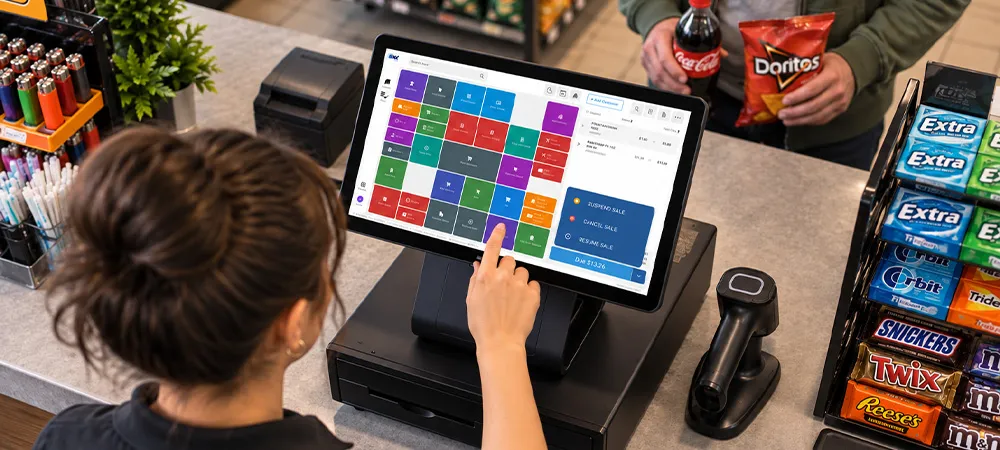
A cloud-based point-of-sale system can automatically sync sales and inventory data, reducing the need for manual updates and giving retailers a clearer picture of what's happening across their stores.
Real-Time Inventory Tracking
Real-time inventory tracking updates stock levels as products are sold, giving retailers a clearer picture of what's available without waiting for end-of-day updates.
Automated Stock Updates
Automated inventory management reduces the need for manual data entry by updating the centralized inventory database as sales, returns, and received deliveries are recorded. This can help reduce data-entry errors and inventory discrepancies, although physical stock counts are still important for checking accuracy.
Better Stock Replenishment and Reordering
Low-stock alerts can let retailers know when it's time to reorder, helping them replenish popular products before they run out. By keeping an eye on sales trends and reorder points, retailers can also make more informed purchasing decisions and avoid ordering more stock than they need.
Reduced Overstocking and Product Waste
Sales forecasting tools analyze demand patterns to help retailers determine how much stock to order. This can reduce the amount of money tied up in slow-moving products and help minimize waste from items with limited shelf lives.
Multi-Location Inventory Management
Managing inventory across multiple locations is easier when retailers can check stock levels from one central dashboard. They can see which stores have products available, transfer inventory when needed, and make purchasing decisions with a better understanding of stock across the business.
Improved Inventory Accuracy
Handheld scanners can help staff complete cycle counts and verify incoming deliveries from the sales floor or stockroom. When each scan updates inventory records in real-time, it becomes easier to keep stock information accurate and identify discrepancies.
Traditional POS System vs Cloud-Based POS System: Key Differences
Traditional and cloud-based POS systems differ in several ways, and understanding those differences can help retailers choose the right fit for their business.
| Aspect | Traditional (On-Premise) POS | Cloud-Based POS |
| Data Storage | Local servers, on-site | Remote cloud servers |
| Accessibility | In-store only | Any device, anywhere with an internet connection |
| Inventory Management | Manual or batch updates | Real-time, automated updates |
| Sales Reporting | End-of-day local reports | Live, on-demand dashboards |
| Initial Cost | High upfront server cost | Low software as a service (SaaS) monthly fee |
| Software Updates | Manual IT intervention | Automatic, no downtime |
| Scalability | Complex, infrastructure-dependent | Easy, no new hardware needed |
How to Choose the Right Cloud-Based POS System
Choosing a cloud-based POS system means finding the features that fit your business today while leaving room for growth.
Sales Reporting and Analytics
Managing inventory and sales becomes easier when reports break down performance by stock keeping unit (SKU), category, staff member, and location. These insights can help retailers identify sales trends, monitor margins, and spot areas that need improvement.
Multi-Store Inventory Management
Look for a cloud-based POS system with centralized inventory tracking that lets you check stock levels, update prices, and apply promotions across multiple locations from one dashboard.
Barcode Scanning and Supplier Integration
A cloud POS should support barcode scanning at fixed terminals and through handheld scanners. Look for inventory tools that record stock movements and connect with purchasing workflows, making it easier to track orders and verify incoming deliveries.
Payment Processing and Hardware Compatibility
When payment processing is integrated with the POS, sales and payment information can stay connected instead of being managed in separate systems. This can reduce manual reconciliation and help staff process transactions more smoothly.
Ecommerce and Accounting Integrations
Integrating online and in-store sales through cloud POS software can help keep inventory levels synchronized across both channels. When supported by the platform, an online sale can update in-store stock counts, helping reduce the risk of overselling.
Data Security and Customer Support
When comparing cloud POS systems, look for providers that offer regular data backups, appropriate security measures, and clear recovery procedures. It's also worth checking what customer support is available if you encounter technical issues.
Pricing and Free Demo Availability
Modern POS platforms offer different pricing plans to suit retailers' needs, allowing owners to choose the features they need now and expand as their businesses grow. If a demo is available, it's a good opportunity to try the system before committing.
What Should Retailers Know About Cloud POS Software Challenges?
Implementing a cloud-based POS system comes with certain challenges that are manageable with the right approach and the right platform.
Internet Connectivity Issues
Cloud POS software depends on internet connectivity. Some systems offer an offline mode that allows staff to continue processing sales during an outage, with data syncing once the connection returns. However, offline capabilities vary, so it's worth checking which features remain available without an internet connection.
Inventory Data Migration
When moving an existing product catalog and inventory history to a new system, it's important to map data fields correctly and check for duplicate records before syncing. Reviewing product information and stock quantities can help ensure the new system starts with accurate data.
Employee Training and Adoption
Cloud POS software offers the most value when staff feel comfortable using it. Training and step-by-step guides can help employees get familiar with the new system and feel more confident handling everyday tasks.
Integration and Compatibility Problems
If a new cloud-based point of sale system cannot connect and sync with existing loyalty programs, ecommerce platforms, and accounting tools, it loses its main purpose, which is automation and cloud-based synchronization.
Data Security and Access Control
Many POS systems offer role-based access controls that determine which features and information employees can access. Owners can have broader permissions, while cashiers can be limited to the functions they need for their roles. These controls can help protect sensitive business information.
Conclusion
Cloud-based POS systems can help retailers keep inventory records up to date, understand sales trends, and make more informed purchasing decisions. From tracking stock across multiple locations to spotting products that need replenishing, the right tools can make everyday inventory and sales tasks easier to manage.
When comparing options, consider how each system fits your current workflows, connects with your other tools, and supports your plans for growth. The goal is to find a POS system that makes managing your business a little easier, both today and down the road.





















Sign in to leave a comment.