

A few years ago, adding AI to a mobile app sounded like a moonshot. Today users expect it. They want smarter search, instant replies, personalized feeds and photos that fix themselves. The harder questions are what it costs, how long it takes and where to start.
Whether you are planning mobile application development from scratch or upgrading a live app, this guide covers each of those questions. It also explains how a mobile app development company can help you scope, build and launch AI features without wasting budget.
Where AI actually helps in a mobile app
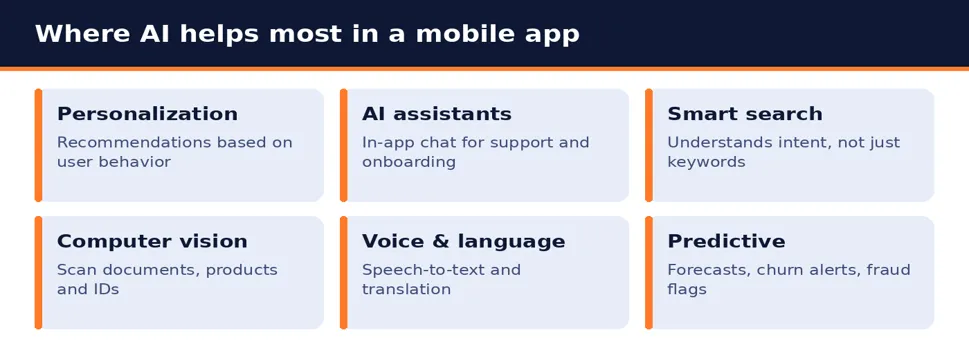
Start with a user problem, not a technology. In custom mobile app development, these use cases tend to pay off fastest:
- Personalization. Product, content or workout recommendations based on behavior. This is the most common and lowest-risk entry point.
- Conversational assistants. In-app chat that answers questions, guides onboarding or handles support. Retail, banking and healthcare apps use it heavily.
- Smart search. Search that understands intent ("black running shoes under 3,000") instead of matching keywords.
- Computer vision. Scanning documents, recognizing products, verifying IDs or reading receipts through the camera.
- Voice and language. Speech-to-text, translation and voice commands.
- Predictive features. Demand forecasts, churn alerts and fraud flags.
Generative features. Drafting text, summarizing content or generating images inside the app.
Pick one or two and ship them well. Adding five half-working AI features usually does more harm than good.
How the technology gets into your app
There are three common approaches, and the choice drives both cost and timeline.
- Third-party AI APIs. You connect to a hosted model such as a large language model or a vision service. This is the fastest and cheapest to start, and it suits most businesses.
- On-device AI. Models run directly on the phone using frameworks like Core ML or TensorFlow Lite. This gives better privacy, offline use and lower latency, but with smaller models and more optimization work.
- Custom-trained models. You build and train a model on your own data. It costs the most and takes the longest, and it only makes sense when your data is a real competitive edge.
Many apps combine them. For example, a lightweight model runs on the device while heavier requests go to the cloud. Experienced mobile app developers usually recommend starting with a hosted API and moving to on-device or custom models only when usage and data justify it.
How much does it cost?
Costs vary with scope, data readiness and platforms, and also with the mobile app development services you choose, since rates differ between freelancers, in-house teams and an app development agency. As a rough guide:
| Type of AI feature | Typical build cost (USD) | Typical timeline |
|---|---|---|
| Basic integration (chatbot, smart search via API) | $8,000 – $25,000 | 3–6 weeks |
| Mid-level (recommendations, image recognition, voice) | $25,000 – $70,000 | 2–4 months |
| Advanced / custom model (predictive, proprietary vision) | $70,000 – $200,000+ | 4–9 months |

Don't forget these ongoing costs:
- API usage fees. They scale with users and with how long each request is.
- Cloud hosting and storage.
- Monitoring and retraining. Models drift, so plan on regular tuning.
- Data preparation. Cleaning and labeling data is often the hidden budget item.
What drives the price up or down
- Data quality. Clean, accessible data saves weeks. Messy data eats the budget.
- Platforms. Supporting iOS and Android, or going cross-platform, changes the effort. Android app development and Android application development also involve more device and OS-version testing because of the range of phones in use.
- Compliance. Health, finance and children's apps need extra privacy and security work.
- Accuracy targets. Going from 85% to 95% accuracy usually costs far more than the first 85%.
- Backend readiness. If your APIs and infrastructure can't handle AI workloads, they'll need upgrading first.
A realistic timeline
- Discovery and use-case validation (1–2 weeks). Define the problem, success metrics and data needs.
- Prototype or proof of concept (2–4 weeks). Test the idea cheaply before committing.
- Development and integration (4–12 weeks). Build the feature, connect the backend and design the user experience.
- Testing and tuning (2–4 weeks). Check accuracy, edge cases, speed and bias.
- Launch and monitor (ongoing). Watch real usage and improve.
Mistakes to avoid
- Starting with the tech instead of the problem. "We need AI" isn't a requirement.
- Skipping the prototype. A small proof of concept can save a large build.
- Ignoring privacy. Be clear about what data you collect and why. Get consent and minimize what you store.
- Forgetting the fallback. When the AI is wrong or slow, users still need a way to finish the task.
- Underestimating running costs. A feature that's cheap to build can be expensive to serve at scale.
How to choose the right development partner
The team you pick affects cost and timeline as much as the technology does. When you hire mobile app developers or evaluate a mobile app development company, check for these:
- AI and ML experience. Ask for live apps that use recommendations, chatbots, vision or voice, not just demos.
- Full-cycle application development services. Strategy, UI/UX design, development, QA, launch and support under one roof reduce handoff delays.
- Platform depth. Strong iOS and Android app development skills, plus cross-platform options such as Flutter or React Native.
- Security and compliance practices. Especially for health, finance and children's apps.
- Transparent pricing. A clear breakdown of build, API, cloud and maintenance costs.
- A flexible engagement model. Fixed-price, time-and-material or a dedicated team, depending on how well defined your scope is.
If you have an in-house product team but lack AI skills, you can also hire mobile app developers on a dedicated basis to extend your team instead of outsourcing the whole project.
Final thoughts
AI works best when it quietly makes an app faster, simpler or more relevant. Start small, measure real impact and expand from there. If you're planning AI features and want a clear scope, timeline and budget before committing, the team at DianApps, a trusted mobile app development company, can help you validate the idea and build it. From custom mobile app development to Android and iOS delivery, our mobile app developers and application development services cover the full journey. Visit dianapps.com/mobile-app-development to learn more about our mobile app development services.






















Sign in to leave a comment.