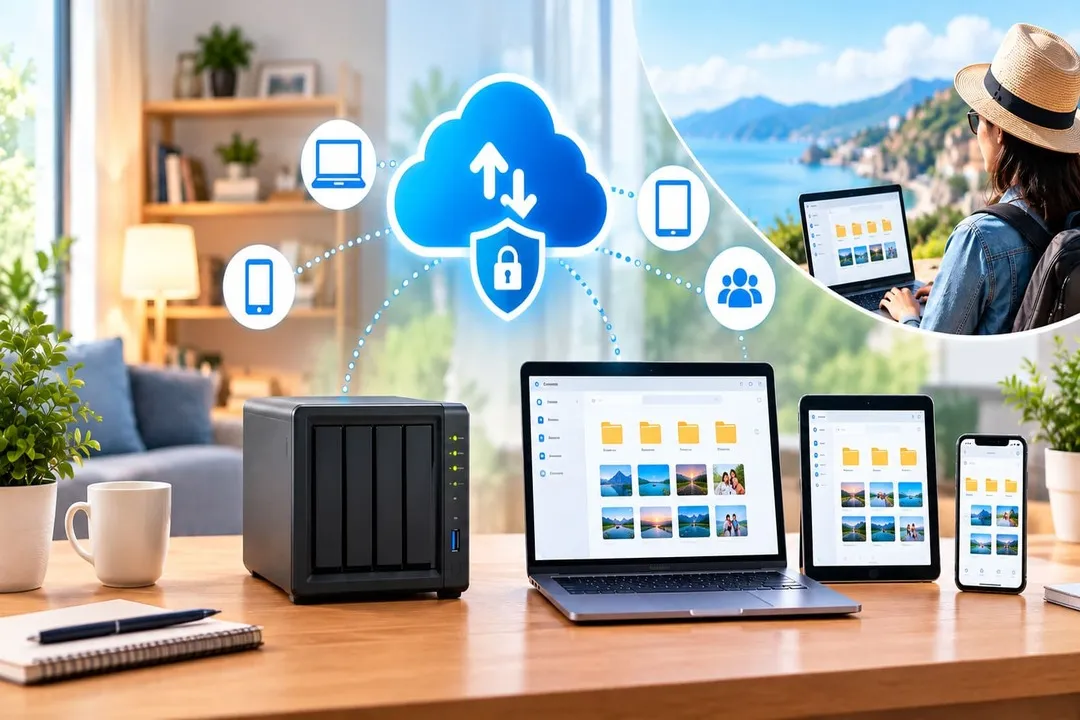

Your files shouldn't become inaccessible simply because you left home.
Whether you're working remotely, traveling, or switching between devices, being able to access your files wherever you are has become increasingly important. But choosing a home storage solution isn't just about finding the largest drive.
You also need to think about security, privacy, accessibility, ease of use, and what happens as your storage needs grow.
That's where home cloud storage with remote access comes in.
Instead of keeping your files exclusively on a computer or external hard drive, you can store them on hardware you own and securely access them over the internet when you're away from home.
But not every solution works the same way.
Here's what to consider before choosing one.
What Is Home Cloud Storage with Remote Access?
At its simplest, home cloud storage is a storage system located in your home that you can access remotely.
Your files are stored on hardware you control rather than exclusively on infrastructure operated by a public cloud provider. When remote access is configured securely, you can connect to those files from outside your home network.
That can mean:
- Opening work documents while traveling
- Backing up photos from your phone
- Accessing family videos from another city
- Retrieving files from your home computer while at work
- Keeping important documents available across multiple devices
The result is similar to the convenience of cloud storage, but with greater control over where your primary data is stored.
Why Does Remote Access Matter?
A storage device that only works when you're connected to your home Wi-Fi has limited usefulness.
Imagine leaving for a business trip and realizing that an important presentation is sitting on your home computer.
Or taking hundreds of photos on vacation and wanting to back them up without waiting until you get home.
Remote access solves this problem by allowing your home storage system to remain useful even when you're away.
However, accessibility should always be balanced with security. A storage device connected to the internet needs appropriate authentication and protection against unauthorized access.
So when comparing solutions, don't simply ask:
"Can I access my files remotely?"
Ask:
"How securely and reliably can I access them?"
What Should You Look for in a Home Cloud Storage Solution?
Storage capacity is only one part of the decision. The following factors can have a much bigger impact on your experience.
1. Secure Remote Access
Remote access is useful only when it is secure.
Look for solutions that provide secure connections, strong authentication, device management, and protection against unauthorized access.
You should also understand how remote connections are established and what security controls are available to you.
Convenience should never mean leaving your files unnecessarily exposed to the internet.
2. Control Over Your Data
One of the main advantages of a home cloud is control.
When your files are stored on hardware you own, you have more say over where they reside and how they're managed.
This can be particularly important for personal photographs, financial documents, work files, and other information you may not want to store exclusively on a third-party platform.
Data ownership isn't just about where a file is stored. It's also about having meaningful control over how you access, manage, move, and protect it.
3. Simple Setup and Management
Self-hosted storage can be powerful, but it can also become complicated.
Networking configuration, software installation, user management, security updates, and maintenance can be intimidating if you're not technically inclined.
A good home cloud solution should reduce that complexity.
Ideally, you should be able to set up your storage, connect your devices, manage users, and access your files without spending hours configuring servers.
The best system is often the one you can actually maintain.
4. Automatic Backups
Having storage isn't the same as having a backup.
If your phone contains years of family photos, manually transferring them every few weeks is easy to forget.
Automatic backup can make a significant difference.
Look for a solution that can automatically back up important data from the devices you use regularly, including:
- Smartphones
- Laptops
- Desktop computers
- Photos and videos
And remember that your home cloud itself should ideally be backed up. If the only copy of your files exists on one storage device, a hardware failure could still result in data loss.
5. Support for the Devices You Already Use
Most households don't use a single type of device.
You might have a Windows laptop, an iPhone, an Android phone, and a MacBook all accessing the same storage system.
Before choosing a solution, check whether it supports the operating systems and devices you actually use.
Web access and mobile apps can also make remote access considerably more convenient.
6. Performance
Remote storage is only useful if accessing your files isn't frustratingly slow.
Performance depends on several factors, including your home internet upload speed, the connection you're using remotely, the storage hardware, and the software managing the connection.
For large photo and video libraries, these factors become especially important.
If you're primarily storing documents, performance requirements may be modest. If you expect to move large video files regularly, you'll want to pay much closer attention to the underlying hardware and network.
7. Room to Grow
Your storage requirements probably won't remain the same forever.
A few hundred gigabytes may seem like plenty today, but photos, videos, backups, and other files can accumulate quickly.
Consider whether the solution allows you to increase capacity later.
Being able to add or upgrade storage without replacing the entire system can make a home cloud a more practical long-term investment.
NAS or Plug-and-Play Home Cloud?
When researching home cloud storage, you'll likely encounter two broad approaches: traditional NAS devices and simpler plug-and-play systems.
A NAS (Network Attached Storage) can provide extensive customization. Depending on the device, you may be able to run applications, configure different storage arrangements, create multiple user accounts, and build a sophisticated home server.
The trade-off is complexity.
Setting up and maintaining a NAS can require some technical knowledge, particularly if you want to configure advanced remote access, security, backups, or other services.
Plug-and-play home cloud solutions take a different approach.
They're designed for people who want the benefits of personal cloud storage without having to become their own server administrator.
The right choice depends on what you value.
Choose a NAS if you want extensive customization and don't mind managing the system.
Consider a plug-and-play solution if simplicity, straightforward setup, and easier ongoing management matter more to you.
Home Cloud vs Public Cloud: What's the Difference?
Both approaches can give you access to files from anywhere, but the underlying model is different.
| Consideration | Home Cloud | Public Cloud |
| Primary storage | Hardware you control | Provider infrastructure |
| Data control | Greater direct control | Governed by provider policies |
| Remote access | Yes, when configured | Yes |
| Ongoing storage fees | Depends on your setup | Often subscription-based |
| Storage expansion | Usually through your hardware | Usually through a larger plan |
| Maintenance | Your responsibility or partly managed | Mostly handled by provider |
| Internet access | Required for remote access | Required for cloud access |
Neither option is automatically better for everyone.
Public cloud services are convenient because the provider handles much of the infrastructure. A home cloud can be attractive if you place a higher value on ownership, control, and reducing dependence on third-party storage infrastructure.
The important thing is understanding the trade-off before choosing.
Who Can Benefit from Home Cloud Storage?
A home cloud isn't only for technical users.
Families
A central storage system can bring photos, videos, and important household documents together in one place.
Instead of maintaining separate collections across multiple devices, family members can access shared files from their own devices.
Remote Professionals
If you regularly work away from home, remote access can help you retrieve documents without carrying additional storage devices everywhere.
Content Creators
Photographers, designers, and video creators can quickly accumulate large collections of files.
Having a central storage system can make it easier to manage those files while maintaining control over the underlying data.
Students
Assignments, notes, presentations, and project files can be accessed across multiple devices instead of being tied to one computer.
Home Offices
Small businesses and home offices may use personal storage for documents, backups, media, and other files without relying entirely on public cloud platforms.
Mistakes to Avoid
Choosing home cloud storage based only on storage capacity is one of the most common mistakes.
A 10TB system isn't necessarily better than a 4TB system if it's difficult to use, poorly secured, or impossible to expand.
Before making a decision, think about:
- How you'll access your files remotely
- What security measures are available
- Which devices need access
- How backups will work
- How much storage you need today
- How much you'll likely need in the future
- How much technical maintenance you're comfortable handling
Also remember that remote access, storage, and backup are three different things.
A good setup needs to address all three.
Where MyFlopy Fits In
The idea behind MyFlopy is simple: give users the convenience of cloud storage while keeping greater control over their data.
Instead of relying exclusively on third-party infrastructure, MyFlopy is designed to let users build a personal cloud around hardware they own.
The goal is to make personal cloud storage more approachable, with features designed around remote access, backups, cross-device use, and straightforward management.
For someone who wants the flexibility of accessing files from anywhere but doesn't necessarily want to spend time configuring and maintaining a complex server environment, this approach can offer a practical middle ground.
Whether you're storing family photos, personal documents, work files, or large media collections, the important question isn't simply how much storage you get.
It's how much control, accessibility, security, and flexibility you get along with it.
Final Thoughts
The best home cloud storage solution isn't necessarily the one with the biggest hard drive or the longest list of features.
It's the one that fits the way you actually use your data.
If you need simple remote access and don't want to manage infrastructure, ease of use may be your biggest priority.
If you're comfortable with technical configuration, a NAS may give you more flexibility.
And if privacy and data ownership are particularly important to you, storing your primary files on hardware you control can be an attractive alternative to relying entirely on public cloud services.
The shift toward remote work, larger media libraries, and multiple connected devices means our data increasingly needs to be available wherever we are.
A home cloud can provide that accessibility while giving you greater control over where your files live.
The key is choosing a solution that doesn't force you to compromise on the things that matter most.













Sign in to leave a comment.