

What happens when a dispatch email arrives mid-route, and the only place for a laptop is a sliding, cluttered passenger seat? The best laptop mount for truck cabs solves this by holding the device steady, at a readable angle, within comfortable reach of the driver. This guide explains how seat-rail mounts, trays, and adjustable arms turn an empty cab into a stable workspace for logging, navigation, and paperwork.
Why does setup matter so much, and what separates a dependable mount from one that rattles loose after a week of rough roads? Choosing the Best Laptop Mount for Truck use starts with knowing the cab layout, vehicle model, and how drivers actually work on the road. Keep reading to compare mount types, avoid common fitting mistakes, and explore custom-fit options built for a specific vehicle before buying.
Which Features Matter Most in the Best Laptop Mount for Truck Cabs?
A reliable mount has to cope with road vibration, sudden braking, and tight cab space, so a few features matter more than others.
Rigid Seat-Rail Mounting: Seat-rail bases bolt to existing seat hardware, so the laptop stays put over potholes without drilling into the dashboard or door panel.
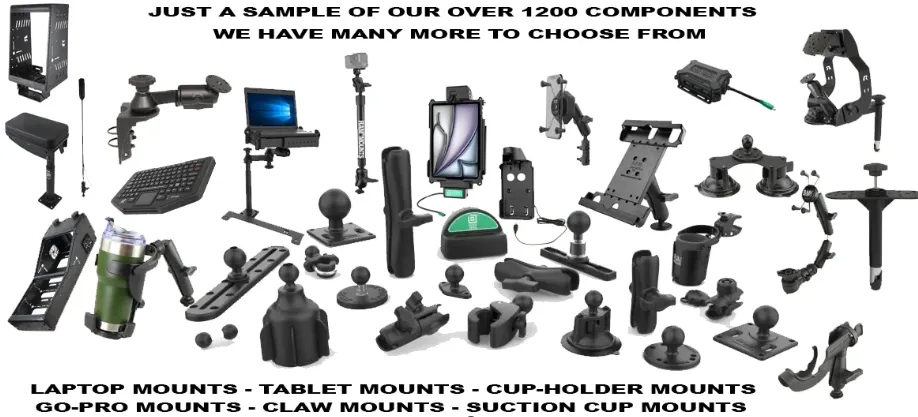
Adjustable Arm Positioning: Adjustable arms tilt, swivel, and extend, letting a driver move the screen from typing height to a safe parked position quickly.
Vehicle-Specific Fit: Mounts made for a specific truck model, such as the Ram 2500 or Ford F-150, usually align with factory seat bolts without brackets.
Which Mount Suits a Cab Better: a Seat-Rail Base or a Laptop Tray?
The right choice depends on how long drivers work inside the cab and whether the passenger seat needs to stay free.
Seat-Rail Mounts for Daily Drivers
Seat-rail mounts suit delivery drivers and field technicians who open a laptop dozens of times each shift between stops. The base stays on the seat rail, so the laptop can come off in seconds and the cab stays tidy overnight.
Laptop Trays for Long-Haul Work
Laptop trays give long-haul drivers a flat surface for typing, dispatch updates, and invoicing while the truck sits parked at rest stops. Many trays pair with a pedestal base, which lets drivers shift the work surface toward the steering wheel or the passenger side.
What Should Buyers Check Before Choosing a Laptop Mount for a Truck?
Before choosing the best laptop mount for truck use, drivers should run through a short checklist covering fit, safety, and practicality.
- Confirm the mount matches the truck's make, model, and year.
- Check the weight rating against the laptop and docking station.
- Keep the screen low, below the driver's line of sight.
- Choose powder-coated steel or aluminum that resists corrosion and heat.
- Test tilt, swivel, and locking strength while parked before driving.
How Can Drivers Build a Stable Laptop Workspace in a Cab With No Desk?
A good mount only works if the setup around it is sensible, so a few small habits make a noticeable difference.
- Position the Screen First: Drivers should set screen height and angle first, using a parked cab and a normal seating position, then tilt away from sunlight.
- Secure the Base Properly: Installers should tighten every bolt to the manufacturer's torque guidance, then shake the mount firmly to confirm there is no play or rattling.
- Manage Cables and Accessories: Short, right-angle charging cables and a clipped power cord keep wires away from pedals, gear shifters, and the driver's knees.
Picking the Best Laptop Mount for Truck work mostly comes down to fit, stability, and how easily the screen adjusts for the driver. Drivers who want a vehicle-specific, custom-fit option can look at specialist suppliers that make seat-rail bases, trays, and adjustable arms for popular pickup models.














Sign in to leave a comment.