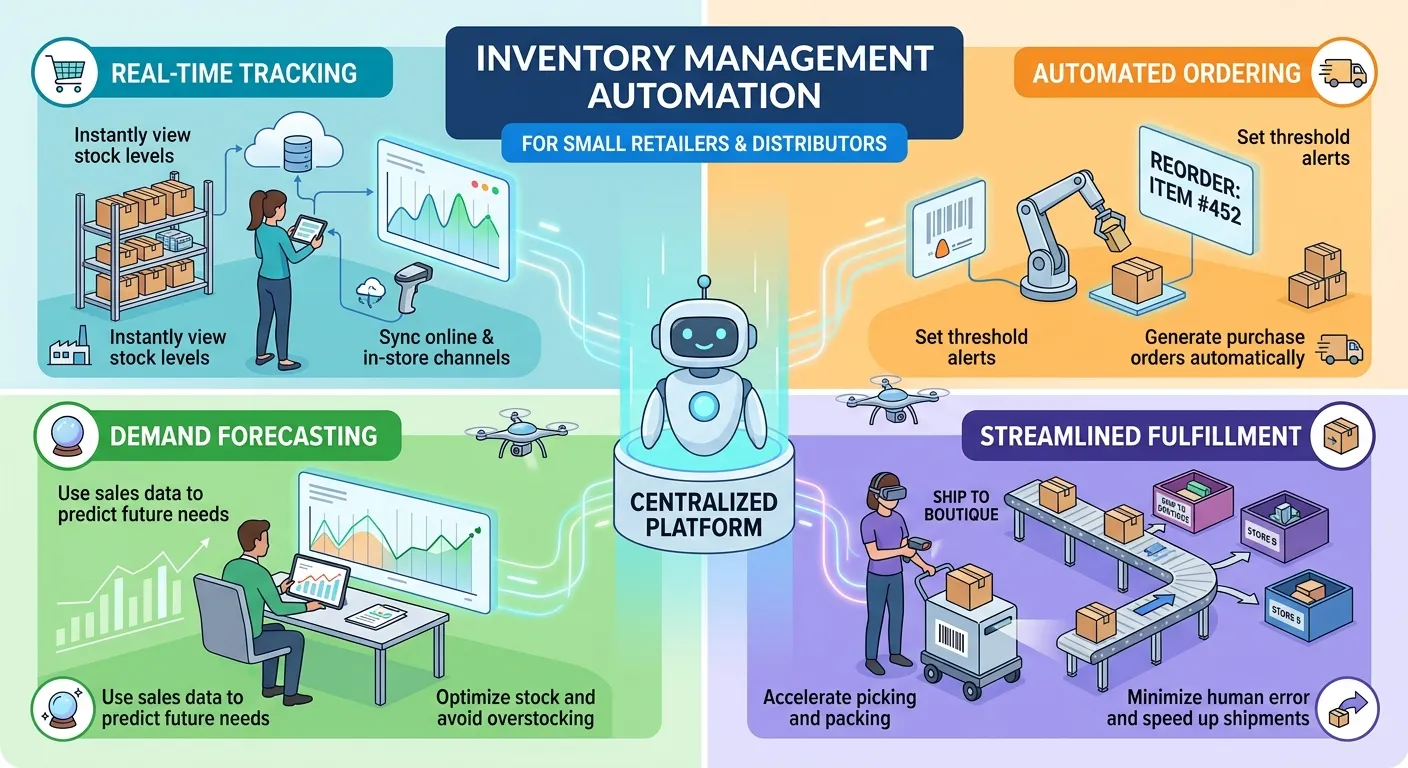

Stockouts lose sales. Overstock ties up cash. And for many small retailers and distributors, inventory still runs on spreadsheets, manual counts, and someone remembering to reorder before the shelf goes empty.
Inventory management automation replaces those manual steps with systems that track stock in real time, reorder at the right moment, and keep every sales channel in sync. It is a practical place to start with business process automation because the savings show up in sales and cash flow quickly.
Where Manual Inventory Management Falls Short
- Delayed updates. Stock levels are only as current as the last manual count.
- Channel mismatches. Online stores, marketplaces, and physical locations show different numbers.
- Missed reorders. Products run out because nobody noticed in time.
- Over-ordering. Without clear data, buyers order extra “just in case.”
- Time-consuming counts. Staff spend hours counting instead of selling or serving customers.
Each of these problems costs money in a different way. Stockouts lose sales and customer trust, while overstock locks up cash that the business needs for growth, payroll, and new products.
What Inventory Management Automation Covers
Real-Time Stock Tracking
Every sale, return, and delivery updates stock levels instantly across all locations and channels.
Automated Reorder Points
The system calculates when to reorder each product based on sales speed and supplier lead time, then creates a purchase order or sends an alert.
Multi-Channel Inventory Sync
Stock levels stay consistent across the online store, marketplaces, and physical locations, which prevents selling items that are out of stock.
Barcode and Scanner Integration
Receiving, picking, and counting with barcode scanning reduces errors and speeds up warehouse work.
Supplier Communication
Purchase orders, confirmations, and delivery updates flow automatically between the business and its suppliers.
Low-Stock and Dead-Stock Alerts
The system flags items running low and items that have not sold in a set period, so buyers can act on both. Slow movers are a hidden cost, since they take up shelf space and cash that faster-selling products need.
Smarter Reordering With Data
Basic reorder points use fixed rules. More advanced setups use sales history, seasonality, and promotions for demand forecasting. The guide on predictive analytics in supply chain explains how forecasting improves stock decisions. Clean, connected data from inventory analytics makes those forecasts reliable.
How to Get Started
1. Clean the product data. Consistent product names, codes, and units are the foundation of accurate tracking.
2. Pick one location or channel. Start where stock problems cause the most lost sales.
3. Set reorder rules. Define minimum stock levels and lead times for the top-selling products first.
4. Connect sales channels. Sync the online store and point of sale so stock updates automatically.
5. Train the team. Scanners and new processes only help when staff use them consistently.
Off-the-Shelf Tools vs Custom Inventory Software
Many inventory tools work well for straightforward retail. Businesses with complex needs, such as kits and bundles, multiple warehouses, batch tracking, or unusual supplier processes, outgrow them quickly. That is where custom inventory software earns its place. Either way, the goal is the same: connect stock data to purchasing, sales, and accounting so every system works from one set of numbers.
Staff who receive goods or count stock on the floor also benefit from a simple scanning app on their phones.
Common Mistakes
- Automating with messy product data
- Setting the same reorder rule for every product
- Ignoring returns and damaged stock in counts
- Leaving one sales channel disconnected
Final Thoughts
Inventory management automation turns stock from a guessing game into a managed system. Track stock in real time, reorder based on data, and keep every channel in sync. Start with the products and locations where stockouts hurt most, then expand as the system proves itself. Teams like Enorness help small retailers and distributors connect inventory to the rest of their operations.






















Sign in to leave a comment.