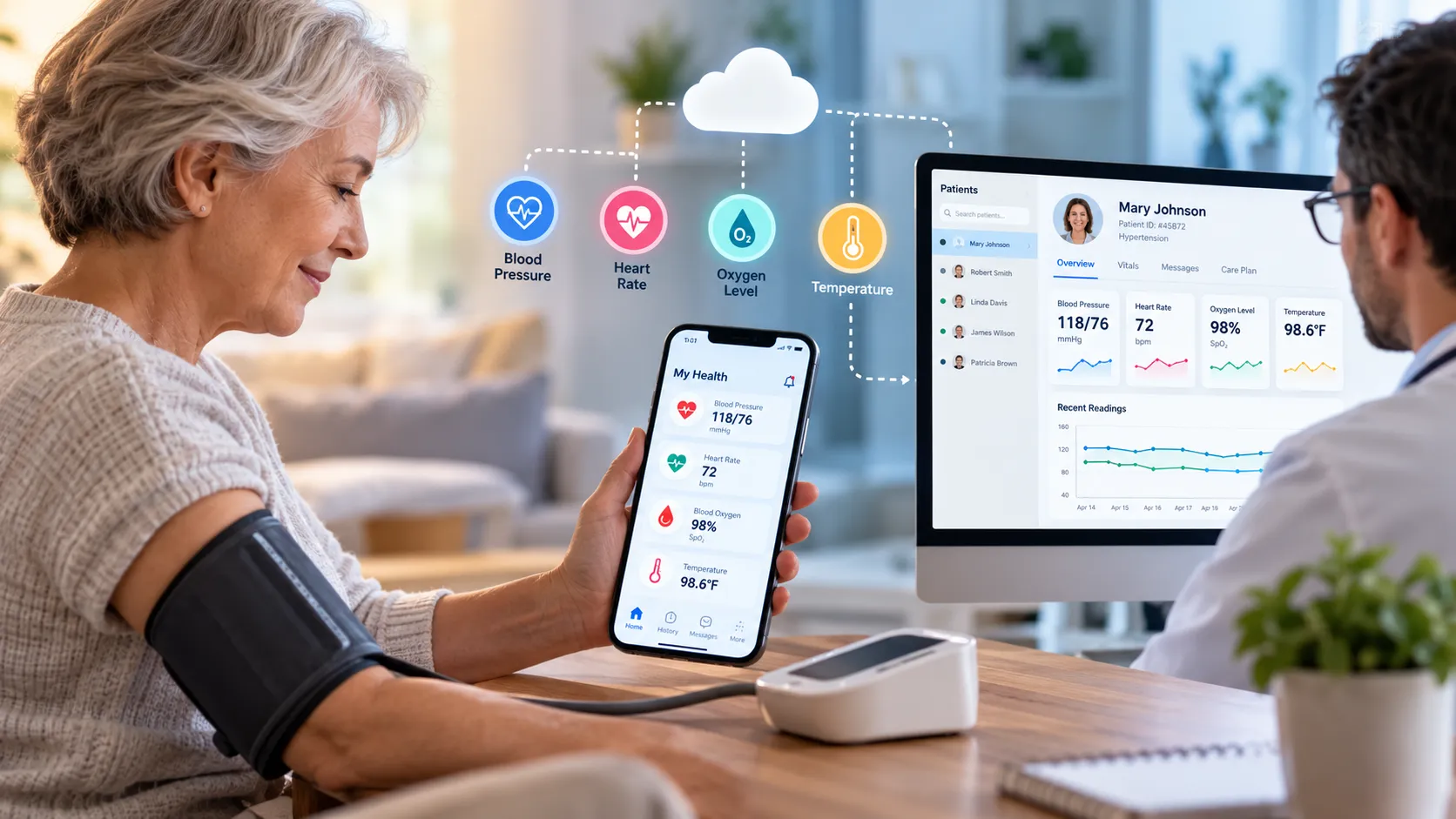

Remote patient monitoring (RPM) helps healthcare providers track patients outside traditional clinical settings. A well-designed Medical App can collect health data, support timely interventions, and improve communication between patients and care teams. In this guide, we explore essential features, practical benefits, development challenges, and the steps involved in building a reliable remote patient monitoring solution.
What Is a Remote Patient Monitoring App?
A remote patient monitoring app allows healthcare providers to monitor a patient's health without requiring frequent in-person visits. It collects health information through connected medical devices, wearable sensors, and patient-reported data. Providers can review this information through dashboards and respond when readings indicate a potential concern.
For example, a patient with hypertension can use a connected blood pressure monitor at home. The device sends readings to the app, which displays trends and shares relevant information with the patient's care team. Providers can identify concerning changes and decide whether the patient needs additional support.
A Medical App for remote monitoring can support several healthcare scenarios, including:
- Chronic disease management: Track conditions such as diabetes, hypertension, and heart failure.
- Postoperative recovery: Monitor recovery indicators after surgery and help patients follow care instructions.
- Elderly care: Support independent living through regular health checks and appropriate alerts.
- Maternal health: Help providers monitor selected health indicators during pregnancy and after delivery.
- Cardiac care: Track heart rate, blood pressure, and other clinically relevant measurements.
Remote monitoring does not replace every clinical appointment. Instead, it gives providers additional information between visits and helps them make more informed care decisions.
Why Is Remote Patient Monitoring Becoming Important?
Traditional healthcare often depends on scheduled appointments and measurements collected during clinical visits. This approach can make it difficult to identify changes that occur between appointments. Remote monitoring gives providers access to a broader picture of a patient's health over time.
It also supports healthcare delivery beyond hospitals and clinics. Patients can share measurements from home, while providers review relevant information through digital systems. This model can reduce unnecessary travel and make follow-up care more convenient.
However, technology alone does not guarantee better outcomes. Providers need reliable measurements, appropriate clinical workflows, and clear procedures for responding to alerts. A successful Medical App must support these requirements rather than simply collect large amounts of data.
Essential Features of a Remote Patient Monitoring App
The feature set depends on the target patient population, clinical objectives, connected devices, and provider workflows. We recommend prioritizing features that improve data quality, support clinical decisions, and make everyday use straightforward.
1. Patient Registration and Health Profiles
Patients need a straightforward way to create accounts and access their health information. Registration may include identity verification, consent management, and secure account recovery.
Health profiles can store relevant information, such as medical history, prescribed medications, allergies, and care plans. Providers should only collect information that supports the intended clinical use.
The app should also accommodate different accessibility needs. Clear instructions, readable text, and simple navigation can help patients use the platform consistently.
2. Integration With Medical Devices and Wearables
Device integration forms the foundation of remote monitoring. Depending on the use case, a Medical App may connect with blood pressure monitors, glucose meters, pulse oximeters, thermometers, and wearable heart rate sensors.
Developers can use Bluetooth Low Energy, device-specific software development kits, or application programming interfaces (APIs) to exchange information. Some devices can transmit readings directly, while others require a smartphone or dedicated gateway.
Before selecting an integration method, we should verify device compatibility, measurement accuracy, data formats, and transmission reliability. We should also define how the app handles missing readings, duplicate records, and disconnected devices.
3. Real-Time and Scheduled Health Tracking
Patients and providers need access to meaningful health measurements. The app can display readings, historical trends, and changes against clinically defined thresholds.
Not every measurement requires real-time transmission. Some conditions need frequent monitoring, while others work well with scheduled daily readings. The monitoring schedule should reflect clinical requirements, battery constraints, connectivity, and patient routines.
The interface should clearly identify measurement timestamps and units. It should also distinguish patient-entered readings from measurements collected automatically through connected devices.
4. Alerts and Notifications
Alerts help providers identify readings that may require attention. For example, the system can flag blood pressure measurements that exceed a clinician-defined threshold.
A useful alert system should support configurable rules, escalation procedures, and notification preferences. It should also distinguish urgent clinical alerts from routine reminders.
Developers must avoid excessive notifications. Too many alerts can overwhelm care teams and cause important warnings to go unnoticed. Clinical professionals should help define thresholds, priorities, and response procedures before deployment.
The app must also explain its limitations. Users should never mistake an automated notification for a confirmed diagnosis or emergency response.
5. Healthcare Provider Dashboard
A provider dashboard brings patient information into one interface. Clinicians can review measurements, identify trends, check adherence, and prioritize patients who need follow-up.
Useful dashboard capabilities include:
- Patient lists organized by clinical priority.
- Historical measurements and trend visualizations.
- Alerts with timestamps and relevant context.
- Patient notes and follow-up records.
- Filters for conditions, care programs, and monitoring status.
- Access controls based on professional roles.
A good dashboard reduces unnecessary navigation and highlights actionable information. It should also help providers distinguish clinically meaningful changes from normal variations.
6. Appointment Scheduling and Secure Communication
Remote monitoring works best when patients can communicate with their care teams. Messaging features allow patients to ask nonurgent questions and share updates about symptoms or treatment concerns.
Appointment scheduling can help patients arrange follow-up consultations when necessary. Video consultations may also support virtual assessments, depending on clinical requirements and applicable regulations.
The app should define response-time expectations for messages. It should also provide clear instructions for emergencies that require immediate medical attention instead of waiting for a reply.
7. Medication Reminders and Care Plans
Patients may need reminders to take prescribed medications, record measurements, or complete recommended activities. A Medical App can provide scheduled notifications and display personalized care instructions.
Care plans should reflect the instructions that authorized healthcare professionals provide. The app should not independently change medication dosages or recommend treatment adjustments without appropriate clinical oversight.
Progress tracking can help patients and providers identify missed measurements or difficulties following a care plan. These insights can support conversations during follow-up appointments.
8. Electronic Health Record Integration
Electronic health record (EHR) integration helps providers access remote measurements alongside existing patient records. It can reduce duplicate data entry and improve continuity across care settings.
Developers may use standards such as Health Level Seven Fast Healthcare Interoperability Resources (HL7 FHIR), where supported by the systems involved. However, interoperability depends on the specific EHR, available APIs, data permissions, and implementation requirements.
Teams should map data fields carefully and validate how each measurement appears in the clinical record. Incorrect mappings or incomplete records can create risks for patient care.
9. Security, Privacy, and Access Controls
Remote monitoring platforms handle sensitive health information. Developers must protect that information throughout collection, transmission, storage, and access.
Core safeguards include encryption, secure authentication, role-based access controls, audit logs, and appropriate session management. Teams should also establish data retention rules and procedures for responding to security incidents.
Regulatory obligations depend on the deployment location, the organization's role, and the data involved. For example, organizations subject to the Health Insurance Portability and Accountability Act (HIPAA) must follow applicable privacy and security requirements in the United States.
Security should guide architecture decisions from the beginning. Adding basic protections near launch may leave critical gaps in the system.
Benefits of Remote Patient Monitoring Apps
Remote patient monitoring can create value for patients, healthcare professionals, and healthcare organizations. However, the results depend on implementation quality, patient participation, and the clinical program.
1. More Convenient Access to Care
Patients can record measurements from home instead of traveling to a clinic for every routine check. This can benefit people who live far from healthcare facilities or have limited mobility.
Remote monitoring can also make follow-up more convenient for patients managing long-term conditions. Providers can review submitted information and determine whether an in-person appointment remains necessary.
2. Better Visibility Into Health Trends
Measurements collected over time can reveal patterns that a single appointment may not capture. Providers can compare readings across days or weeks and evaluate changes in the context of a patient's care plan.
This information can support clinical decisions when the measurements are accurate and the monitoring process is appropriate. Providers must still interpret the results alongside symptoms, medical history, and other relevant evidence.
3. Earlier Identification of Potential Problems
Automated rules can flag measurements that cross predefined thresholds. These alerts may help care teams identify potential problems sooner than they would through scheduled visits alone.
However, an alert does not establish a diagnosis. Providers need clear escalation procedures, and patients must understand when to seek urgent medical attention.
4. Greater Patient Engagement
Remote monitoring encourages patients to participate in their care. Progress charts, reminders, and educational resources can help them understand their measurements and follow recommended monitoring routines.
The interface should make these tasks manageable rather than burdensome. Patients are more likely to continue using an app when it fits their daily routines and offers clear value.
5. More Efficient Clinical Workflows
A centralized dashboard can help providers review readings without switching between disconnected systems. Automated data collection may also reduce manual entry and improve consistency.
Healthcare organizations still need to plan staffing and alert management carefully. If a monitoring program creates more alerts than clinicians can reasonably review, efficiency may decline instead of improving.
6. Potential Cost Savings
Remote monitoring may reduce some avoidable visits, unnecessary travel, and administrative work. It can also help organizations manage selected patient populations outside traditional clinical settings.
Actual savings depend on the condition, reimbursement model, device costs, staffing requirements, and program design. Organizations should measure total operating costs and patient outcomes rather than assuming that every remote monitoring program will reduce spending.
Common Challenges in Remote Patient Monitoring App Development
Developing a reliable monitoring solution involves more than building a patient interface and connecting a device. Technical decisions must support clinical safety, privacy, interoperability, and long-term operations.
1. Device Compatibility and Data Accuracy
Different medical devices use different communication protocols and data formats. Some may provide manufacturer-specific APIs, while others require additional integration work.
Device readings may also contain errors, missing values, or inconsistent timestamps. Developers should validate incoming data, handle connection failures, and preserve information about measurement sources.
We should test integrations with the actual devices intended for deployment. Simulated data alone cannot confirm that the complete monitoring workflow will operate reliably.
2. Protecting Sensitive Health Information
A security incident can expose private health information and damage patient trust. Remote monitoring systems may also connect several external services, which increases the number of potential security weaknesses.
Development teams should conduct threat modeling, apply least-privilege access, secure APIs, and review third-party dependencies. They should also test authentication, authorization, logging, and data protection controls before launch.
Compliance requires more than adding encryption or displaying a privacy policy. Organizations must evaluate applicable laws, contractual responsibilities, operational procedures, and documentation requirements.
3. Interoperability With Existing Healthcare Systems
Healthcare organizations often use different EHR platforms, patient management systems, and reporting tools. Each system may support different interfaces, data structures, and authentication methods.
Developers should identify integration requirements early and confirm API access with each vendor. They should also define data ownership, error handling, synchronization schedules, and procedures for resolving conflicting records.
Standards such as HL7 FHIR can help, but they do not eliminate every integration challenge. Teams still need to validate individual implementations and ensure that exchanged data retains its clinical meaning.
4. Managing Connectivity and Battery Limitations
Patients may use remote monitoring devices in locations with unreliable internet access. Wearable sensors and mobile devices also have limited battery capacity.
A resilient application should handle temporary disconnections and resume transmission when connectivity returns. Where appropriate, it can store readings locally and synchronize them later through a secure process.
The system must preserve timestamps and identify delayed data. Clinicians need to know whether a reading arrived immediately or after a prolonged connection failure.
5. Reducing Alert Fatigue
Alert fatigue occurs when users receive too many notifications or repeatedly encounter warnings that require no meaningful action. This problem can reduce attention to genuinely important events.
Developers should work with clinical stakeholders to define thresholds, severity levels, and escalation rules. They should also provide alert context and track how care teams respond.
Monitoring programs should review alert performance after deployment. Teams can use this evidence to refine rules while maintaining appropriate clinical safeguards.
6. Designing for Patient Usability
Patients may have different levels of digital literacy, physical ability, and familiarity with connected devices. Complicated onboarding or confusing instructions can reduce participation.
We should test the app with representative users before release. Testing should cover account setup, device pairing, measurement recording, alert explanations, and accessibility.
Designers should use plain language and consistent navigation. Clear error messages can help patients recover from problems without repeatedly contacting support.
7. Scaling Performance and Reliability
A growing monitoring program may process thousands of patients and large volumes of time-stamped measurements. The architecture must support reliable ingestion, storage, reporting, and alert processing.
Teams should evaluate database design, background processing, monitoring, and failure recovery. Load testing can reveal bottlenecks before patient enrollment increases.
Healthcare organizations also need operational visibility after launch. Logging, performance metrics, backups, and incident response procedures help teams maintain service reliability.
8. Regulatory and Clinical Validation Requirements
Healthcare software may face regulatory obligations based on its intended use and the claims made about its functionality. Software that performs medical functions may face requirements beyond those for a general wellness application.
Teams should evaluate the relevant rules before finalizing product scope. In the United States, this may involve reviewing applicable Food and Drug Administration (FDA) guidance, HIPAA requirements, and state privacy laws.
Clinical validation also matters when the app supports medical decisions. Developers and healthcare professionals should define acceptance criteria, test relevant workflows, and document limitations before deployment.
How to Develop a Remote Patient Monitoring App
A structured development process helps teams manage technical complexity and reduce avoidable rework. We recommend the following steps.
Step 1: Define the Clinical Use Case
Choose the patient population, health condition, and monitoring objectives. Identify which measurements matter, who reviews them, and what actions follow abnormal readings.
Avoid building a broad feature set before confirming the actual clinical need. A focused first release can help validate workflows and reveal practical requirements.
Step 2: Identify Users and Requirements
Document the needs of patients, clinicians, administrators, and support staff. Define functional requirements alongside privacy, performance, accessibility, and security expectations.
Map important workflows, including device setup, measurement collection, alert handling, and follow-up. Establish measurable acceptance criteria for each critical feature.
Step 3: Select the Technology Architecture
Choose mobile platforms, backend services, databases, device integrations, and healthcare interoperability standards. The architecture should reflect data volume, connectivity needs, security requirements, and expected growth.
Evaluate third-party services before committing to them. Confirm their security capabilities, integration limits, costs, and support arrangements.
Step 4: Design and Build the Core Features
Start with patient onboarding, device integration, measurement history, provider dashboards, and essential notifications. Add messaging, scheduling, and other features according to validated user needs.
Keep clinical rules separate from presentation logic where appropriate. This makes the system easier to test, review, and maintain.
Step 5: Test Clinical and Technical Workflows
Test device accuracy, data transmission, authentication, permissions, and system performance. Verify that alerts behave correctly under normal conditions and failure scenarios.
Include usability testing with representative patients and clinicians. Resolve high-risk issues before expanding the user base.
Step 6: Launch a Controlled Pilot
Start with a limited patient group and a clearly defined monitoring program. Collect feedback on usability, reliability, alert volume, and staff workload.
Measure results against the original objectives. Use pilot findings to improve the workflow before expanding deployment.
Step 7: Maintain and Improve the Platform
Monitor uptime, data quality, integration failures, and security events. Keep dependencies updated and review access permissions regularly.
Healthcare workflows and regulatory expectations can change. A maintenance plan should include technical updates, user feedback, incident response, and periodic clinical review.
Technology Considerations for a Medical App
The technology stack should support the product's requirements rather than follow trends. Native iOS and Android development may suit applications that need deep device integration, while cross-platform frameworks can reduce duplicated development effort.
A backend can manage authentication, measurement ingestion, patient records, alerts, and reporting. Cloud infrastructure may support scaling, but the selected services must meet applicable security and compliance requirements.
Teams should also evaluate:
- Device connectivity: Bluetooth Low Energy, manufacturer APIs, and compatible gateways.
- Interoperability: HL7 FHIR and other supported healthcare interfaces.
- Data storage: Secure databases designed for the expected workload.
- Analytics: Trend analysis and reporting appropriate to the clinical use case.
- Testing and monitoring: Automated tests, performance monitoring, and incident tracking.
Artificial intelligence may help identify unusual patterns or prioritize information for review. However, teams must validate these capabilities carefully and define appropriate clinical oversight.
How Much Does Remote Patient Monitoring App Development Cost?
Development costs depend on the number of platforms, integrations, security controls, and clinical workflows. A simple monitoring application with limited device support generally requires less effort than a multi-condition platform integrated with several EHR systems.
Other cost factors include interface design, backend infrastructure, testing, regulatory assessments, cloud services, and ongoing maintenance. Device procurement and clinical program operations can add significant expenses beyond software development.
Instead of relying on a generic price estimate, organizations should request a scope-based assessment. The estimate should separate initial development, third-party services, integration work, deployment, and recurring operational costs.
A phased rollout can help control investment. It allows organizations to validate the core workflow before funding more complex features.
Frequently Asked Questions
1. What is a remote patient monitoring app?
A remote patient monitoring app collects health measurements from connected devices or patient reports. It helps healthcare providers review trends and identify readings that may require follow-up.
2. What features should a Medical App for remote monitoring include?
Essential features often include patient profiles, device integration, health tracking, alerts, provider dashboards, secure communication, and access controls. EHR integration may also be necessary for clinical workflows.
3. Is remote patient monitoring secure?
It can be secure when developers implement appropriate encryption, authentication, access controls, audit logging, and data handling procedures. Organizations must also address applicable privacy regulations and operational security requirements.
4. How does remote patient monitoring benefit patients?
It can reduce unnecessary travel, improve access to follow-up care, and help patients participate in ongoing health monitoring. Its effectiveness depends on the clinical program and how providers use the collected information.
5. Which devices can connect to a remote monitoring app?
Depending on the use case, supported devices may include blood pressure monitors, glucose meters, pulse oximeters, thermometers, and wearable sensors. Compatibility depends on the device, its communication protocols, and available integration interfaces.
6. How long does it take to develop a remote patient monitoring app?
Timelines vary with feature scope, device compatibility, healthcare integrations, testing, and regulatory requirements. A focused initial release may take considerably less time than a complex, multi-platform clinical solution.
7. Does a remote patient monitoring app need FDA clearance?
Not every healthcare app requires FDA clearance. Requirements depend on the software's intended use, functionality, and applicable regulatory classification. Organizations should evaluate the relevant FDA guidance before development and deployment.
8. Can artificial intelligence improve remote patient monitoring?
Artificial intelligence can help analyze trends, identify unusual measurements, and prioritize information for review. Developers must validate these capabilities, manage false alerts, and maintain appropriate clinical oversight.
Build a Remote Patient Monitoring Solution Around Real Clinical Needs
Remote patient monitoring can extend healthcare beyond traditional clinical settings, but success requires more than connecting devices to an app. Reliable data, practical workflows, patient usability, and strong security must work together.
When planning a Medical App, start with a defined clinical problem and identify how remote measurements will support patient care. Then validate the essential features, integrations, and operational requirements before expanding the product.















Sign in to leave a comment.