

According to HUMAN Security's 2026 State of AI Traffic report, Agentic AI traffic, where agents take actions on behalf of users, grew 7,851% year over year. This growth signals a fundamental shift in how people access the web and who interacts with digital experiences. For decades, websites have been built around two primary interaction models, one is people navigating through pages, and another is applications communicating with systems through APIs. The underlying assumption was that users would either click, search, and complete actions themselves or that software would exchange information through predefined integrations. However, AI Agents are introducing a third type of web user.
Instead of understanding visual layouts, reading navigation menus, or deciding which buttons to click, AI Agents need direct access to the actions a website can perform. Yet, most websites today are still designed and developed around human interfaces, forcing agents to interpret pages and infer available workflows.
As the web moves toward supporting both human and machine users, organizations need to rethink website architecture. This article explores why websites need this new architecture for agentic interactions, how WebMCP bridges this gap, a step-by-step guide to make an AI Agent-ready website, and the technical challenges organizations should consider.
Why Traditional Websites are Difficult for AI Agents to Read
Traditional websites were built to help people see, understand, and act. That works well for human visitors, but AI Agents need explicit descriptions of what a website can do and how to use those capabilities. The gaps become clear when we compare how websites present interfaces, rules, and integrations with what agents actually need.
Screen Interfaces Hide Website Capabilities
Websites communicate their capabilities through visual layouts, buttons, forms, and navigation designed for human interpretation. A human user understands them at a glance, but an AI Agent must infer what each element does from its position, label, and surrounding content. As a result, the agent relies on presentation rather than accessing website capabilities directly.
Business Rules are Buried in Human Context
Return policies, booking limits, eligibility requirements, and validation rules are usually scattered across page copy, tooltips, and workflow messages. Human users absorb these signals from context as they browse. However, AI Agents cannot interpret them reliably, so they often discover important constraints only after attempting an invalid action.
APIs Do Not Provide the Full User Context
Public APIs do offer structured access to selected data and operations, but they require separate authentication, documentation, and developer integration. More importantly, an API may not reflect what a specific signed-in user can access at that moment, so it cannot represent the live website experience an AI Agent is acting within.
Interfaces and Backend Logic are Often Disconnected
Most websites separate what users see from the systems that execute actions behind the interface. A person simply clicks and trusts the result. An agent navigating the page, however, cannot tell which backend capability a button triggers, what parameters it needs, or which conditions must be met before it runs.
Websites Assume Humans Will Make the Decisions
Many workflows leave decisions implicit because human users can read context and adjust as they go. AI Agents cannot rely on the same assumptions. Without explicitly defined capabilities, inputs, permissions, and outcomes, an AI Agent must guess the intended workflow from information that was never designed for machine interpretation.
Architecture Behind AI Agent-Ready Websites: Web Model Context Protocol
Developing AI Agent-ready websites requires more than adding an AI interface. Its capabilities must be discoverable, its data structured, and its workflows governed by clear execution rules. WebMCP provides these capabilities through a browser-based mechanism that exposes them as structured tools.
This lets the website define what an action does, the inputs it accepts, what it returns, and when it can be used. The following capabilities show how Web Model Context Protocol helps web developers build machine-readable websites.
Expose Individual Capabilities as Purpose-Built Tools
An AI Agent first needs to know what it can actually do on a website. WebMCP addresses this by allowing a page to register individual capabilities as tools, such as search_products, check_inventory, or track_order. Because each tool represents a specific operation, the agent has clearer choices, and the website can independently authorize, validate, test, and monitor each one.
Give Agents an Explicit Contract for Every Action
Once an action is exposed, the AI Agent needs to understand exactly how to use it. This is where WebMCP tool definitions can provide descriptions and JSON Schemas that specify required fields, data types, permitted values, and constraints, giving the agent a defined contract.
Return Structured Results Instead of Page Content
WebMCP tools can return structured results with stable field names and typed values, making information easier for AI agents to interpret and use consistently. When an action cannot be completed, the response can follow the same structured approach by explaining the failure and helping the agent determine the appropriate next step.
Apply Stronger Controls to Consequential Actions
Not every capability carries the same level of risk, so AI Agent-ready websites need to distinguish between retrieving information and changing something. WebMCP's consequentialHint can help indicate that an operation may require confirmation, while the application's authorization and transaction controls determine whether the action can ultimately proceed.
Control Agent Access Across Embedded Content
The browser context also introduces security boundaries when websites contain third-party components or cross-origin iframes. Agentic capabilities should not automatically become available to every embedded component simply because it appears within the page. To restrict the agent’s access, WebMCP tool registration allows developers to define browser permission policies, requiring the host page to explicitly delegate the relevant permission before a cross-origin frame can expose tools.
How WebMCP Works in Practice: A Four-Step Implementation Flow for Developers
Understanding why websites need WebMCP is only half the picture; the real value becomes clear once you see how a page and an AI Agent actually exchange work. This section walks through that loop in 4 stages, from registering the first tool and controlling how agents discover it to securing every call and shaping the results agents receive.
Step 1: Register Website's Capabilities as Tools
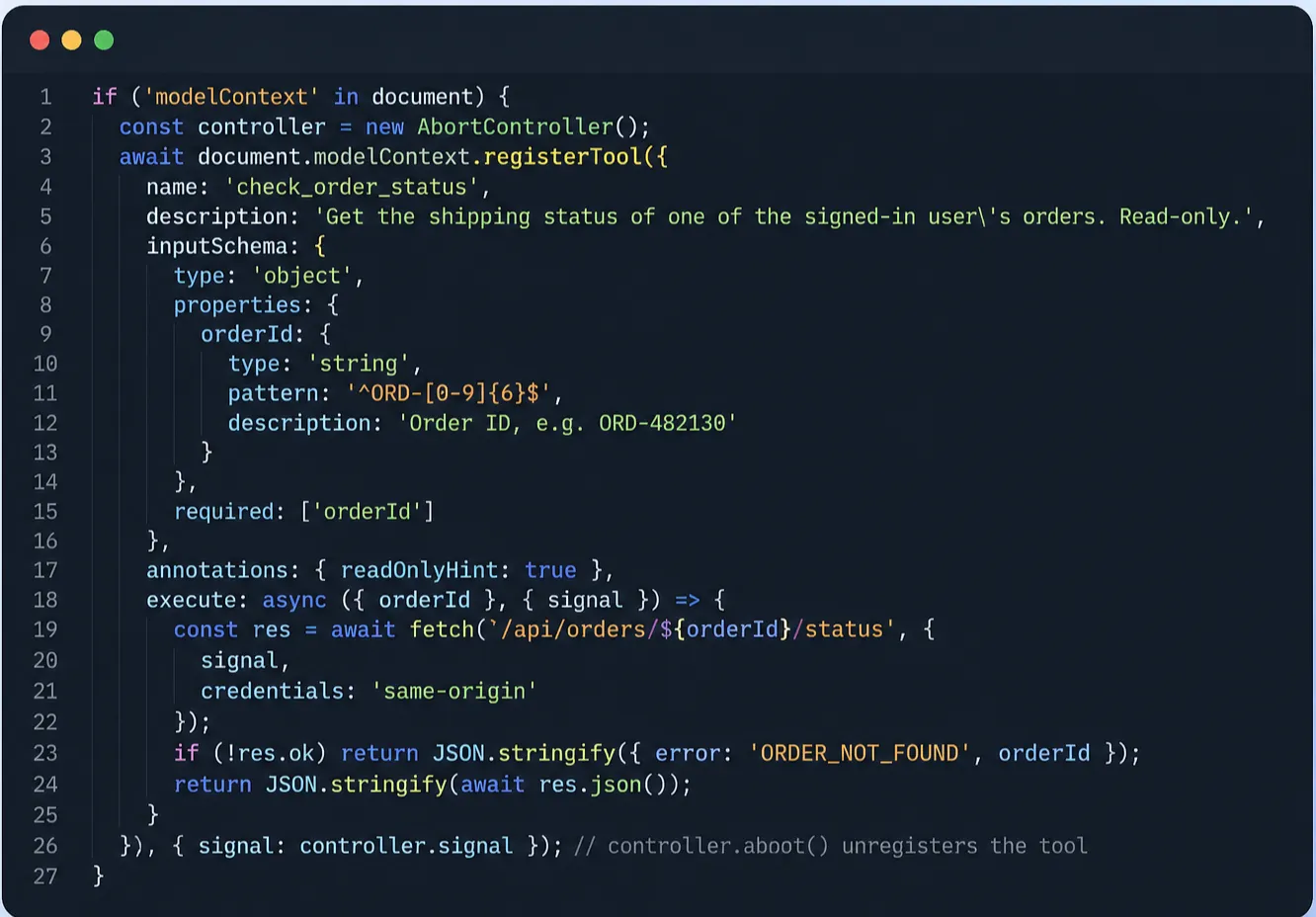
Begin with a single high-value action, such as order tracking, which web app developers expose as a tool on the browser-level document.modelContext API after confirmation. Each tool needs a stable snake_case name and a description explaining what it does, when to use it, and what it returns. Its inputSchema must be written in JSON Schema, which narrows what the agent can send through types, required fields, enum values, and pattern constraints.
Rather than duplicating business logic, the execute handler should call the backend endpoint the site already uses, while the AbortSignal passed at registration lets the team unregister the tool later. Simple forms can skip JavaScript entirely, since adding tool-name, tool-description, and tool-param-description attributes lets the browser derive the schema from existing inputs.
Step 2: Make Tools Discoverable and Context-Aware
Once tools exist, the next concern is controlling what agents see and when. Annotations such as readOnlyHint tell the agent a lookup has no side effects, consequentialHint marks payments, bookings, and deletions as high-stakes, and untrustedContentHint warns that the output contains reviews.
Tools should also follow the interface lifecycle, registering when a component mounts and aborting when it unmounts, so that a checkout tool exists only while a cart does. During development of AI Agent-ready websites, the toolchange event confirms that the toolset updates correctly, and document.modelContext.getTools() shows exactly what an agent will receive.
Step 3: Agent Invokes a Tool and the Site Enforces its Rules
Invocation is a function call, not a click. The AI Agent sends JSON arguments that should satisfy inputSchema, and the browser runs your execute handler on the page. For declarative tools, it focuses and pre-fills the annotated form instead, with tool-auto-submit deciding whether it submits automatically.
Therefore, treat the schema as a hint and re-validate arguments on the server, enforce per-resource authorization and rate limits, and apply business rules in the same service layer the human UI uses. For tools flagged consequentialHint, keep a confirmation step in your UI, and honor the AbortSignal passed to execute so canceled calls stop network work cleanly.
Step 4: Website Returns a Structured Result
The handler's return value goes straight back to the model, so design it like an API response rather than a page. Return compact, consistently shaped JSON (serialized as text) with stable keys, ISO 8601 dates, explicit currencies, and IDs the agent can pass into the next tool.
Hence, it is better to make errors machine-actionable with a code, a reason, and a recovery hint, such as {"error":"SLOT_UNAVAILABLE","alternatives":["19:30","21:00"]}. If a call triggers navigation, executeTool() resolves to null, so prefer tools that update state in place when the AI Agent needs to chain calls.
Challenges Organizations Should Consider Before Implementing WebMCP
WebMCP is promising, but it is not a switch you flip. Each challenge below needs a plan before the first tool goes live.
Security Risks from Agent-Executed Actions
WebMCP lets agents execute actions, so a misunderstood instruction can have real consequences. Therefore, organizations need an AI Agent governance framework for verified sessions, permission models that separate read-only lookups from refunds or payments, and audit trails recording each tool.
Prompt Injection through Untrusted Content
If a tool returns reviews, comments, or other user-generated text, that content could hide instructions aimed at the agent. Chrome's untrustedContentHint annotation flags such output, but sites should still sanitize and clearly delimit it.
Legacy Website Limitations
Many legacy websites lack modular architecture, API-first design, or structured data models, so business logic is locked inside templates, plugins, or monolithic controllers, limiting AI initiatives. The Declarative API offers a low-effort start by annotating existing forms, and WordPress plugins already add these attributes. Additionally, deeper capabilities like order tracking or personalized search usually require refactoring.
Skills and Ownership Gaps
WebMCP spans front-end development, backend APIs, security, and AI product thinking, and few organizations have one team owning all four, while few hire web developers through IT staff augmentation to create a blended squad to establish this foundation. Web development teams need a named owner for the tool catalog, a review process for new tools, and releases that keep tools in sync with the UI.
From Pages to Capabilities, and What you Should Do Next
As the article shows, AI Agent-ready websites are ultimately defined by what an agent can reliably understand and accomplish, not by whether a website has added a particular protocol. Web Model Context Protocol provides the connection layer, but the underlying website still needs clearly defined capabilities, interpretable data, and workflows that can be executed within controlled boundaries. This makes agent readiness an architectural property rather than a standalone feature.
For web development projects, that distinction changes where effort should begin. Machine-readable websites with polished interfaces but tightly coupled services, inconsistent data, or unclear permissions may require foundational modernization before exposing agent capabilities. Conversely, organizations with modular services and well-defined workflows can progressively make selected functions available to agents. The objective is therefore to identify which parts of the business can safely become machine-operable and then build the technical controls around them.





















Sign in to leave a comment.