Why Your Google Ads Are Getting Clicks but No Leads

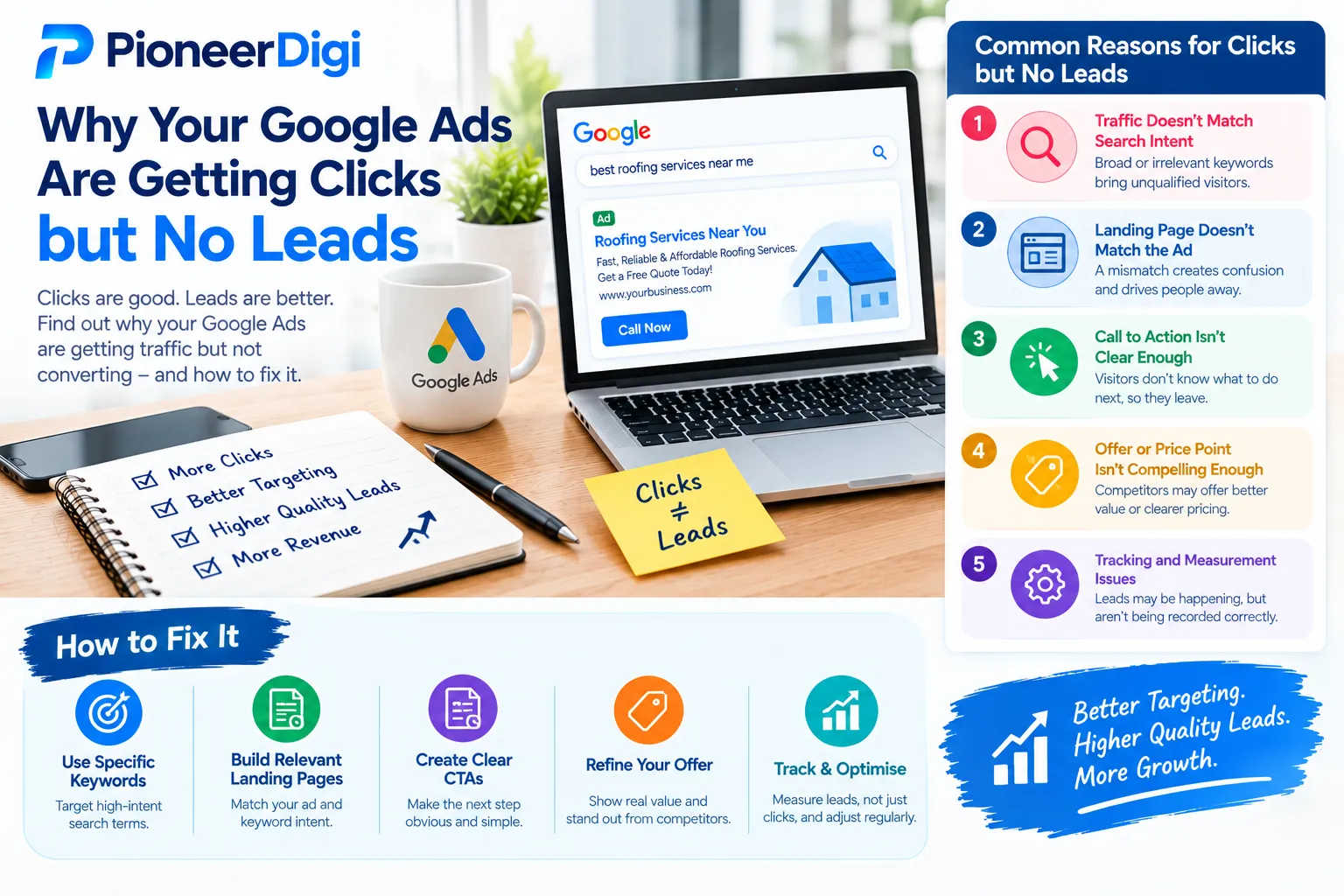
It's one of the most frustrating positions a business owner can find themselves in with Google Ads: the campaign is live, the budget is being spent, the click-through rate looks respectable, traffic is arriving on the website — and yet the phone isn't ringing and the enquiry form sits empty. Everything on the surface suggests the campaign is "working," but nothing is actually converting into business.
This gap between clicks and leads is one of the most common Google Ads problems, and it almost always comes down to a specific, identifiable cause rather than the platform simply "not working" for that industry. This article walks through the most likely reasons clicks aren't turning into leads, and how to diagnose which one applies to your situation.
Start by Confirming the Problem Is Real
Before diagnosing why clicks aren't converting, it's worth ruling out the possibility that they actually are converting, but the conversions simply aren't being measured. Broken or incomplete conversion tracking is extremely common, and a business that relies heavily on phone enquiries in particular may be generating plenty of leads by phone while the Google Ads account shows almost no conversions because it set up website form tracking but never set up call tracking.
Cross-checking actual business records — genuine enquiries, calls answered, forms received — against what Google Ads is reporting is a useful first step. If real leads are coming in but not being recorded, the problem isn't the campaign at all; it's the measurement. If the shortfall is confirmed as genuine — clicks really are failing to produce enquiries — the following causes are the most common places to look next.
The Traffic Doesn't Match the Search Intent
One of the most frequent causes of clicks without leads is a mismatch between what people are searching for and what your ad and landing page actually offer. This often happens when keyword targeting is too broad or loosely controlled, pulling in searches that are only tangentially related to your business.
A business targeting broad match keywords without careful oversight might find its ads showing for informational searches, DIY-oriented queries, or searches from people looking for something adjacent but not quite what's being offered. These visitors click because the ad seemed relevant enough at a glance, but leave immediately once they realise the page doesn't match what they were actually looking for. Reviewing the search terms report closely often reveals this mismatch clearly — a pattern of searches that technically relate to your keywords but don't reflect genuine buying intent for your specific service.
The Landing Page Doesn't Match the Ad
Even with well-targeted traffic, a landing page that fails to deliver on what the ad promised will lose visitors quickly. This is especially common when ads send traffic to a general homepage rather than a page specifically built around the service or offer mentioned in the ad.
A visitor who clicks an ad for "emergency roof repair" and lands on a homepage listing ten unrelated services, with no obvious next step and no mention of emergency service, is likely to leave within seconds. The disconnect between expectation and experience creates friction that a more aligned landing page would avoid entirely. A dedicated page that mirrors the ad's headline, speaks directly to the specific service searched for, and makes the next step obvious will almost always convert better than a generic page asked to serve every campaign at once.
The Call to Action Isn't Clear Enough
Sometimes the landing page is relevant, but visitors still don't act because it isn't obvious what they're supposed to do next. A page with multiple competing actions — a contact form buried below several sections of content, a phone number in small text at the bottom of the page, several different buttons leading to different places — creates decision fatigue that often ends in the visitor simply leaving without taking any action at all.
Effective landing pages tend to have one clear, prominent call to action, repeated where relevant, with minimal distraction from unrelated content, navigation menus, or secondary offers competing for attention. Simplifying a page down to a single obvious next step is often one of the highest-impact, lowest-effort changes available.
The Offer or Price Point Isn't Compelling Enough
Sometimes the traffic is well-targeted and the landing page is well-built, but visitors still don't convert because the offer itself doesn't stand out. If competitors are offering free quotes, faster response times, or clearer pricing, and your page doesn't communicate a comparable or stronger value proposition, visitors may simply be comparing options and choosing elsewhere.
This doesn't necessarily mean discounting prices — often it's a matter of clearly communicating existing strengths that aren't currently visible on the landing page, such as guarantees, response times, reviews, or specific expertise that differentiates the business from competitors in the same search results.
Mobile Experience Is Letting the Campaign Down
A significant share of Google Ads traffic arrives on mobile devices, and a landing page that works well on desktop but loads slowly, displays awkwardly, or makes forms difficult to complete on a phone can quietly sabotage conversion rate without ever showing up as an obvious problem in campaign reporting.
Testing the actual landing page experience on a mobile device — not just checking that it "looks fine" but actually attempting to complete the desired action, from tapping a phone number to filling out a form with a mobile keyboard — often reveals friction points that aren't visible when reviewing the page on a desktop screen.
Trust Signals Are Missing
Visitors arriving from a cold click, with no prior familiarity with the business, often look for quick signals of credibility before committing to an enquiry — reviews, testimonials, certifications, years in business, recognisable client logos, or clear contact information. A landing page that omits these signals entirely can leave visitors hesitant to proceed, even if the core offer is genuinely strong.
Adding visible, specific trust indicators — a real review count and rating, a licence or certification number, a physical location or service area clearly stated — can meaningfully improve conversion rate, particularly for higher-consideration purchases like home services, healthcare, or professional services where trust plays an outsized role in the decision to enquire.
The Traffic Is Technically Working but Poor Quality
Not all clicks are equal, and some traffic quality issues sit slightly outside the advertiser's direct control. Invalid click activity, bot traffic, or accidental clicks (particularly common on mobile devices, where ads can be tapped unintentionally while scrolling) can inflate click counts without ever representing genuine potential customers.
While Google has systems in place to detect and exclude a significant portion of invalid traffic automatically, reviewing click patterns for unusual spikes, unusually short site visit durations recorded in analytics, or geographic click patterns that don't make sense for the business can help identify whether a portion of traffic simply isn't genuine, human, interested visitors in the first place.
The Account Structure Is Diluting Relevance
Sometimes the underlying issue sits deeper in the account structure itself. Ad groups that combine too many different keyword themes under one generic ad and one landing page struggle to maintain strong relevance for any single search term. A visitor searching for one very specific service, shown a generic ad written to loosely cover five different services, receives a less compelling, less targeted message than one written specifically for their exact search.
Restructuring campaigns into tighter, more specific ad groups — each built around a closely related set of keywords, its own tailored ad copy, and its own matching landing page — often produces a noticeably stronger conversion rate than a broader, more generalised structure, even without any change in overall targeting or budget.
How to Diagnose Your Specific Situation
Given how many possible causes exist, a structured process of elimination is usually more productive than guessing. Start by confirming conversion tracking is accurate and not simply under-reporting real leads. Then review the search terms report to check whether traffic genuinely matches search intent. From there, walk through the actual landing page as a real visitor would — on both desktop and mobile — checking whether the offer, call to action, and trust signals are clear and compelling. Finally, review account structure to confirm ad groups, ads, and landing pages are tightly aligned around specific, related keyword themes rather than broad, generalised groupings.
Working through these steps in order, rather than making several changes simultaneously, makes it far easier to identify which specific factor was actually responsible for the gap between clicks and leads — and to know with confidence once it's been fixed.
Final Thoughts
Clicks without leads is rarely a sign that Google Ads "doesn't work" for a particular business or industry. In almost every case, it points to a specific, fixable mismatch somewhere in the chain between the search, the ad, the landing page, and the offer. Whether the root cause is broken tracking, mistargeted keywords, a generic landing page, an unclear call to action, or an account structure spread too thin, the underlying traffic is often still valuable — it simply hasn't yet been given a clear, relevant, trustworthy path to actually convert.
Systematically working through each of these possibilities, rather than abandoning the platform or simply increasing budget in the hope that more traffic solves the problem, is almost always the faster, more cost-effective path to turning existing clicks into the leads a campaign was meant to generate in the first place.



Sign in to leave a comment.