

A calm checklist based on US FTC and CISA guidance: what to do first, how to match your response to the data that leaked, and how to stop the next breach from hurting you.

The email arrives with a subject line like “Important notice about your account.” Your stomach drops. Was it real? What did they take? Do you have to change everything today? It helps to know you are not alone. Have I Been Pwned, a service that tracks known breaches, showed 17,846,550,965 breached addresses across 1,047 breached websites when we read its home page on 22 October 2026. A person can appear in several breaches, so the figure is not a count of people, but it shows how common this is. We collect the sources for figures like these in Password Statistics 2026.
The good news is that the response is a short list, and the order matters. This article follows the US Federal Trade Commission (FTC) and CISA guidance as we read it on 16 October 2026
Step zero: check that the notice is real Scammers send fake breach notices to steal your password. Do not click the link in the email. Open the company’s website by typing the address yourself, or use its official app, and look for the notice there. Contact the company only through those official channels. The first hour: four moves 1. Change the password on the breached account. The FTC says to change the password you use with that company right away, and the username too if you can. If you cannot log in, contact the company to recover or close the account. 2. Change it everywhere else you used it. The FTC says to change it on any account that uses a similar password. Attackers feed leaked passwords into other sites automatically, which is called credential stuffing. This is the reason reusing passwords is so costly. 3. Secure your email first, then your money. Whoever controls your email can reset almost every other account. After that, move to banking, payment and shopping accounts. 4. Turn on multi-factor authentication. CISA explains why: if an attacker has one factor, such as your password, they still cannot meet the second requirement. CISA says any MFA is better than none, and that phishing-resistant MFA based on FIDO/WebAuthn is the standard to aim for. A passkey is one such method. Match your response to what leaked Not every breach needs the same response. A leaked password, a card number and a Social Security number each call for different steps. The company’s notice should say what data was affected.
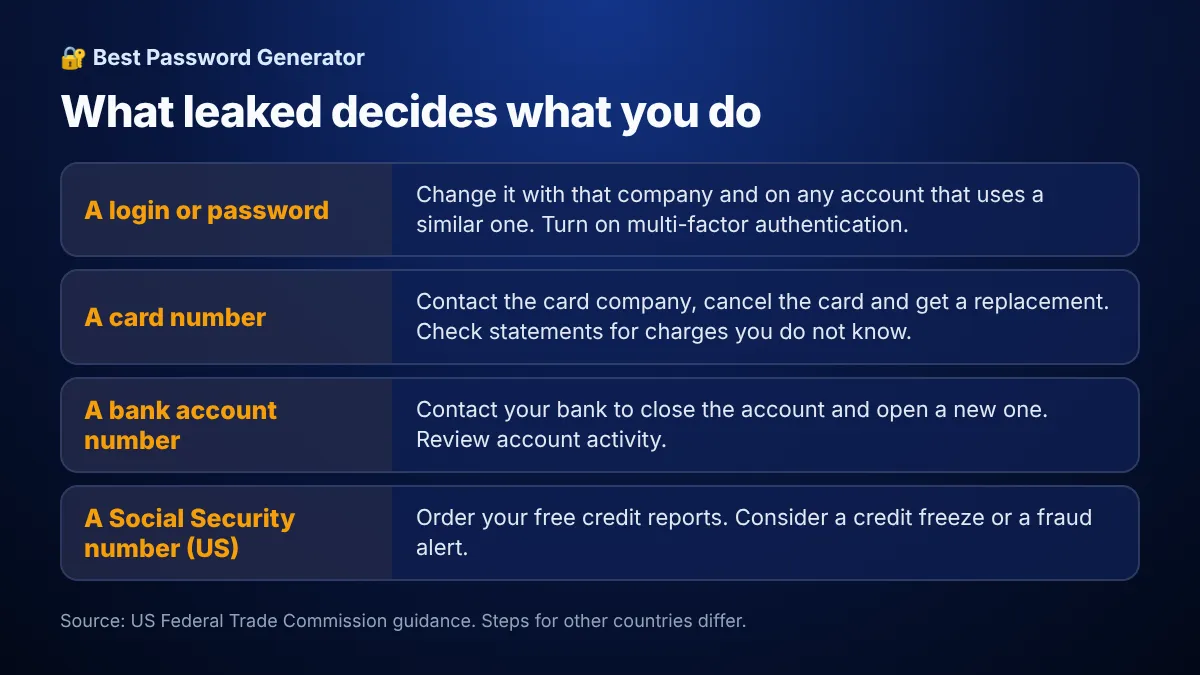
Whatever the data type, check your statements for charges you do not recognise. If you see fraud, alert that company’s fraud department and ask it to close or freeze the affected account. If a Social Security number leaked (United States) The FTC says to order your free credit reports and look for accounts you do not recognise, to accept free credit monitoring if the breached company offers it, and to consider a credit freeze or a fraud alert. Both are free, according to the FTC’s page on credit freezes and fraud alerts, and they work different.

Outside the United States, the equivalent steps depend on your country. Contact your national consumer or data-protection authority. If someone has already used your information Three steps, per the FTC’s recovery guidance: 1. Contact the companies involved. Alert each company’s fraud department and ask it to close or freeze the affected accounts. Change logins, passwords and PINs. 2. Place a fraud alert with one credit bureau, read your free reports at AnnualCreditReport.com, and freeze your credit if you have not already. 3. Report it to the FTC at IdentityTheft.gov or by phone at 877-438-4338. The FTC gives you a personalised recovery plan. Watch for follow-up scams After a breach, attackers often use the leaked details to make fraudulent messages more convincing. Be cautious with any email, text or call that mentions the breach, asks you to verify account details, or pressures you to act quickly. Use the company’s official website or app, never a link in the message.
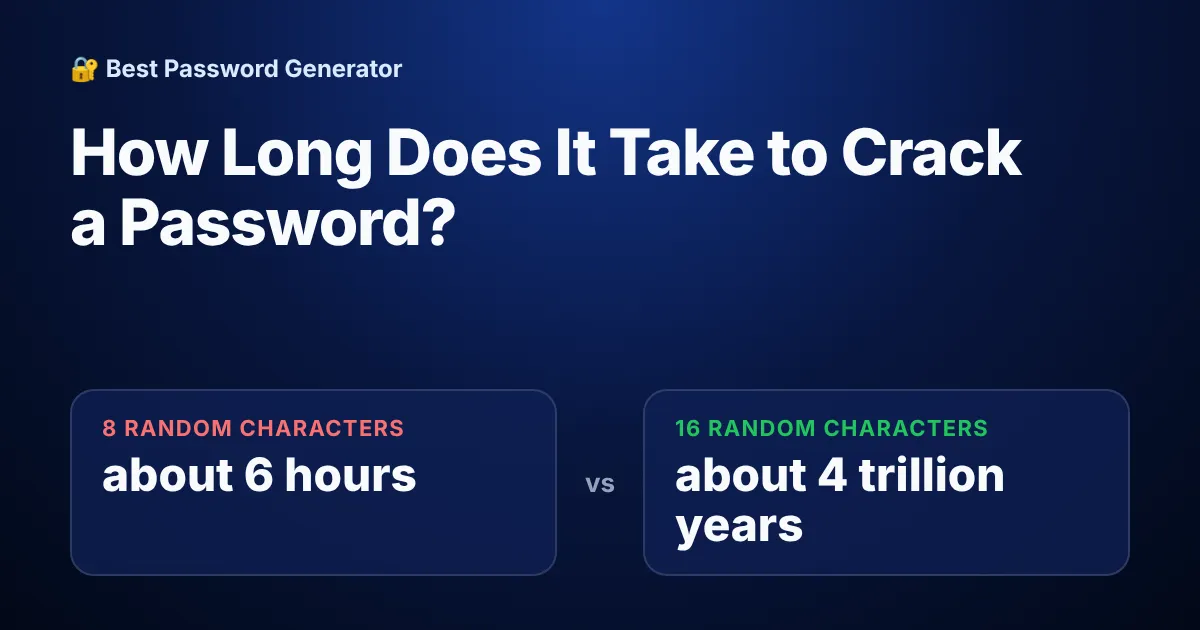
Make the next breach matter less You cannot stop companies from being breached. You can make sure that one breach does not spread. Use a different password for every account. Generate long random ones with our strong password generator and keep them in a password manager. Make them long. Length is what slows guessing down, as our crack-time guide shows. Avoid the passwords attackers try first. See the most common passwords. Prefer services that offer passkeys and two-factor authentication. Check which known breaches include your email address at Have I Been Pwned. A clean result does not guarantee you were never affected, so keep passwords unique anyway. The short version Verify the notice, change the password and every reused copy, secure your email, switch on multi-factor authentication, and match the rest to what leaked. The full ten-step list, with sources, is on our Data Breach Checklist. About this article: We run Best Password Generator, a set of free browser-based password tools and guides. This article is general information, not legal or financial advice, and it follows United States FTC and CISA guidance. The steps for stolen card and bank account numbers come from an older FTC publication (2016) that the FTC’s current pages do not repeat, so check IdentityTheft.gov for current advice. The original checklist lives at bestpasswordgenerator.io/data-breach-checklist.html.

















Sign in to leave a comment.