





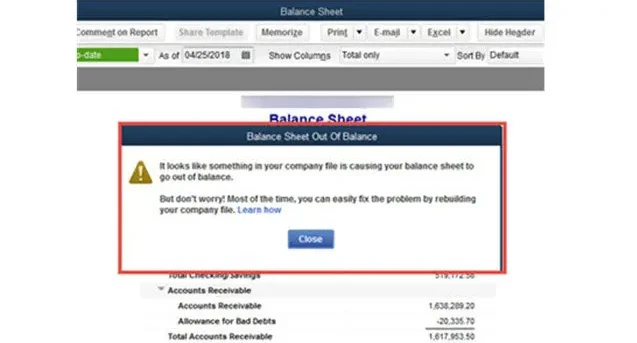
A balance sheet is one of the most critical financial statements in QuickBooks, giving you a clear view of your company's assets, liabilities, and equity. However, users occasionally encounter a frustrating issue—the QuickBooks balance sheet being out of balance, meaning the total assets do not equal the total liabilities and equity.
This issue can lead to inaccurate financial reporting and tax filings. Let’s walk through the reasons behind the imbalance, how to identify the problem, and effective ways to fix it.

What Does "Balance Sheet Out of Balance" Mean?
In accounting, the basic formula is:
Assets = Liabilities + Equity
If this equation doesn’t hold true in your QuickBooks balance sheet, your report is out of balance. This problem can occur in either the accrual basis or cash basis financial reporting methods.
Common Causes of an Out-of-Balance Balance Sheet
- Corrupted or Damaged Transactions
- Damaged data entries, especially journal entries or paychecks, may throw off the balance.
- Incorrectly Linked Transactions
- Linking a deposit to a journal entry or incorrect use of clearing accounts can lead to mismatch issues.
- Rounding Errors or Modified Transactions
- Even minor adjustments, if done incorrectly, can affect totals, especially in multi-currency accounts.
- Negative Inventory
- Selling items before recording them as received can trigger negative inventory values, affecting cost of goods sold.
- Data File Damage
- If your company file is too large or has structural damage, it may lead to reporting inconsistencies.
- Account or Date Range Filtering Errors
- Running reports with incorrect filters or date ranges can display imbalances that aren’t actually present.
Learn More:- Update QuickBooks Company File
Steps to Fix QuickBooks Balance Sheet Out of Balance
Step 1: Run the Balance Sheet on an Accrual Basis
- Open QuickBooks.
- Go to Reports > Company & Financial > Balance Sheet Standard.
- Click Customize Report.
- In the Display tab, set the Report Basis to Accrual.
- Set the date to All or the specific problematic period.
Check if the report is balanced in accrual. If it is, the issue might be specific to cash-basis reporting.
Step 2: Identify the Affected Date or Period
- Customize the report to display one column per month or day.
- Look for the first period where the balance sheet goes out of balance.
- This helps narrow down the exact transaction or group of transactions causing the issue.
Step 3: Use the Rebuild Data Tool
- Back up your company file.
- Go to File > Utilities > Rebuild Data.
- After rebuilding, rerun the report and check for balance consistency.
This process helps repair minor data corruption that may be affecting reports.
Step 4: Find and Fix Problematic Transactions
Once you identify the affected date:
- Go to Reports > Custom Transaction Detail Report.
- Set the date range to the problematic period.
- Add columns for Account, Amount, Split, and Entered/Modified Date.
- Look for unusual or manually adjusted entries, such as journal entries, paychecks, and deposits.
Edit or re-enter suspicious transactions carefully.
Step 5: Check for Negative Inventory
- Go to Reports > Inventory Valuation Detail.
- Look for items showing negative quantities on hand.
- If found, adjust the transaction dates or inventory receipts.
QuickBooks calculates inventory-based accounts in real-time, so negative inventory can distort financials.
Step 6: Condense the Company File (if needed)
If your company file is unusually large, it might be time to condense it.
- Go to File > Utilities > Condense Data.
- Choose the appropriate date range and criteria.
Always create a backup first. This method is recommended if data errors persist after all other steps.
Best Practices to Prevent Future Imbalances
- Avoid backdating journal entries.
- Don’t enter transactions that span multiple fiscal years incorrectly.
- Always record inventory receipts before sales.
- Reconcile accounts regularly.
- Use the Verify and Rebuild Data tool monthly.
Frequently Asked Questions (FAQs)
Q1: What does it mean if my balance sheet is only out of balance on a cash basis?
This typically indicates that transactions with partial payments or deposits are affecting only the cash basis reports. Run reports in accrual to confirm whether the issue is basis-specific.
Q2: Can third-party apps cause my balance sheet to be out of balance?
Yes, some third-party integrations that modify journal entries, inventory, or bank feeds can introduce inconsistencies. Disable the app and check your reports again to see if the issue persists.
Q3: What should I do if the balance sheet is still out of balance after following all steps?
If none of the manual fixes work, it may be best to consult a QuickBooks ProAdvisor or contact QuickBooks support. In some cases, your company file might need advanced repair.