




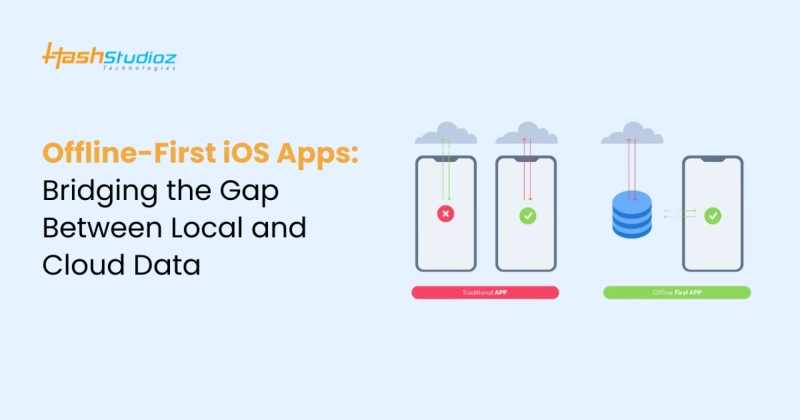
The increasing demand for seamless app experiences has fueled the rise of offline-first iOS apps. Users expect uninterrupted access to app functionality, even in environments with limited or no internet connectivity. Offline-first apps ensure data availability locally while syncing seamlessly with the cloud when a connection is restored. This article explores the strategies, technologies, and best practices for building offline-first iOS apps that balance local and cloud data effectively.
- 80% of app users abandon apps with unreliable performance in offline scenarios. Building offline-first apps can significantly reduce this churn rate and improve user retention.
In today’s fast-paced world, users demand apps that work flawlessly under all conditions. Offline-first iOS apps are designed to bridge the gap between local and cloud data, ensuring that users can access essential features even without an active internet connection. From e-commerce platforms to productivity tools, offline-first functionality has become a competitive advantage for many apps.
What Are Offline-First iOS Apps?
Offline-first iOS apps are designed to provide a seamless user experience by functioning independently of an active internet connection. These apps prioritize local storage and data processing, ensuring users can access essential features and perform tasks even in offline mode.
When a network connection becomes available, the app synchronizes the locally stored data with the cloud to ensure data consistency across devices and users. This approach:
- Enhances Reliability: Users can rely on the app in all network conditions.
- Reduces Network Dependency: Critical app functionalities don’t rely solely on real-time internet access.
- Improves User Experience: Faster response times and uninterrupted usability contribute to a more satisfying experience.
Offline-first apps are especially valuable for industries such as e-commerce, healthcare, and productivity, where uninterrupted access to features is crucial.
Benefits of Offline-First iOS Apps
a) Improved User Experience: Users can access critical features without interruptions caused by network issues.
b) Enhanced Performance: Local data storage ensures faster load times and reduces latency.
c) Reliability in Remote Areas: Offline-first apps are ideal for users in areas with poor connectivity.
d) Increased User Retention: Apps with offline capabilities are more likely to retain users by reducing frustration.
e) Data Security: Sensitive data stored locally can be encrypted, minimizing risks during transmission.
Core Challenges in Developing Offline-First iOS Apps
Developing offline-first iOS apps involves addressing several challenges, including:
1. Data Synchronization: Ensuring accurate syncing between local and cloud data when connectivity is restored, preventing data loss or corruption.
2. Conflict Resolution: Managing discrepancies when multiple users modify the same data offline, using strategies like "last write wins" or merge algorithms.
3. Storage Optimization: Balancing local storage usage to maintain performance without overloading the device's storage capacity.
4. Data Consistency: Maintaining data integrity across devices, ensuring changes sync correctly without causing inconsistencies or duplication.
Strategies for Offline Data Handling
a) Data Storage Technologies
- Core Data: Apple’s native framework for managing object graphs and data persistence.
- SQLite: Lightweight database for structured data storage.
- Realm: Modern database optimized for mobile apps.
b) Data Synchronization Techniques
- Incremental Sync: Syncing only updated or new data to reduce bandwidth usage.
- Two-Way Sync: Ensuring data flows both ways between local and cloud storage.
- Background Sync: Automatically syncing data when connectivity is restored.
c) Conflict Resolution Mechanisms
- Last Write Wins (LWW): The most recent change overwrites earlier changes.
- Merge Strategies: Combining changes from different sources intelligently.
- User Intervention: Prompting users to resolve conflicts manually.
Tools and Frameworks for Offline-First iOS Apps
Developing offline-first iOS apps requires a combination of tools and frameworks that enable efficient data management, synchronization, and offline functionality. Below are some key tools and frameworks that simplify the development process:
1. Core Data
Core Data is Apple's native framework designed for managing the model layer of applications. It handles local data storage, retrieval, and object graph management, making it ideal for offline-first apps. With Core Data, developers can efficiently persist data on the device and easily fetch and update it, even when the device is offline. Core Data supports complex data models and provides built-in functionalities like data validation and versioning, making it one of the most widely used frameworks for offline data management.
Key Features:
- Persistent storage for complex data structures.
- Efficient querying and data manipulation.
- Integrated with the iOS ecosystem for smooth operation.
2. Firebase Realtime Database
Firebase Realtime Database is a cloud-hosted database that provides real-time synchronization and offline capabilities. Firebase stores data as JSON and synchronizes it across all connected clients in real time, even when the device is offline. Once the app reconnects to the internet, Firebase automatically syncs the local changes with the server, ensuring data consistency.
Key Features:
- Real-time data synchronization with automatic conflict resolution.
- Local persistence for offline usage.
- Simple API integration with iOS apps.
3. Apollo GraphQL
Apollo GraphQL is a comprehensive framework for building data-driven apps. It allows efficient querying of APIs and optimizes data retrieval with caching mechanisms that support offline functionality. Apollo Client integrates seamlessly with iOS apps, enabling offline caching and synchronization of data from remote sources.
Key Features:
- Efficient GraphQL queries with automatic data caching.
- Optimized for offline access by storing data locally.
- Syncs data with the server when connectivity is restored.
Leveraging AI and ML for Offline-First Functionality
Integrating Artificial Intelligence (AI) and Machine Learning (ML) into offline-first apps can significantly enhance their functionality and performance, even when users are offline. AI and ML can be used for tasks that don’t require constant connectivity to the cloud. Here are some ways AI and ML can enhance offline-first apps:
1. Predictive Data Fetching
Machine learning models can predict what data users may need based on their behavior patterns and pre-fetch it for offline use. This approach reduces the need to constantly query the server, ensuring the app works smoothly even without an internet connection.
2. Offline Recommendation Systems
AI-driven recommendation systems can operate offline, suggesting products, content, or services based on user preferences and behavior. By processing data locally, the app can continue delivering personalized recommendations without requiring an active internet connection.
3. On-Device ML Models
On-device ML models allow apps to perform complex tasks, such as image recognition, text analysis, and speech recognition, without relying on a cloud connection. These models process data directly on the user's device, ensuring real-time performance and privacy.
Role of Dedicated iOS Developers in Offline App Development
Building an offline-first iOS app requires expertise in both data synchronization and efficient storage management. Dedicated iOS app developers play a crucial role in ensuring that an app is designed with robust offline functionality. These developers bring specialized skills in handling the intricacies of offline-first architecture, from data storage to conflict resolution. By hiring a dedicated iOS developer, businesses can ensure the app meets the specific needs of users while providing a seamless experience.
Why Hire Dedicated Developers?
1. Expertise in Storage Frameworks: Dedicated developers are highly skilled in using storage frameworks like Core Data and Realm to manage and persist data locally. They can design a custom storage solution that balances data needs, performance, and scalability.
2. Proficiency in Data Synchronization and Conflict Resolution: Offline-first apps require sophisticated data synchronization techniques. Dedicated developers are experts at implementing synchronization strategies such as two-way sync, incremental sync, and conflict resolution methods to ensure data consistency and integrity.
3. Agile Development Processes: Hiring dedicated developers ensures an agile development process. Developers can adapt to changing requirements, implement new features, and ensure timely updates, leading to faster delivery and continuous improvement of the app.
4. Tailored Solutions: Dedicated iOS app developers bring deep technical knowledge to create solutions tailored to specific business goals. They understand the unique challenges of offline-first apps and can design custom solutions that work best for your app and user base.
Best Practices for Building Offline-First iOS Apps
a) Design for Offline-First Architecture: Plan the app’s architecture to prioritize local data handling and minimize cloud dependencies.
b) Optimize Data Storage: Choose the right storage framework based on the app’s data complexity and scalability.
c) Implement Secure Storage: Encrypt sensitive data stored locally to enhance security.
d) Test Offline Scenarios: Simulate various offline conditions during testing to ensure seamless functionality.
e) Provide Clear Feedback: Notify users of syncing status or conflict resolutions to improve transparency.
How to Hire Dedicated iOS App Developers
When building a reliable offline-first app, hiring the right dedicated iOS app developers is essential. Here’s what to look for:
1. Experience in Offline-First Architecture: Choose developers with hands-on experience in creating offline-first apps, skilled in local data storage, synchronization, and conflict resolution.
2. Proficiency in AI and ML Integrations: For advanced features like predictive data fetching or offline recommendations, hire developers experienced in integrating AI and ML for offline functionality.
3. Strong Portfolio: Ensure the developer has a proven track record with a portfolio of successful offline-first iOS projects.
4. Technical Expertise & Communication Skills: Look for developers who are proficient in the latest iOS tools like Core Data, Realm, and Firebase, and can communicate effectively to understand and execute your vision.
5. Agile Development Process: Hire developers who use agile methodologies for flexibility and timely updates throughout the development process.
Conclusion
Offline-first iOS apps are essential for delivering uninterrupted user experiences. By bridging the gap between local and cloud data, these apps ensure reliability, performance, and user satisfaction. Leveraging the right tools, strategies, and expertise, businesses can create offline-first apps that stand out in the competitive market. Partnering with a skilled team of developers or a trusted iOS mobile app development company can make all the difference in your app’s success.
FAQs
Q1. Why are offline-first apps important?
Offline-first apps ensure seamless functionality even in low or no connectivity environments, enhancing user satisfaction and retention.
Q2. What tools are best for offline-first iOS apps?
Core Data, SQLite, and Realm are popular for storage, while Firebase and GraphQL offer effective synchronization solutions.
Q3. How can AI and ML improve offline-first apps?
AI and ML enable features like on-device analysis, predictive data handling, and offline recommendation systems.
Q4. Why should I hire a dedicated iOS app developer?
Dedicated developers bring specialized skills in offline-first architecture, ensuring robust and scalable app solutions.
Q5. How does an iOS mobile app development company help?
A professional company provides end-to-end iOS application development services, including offline-first functionality, AI/ML integration, and ongoing support.