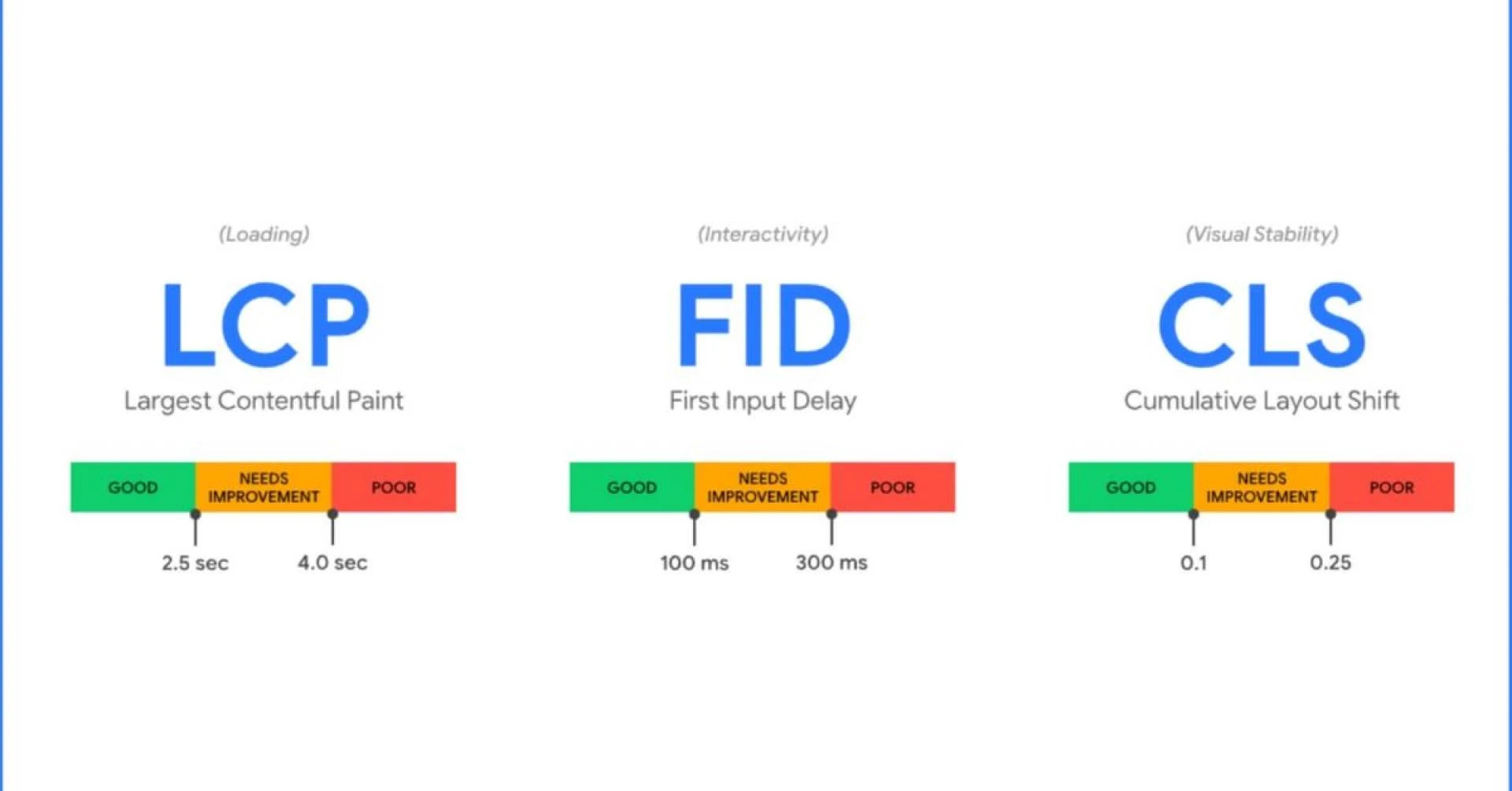

You’ve probably heard of Google’s Core Web Vitals, but do you really know what they’re all about? They’re a set of specific factors that Google considers important in a webpage’s overall user experience. Why should you care? Well, these metrics significantly influence your website’s ranking on search engine results. In this article, we’ll break down these techy terms – Largest Contentful Paint (LCP), First Input Delay (FID), and Cumulative Layout Shift (CLS) into simple language you can understand. We’ll also give you practical tips to improve these metrics and tools to measure them effectively. So if you’re looking to enhance your site performance and climb up the SEO ladder, stick around! You’re about to learn some game-changing info.
The Importance of User Experience Metrics
You’ve got to understand, your website’s user experience isn’t just about looks; it’s a crucial factor that can make or break your audience’s loyalty and trust. It goes beyond the visual appeal, extending into how visitors interact with your site, how easily they find what they’re looking for, and their overall satisfaction with the time spent on your pages.
With Google’s Core Web Vitals in play now, these metrics have become even more critical. They aren’t just arbitrary numbers; they’re a reflection of the quality of user experience you’re providing. A low score might mean it’s time to rethink some aspects of your design or functionality.
Take note that these metrics aren’t static either; they evolve as technology and user expectations do. Something that worked two years ago might not resonate with users today. Keeping abreast with these changes is essential for maintaining a healthy relationship with your audience.
Load speed, interactivity, and visual stability are just a few things measured by Google’s Core Web Vitals – key indicators of how well you’re meeting users’ needs and expectations when it comes to UX. High scores in these areas signal to both users and search engines alike that you value their time and effort.
So remember this: an investment in improving user experience isn’t just beneficial—it’s necessary in today’s competitive digital landscape where every second counts. Don’t wait until your numbers slide before taking action—be proactive in ensuring you provide the best possible experience for those who visit your site because ultimately, they’re why you’re here in the first place.
Understanding Largest Contentful Paint (LCP)
Imagine the frustration of waiting for a web page to load, only for it to take forever – that’s exactly what Largest Contentful Paint (LCP) measures, and why it’s so crucial for your website’s performance. LCP is one of Google’s core web vitals that evaluates how quickly the largest content element appears on the user’s screen. This could be an image, a video or even a block of text.
The goal here is simple: make sure that your page’s main content loads as quickly as possible. You don’t want users staring at a blank or half-loaded page, do you? That can negatively impact their experience and might lead them to abandon your website altogether. As such, Google recommends aiming for an LCP score of 2.5 seconds or less to ensure optimal user experience.
Several factors can affect your LCP score including slow server response times, render-blocking JavaScript and CSS, slow resource load times, and client-side rendering. All these technical terms may sound intimidating but they essentially boil down to having efficient coding practices and using optimised media files on your website.
Improving these aspects isn’t just beneficial from an SEO perspective—it directly impacts your visitors’ experiences too! A faster loading time means people can access the information they need more quickly which leads to better engagement rates and potentially higher conversions.
So remember this: great user experience goes hand in hand with quick content loading. By focusing on improving LCP scores, you’re taking significant strides towards optimising not just your site’s SEO performance but its overall user satisfaction too!
Tips to Improve LCP
To boost your website’s LCP scores, there are several effective strategies you can implement that not only enhance your site’s performance but also refine the user experience. One of the most impactful steps you can take is to optimise and compress your images. Large, high-quality images may look great, but they can seriously slow down your page load times. By reducing image file sizes without compromising too much on quality, you’ll be able to speed up those crucial initial seconds of loading time.
Another useful tip is to defer non-essential JavaScript. When a browser loads a webpage, it has to parse all the JavaScript before it can start rendering content. If you’ve got lots of scripts running at once, this could delay the appearance of important content elements like text or images – thus hurting your LCP score.
Also consider inlining critical CSS and deferring non-critical CSS. This technique helps render important visual elements faster and reduces unnecessary render-blocking resources.
Upgrading web hosting can have a significant impact too. Sometimes, cheap or shared hosting plans just don’t cut it when it comes to delivering high-speed performance. Investing in a premium hosting plan with better resources could drastically improve load times.
Remember that improving LCP isn’t just about ticking boxes for Google’s Core Web Vitals – it’s ultimately about providing an optimal user experience by ensuring visitors aren’t kept waiting for content to load on their screens. With these tips in mind and continuous testing using tools such as Google PageSpeed Insights or Chrome User Experience Report, you’re well-equipped to make strides towards achieving excellent LCP scores.
Decoding First Input Delay (FID)
Let’s dive into the nitty-gritty of First Input Delay (FID), an essential metric that measures responsiveness and quantifies the experience users feel when trying to interact with unresponsive pages. FID, one of Google’s Core Web Vitals, focuses on the delay between a user’s first interaction with your site and when the browser responds to that interaction.
Understanding FID involves breaking down its components. It starts when a user interacts with your site, for example by clicking a link or button. The ‘delay’ is measured from this point until the time the browser can start processing event handlers in response to that interaction.
In essence, FID gauges how quickly your site becomes interactive. It’s crucial because it directly impacts user experience – if there’s too much delay between their action and the website’s reaction, users may perceive your site as slow or clunky.
The performance of FID could be affected by several factors such as heavy JavaScript execution, long tasks blocking the main thread, or resource-heavy content like large images or videos. Ideally, you’d want to aim for an FID score under 100 milliseconds for at least 75% of page loads across all devices and network conditions.
Improving FID could involve optimising your JavaScript (breaking up long tasks, deferring unused JS), reducing third-party code impact, using a web worker for non-UI tasks among other strategies. Remember that each improvement not only boosts your webpage’s performance but also significantly enhances user experience – creating happier visitors more likely to return!
Strategies to Enhance FID
Boosting your First Input Delay (FID) scores isn’t just about quick fixes; it’s about implementing sustainable strategies that ensure your website remains interactive and responsive for all users. A well-optimised FID score can significantly enhance the user experience, leading to higher engagement rates and ultimately better SEO performance.
One of the most effective ways to improve FID is by minimising or deferring JavaScript. JS often blocks the main thread, preventing users from interacting with your page. You can minimise this by only loading what’s necessary for initial interaction and deferring the rest until needed. This way, your page becomes interactive more quickly.
Additionally, browser caching can also help reduce FID scores. By storing a version of your site on a user’s device, subsequent visits will load much faster as fewer resources need to be downloaded from the server. Combine this with HTTP/2 for optimised delivery of smaller files in parallel – you’ll see an improvement in overall performance.
Another strategy involves breaking up long tasks into smaller ones that won’t block the main thread for too long. Tasks longer than 50ms can interrupt input responsiveness and lead to poor FID scores; splitting these tasks allows the browser to remain responsive even during heavy processing.
Optimising server response times is another crucial area: every millisecond counts when you’re trying to keep FID low! Ensure your server responds rapidly by optimising databases, using Content Delivery Networks (CDNs), or upgrading server hardware if necessary.
Remember that maintaining good FID scores requires ongoing attention – regular monitoring and optimisation are key components of this process. By keeping these strategies in mind, you’ll not only improve your site’s interactivity but also its overall user experience – making it a win-win situation!
Unravelling Cumulative Layout Shift (CLS)
After successfully implementing strategies to enhance the First Input Delay (FID), it’s time we take a leap forward. Now that you’re equipped with the knowledge and tools for dealing with FID, let’s turn our attention to another core web vital: Cumulative Layout Shift (CLS).
In simplest terms, CLS measures visual stability on your webpage. Have you ever been reading an article online and suddenly everything shifts around? Perhaps a photo finally loaded or an ad popped up, causing all the text to move. That is what Google refers to as ‘layout shift.’ It can be frustrating for users, leading them to abandon your website entirely. Hence, maintaining a low CLS score is crucial.
Understanding how CLS works isn’t rocket science. It’s calculated by multiplying the impact fraction by distance fraction- sounds tricky but it isn’t really! The impact fraction refers to the visible area of the webpage that changes unexpectedly, while distance fraction deals with how far these elements move when they do shift. So basically, if large portions of your page are moving great distances frequently then expect your CLS score to skyrocket.
The good news is there are several ways you can improve this score. This includes setting size attributes for images and video elements, ensuring ads have a reserved space so they don’t push content down when loading and avoiding inserting new content above existing ones unless it’s in response to user interaction.
So while tackling CLS may seem daunting at first glance, remember it’s about providing users with a stable browsing experience where everything stays put as expected – now who wouldn’t enjoy that?
Techniques to Minimise CLS
Ready to tackle that pesky CLS score? You’re in luck, because we’re about to dive into some practical techniques that can help minimise layout shifts and provide your users with a smoother browsing experience.
Firstly, make sure all elements on a page have specified dimensions. This involves setting the width and height attributes for images, videos, or any other media types that might cause layout shifts when loading. When the browser knows the size of an element beforehand, it can reserve space for it and prevent content from jumping around as things load.
Secondly, consider employing CSS aspect ratio boxes if you need to maintain a specific proportion between the width and height of an element regardless of screen size. This technique helps create stability in responsive designs.
Think about using web fonts wisely too. When text renders after font files download, it can cause a layout shift. To avoid this, use ‘font-display: optional’ or ‘font-display: swap’ in your CSS code which tells browsers how to behave while waiting for fonts to download.
Lastly, avoid inserting content above existing content unless triggered by user interaction like clicking on a button or link. Unexpected addition of new elements at the top pushes down existing content causing unwanted shifts.
So there you have it! With these techniques in your arsenal, you stand a good chance at minimising those frustrating layout shifts on your site. Remember to test regularly with Google’s Core Web Vitals toolset to ensure continuous improvement and better overall performance for your site visitors!
Tools for Measuring These Metrics
You’ll be thrilled to discover there are a host of incredible tools available that can effectively measure these essential performance metrics, guiding you on your quest for a seamless and user-friendly site. High-performing websites not only attract more visitors but also create a pleasant user experience that boosts conversions and customer loyalty.
One of the most recommended tools is Google’s own Lighthouse. It offers an in-depth analysis of how well your website adheres to Core Web Vitals, providing suggestions for improvements where necessary. This open-source tool audits performance, accessibility, SEO, and other elements crucial to optimal web functionality.
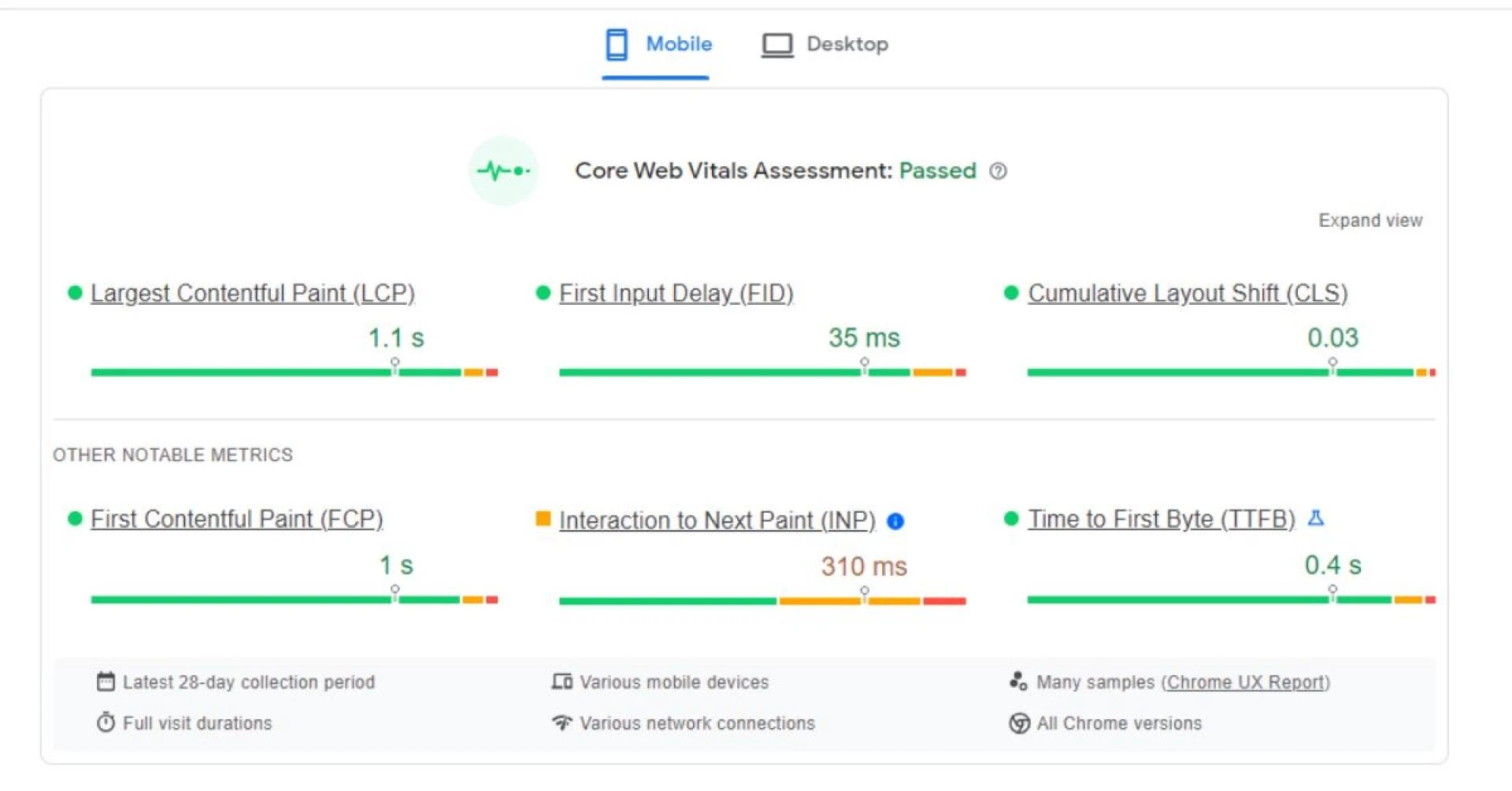
Another powerful tool at your disposal is PageSpeed Insights (PSI). PSI provides both lab data from Lighthouse and field data from the Chrome User Experience Report, giving you comprehensive feedback about your site’s performance across different devices and network conditions.
WebPageTest is another useful resource for measuring Core Web Vitals. It allows you to conduct tests using real browsers at various connection speeds and produces an easy-to-understand report showing how well your webpage performed during each test.
On top of these, Search Console’s Core Web Vitals report gives you a snapshot of URLs on your site that need improvement along with potential solutions. Furthermore, Chrome DevTools can help you diagnose specific issues related directly to layout shifts or loading times.
So as we’ve seen, there’s no shortage of tools out there ready to assist you in optimising your website against Google’s Core Web Vitals guidelines. With their help, improving the overall performance and user experience of your website becomes an achievable goal rather than an elusive dream.
Impact on Search Engine Rankings
Keeping a close eye on your site’s performance metrics isn’t just about providing a stellar user experience – it can also significantly influence your search engine rankings. Google’s Core Web Vitals, in particular, have been built into the company’s algorithm as ranking factors. This means that how well your site performs in these areas has direct implications for where it appears in Google’s search results.
If you’re striving to appear on the first page of Google search results, or even better, to be the top result for relevant keywords, then you need to pay attention to these key performance indicators. They measure aspects such as loading speed (Largest Contentful Paint), interactivity (First Input Delay), and visual stability (Cumulative Layout Shift). If any of these components are lacking, it could prevent you from reaching those coveted top spots.
Google has explicitly confirmed that sites with good Core Web Vitals scores will enjoy greater visibility. This underlines the importance of optimising these metrics not only for an improved user experience but also for better SEO outcomes.
It’s worth noting though that while these vitals are important, they’re not everything when it comes to SEO – there are many other factors at play too like quality content and backlinks among others. But if you neglect them, you might find your website slipping down the rankings ladder.
As a business owner or digital marketer aiming for online success, consider Core Web Vitals as part of your wider SEO strategy. Investing time and resources into improving this aspect could potentially yield excellent returns over time by getting more eyeballs on your content through higher search result placements.
Best Practices for Optimal Performance
To ensure your website is running at its best, it’s crucial to adopt specific practices geared towards optimising performance. Google’s Core Web Vitals focuses on three main areas: Largest Contentful Paint (LCP), First Input Delay (FID), and Cumulative Layout Shift (CLS). How do you optimise these? Let’s dive in.
Firstly, to improve LCP, focus on speeding up the load time of your largest content element. This could be an image or a video block. Consider compressing high-resolution images and using lazy loading techniques so they only load when users scroll down to them. It also helps to move any non-critical JavaScript or CSS that might block the rendering process out of the way.
Next, for FID optimisation, reduce the impact of third-party code and minimise JavaScript execution time. Prioritise tasks that need immediate attention while deferring less important tasks until later stages in page load.
Lastly, CLS can be improved by providing size attributes for images and videos and avoiding inserting new content above existing ones unless it’s user-initiated like opening an accordion list item.
It’s worth noting that although focusing on Core Web Vitals is beneficial for SEO purposes, user experience should remain a priority. Strive to create a balance between efficient web vitals and maintaining a rich user interface with engaging content. Remember, even if your website ranks well due to excellent core web vitals but fails to provide value to users, it won’t succeed in the long run—so keep your audience first while optimising these aspects.
Conclusion
So, you’ve learned about Google’s Core Web Vitals and their importance. By improving your LCP, FID, and CLS scores, you’ll enhance user experience on your site. Remember to use the right tools for accurate measurements. This won’t just boost your search engine rankings, it’ll also give your visitors a smoother ride. Keep following best practices for optimal performance. It’s all about creating an enjoyable browsing experience for users!
About First Page SEO Agency
Thriving in the digital world is about more than just existing online. It demands an effective strategy, compelling design, and a dedicated partner that can guide your business every step of the way. At First Page SEO Agency, we pride ourselves in offering these solutions and more. Get to know us, our mission, and our commitment to your success on our About Us page.
From driving organic traffic to creating visually impactful websites, we have a broad range of services tailored to meet your unique needs. Explore our proven SEO Services and discover our competitive SEO Packages for packages that offer real value for your business. Visit our Web Design section to see how we can elevate your digital presence with a website that not only looks great but functions seamlessly. When you’re ready to start your journey towards digital success, reach out to us on our Contact page.
Learn more on our:
BlogSEO GlossarySEO FAQsSource: https://www.firstpageseoagency.co.za/a-guide-to-googles-core-web-vitals










Sign in to leave a comment.