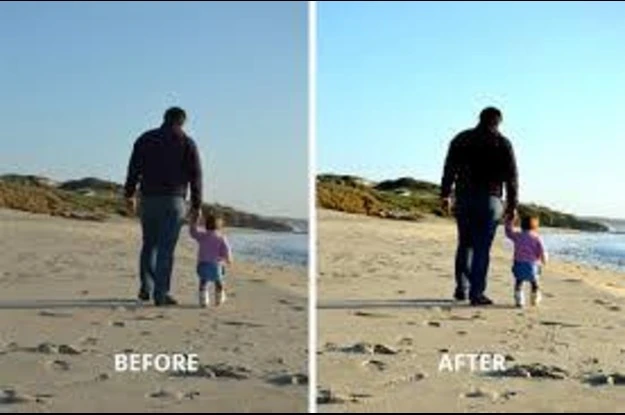

In an age where visuals dominate communication, the quality of an image can make or break its impact. Whether you're a photographer, marketer, business owner, or casual user, understanding and using image enhancing techniques can drastically elevate your content. But what exactly does it mean to enhance an image, and how do modern tools and technologies help us do that?
Let’s explore the world of image enhancement, the core entities involved, and how they work together to improve the quality of an image in visually stunning ways.
What Is Image Enhancing?
Image enhancing is the process of improving a digital image’s visual quality using software-based techniques. These enhancements can range from simple adjustments like brightness and contrast to advanced modifications like removing blur, enlarging resolution, and restoring old photos. The primary goal is to make the image more appealing, clearer, and suitable for its intended purpose—whether that’s for social media, printing, websites, or professional work.
Core Entities and Their Attributes in Image Enhancing
To fully understand how image enhancement works, it's important to identify and describe the key entities that play a role in this process:
1. Image Enhancer (Tool or Software)
An image enhancer is the central entity in image enhancement. It refers to a tool, application, or software designed to refine and upgrade image quality. These can be:
- AI-powered: Uses machine learning to automatically enhance images.
- Manual editors: Allow users to adjust settings like sharpness, noise, exposure, and tone.
- Online platforms: Provide quick image improvement via cloud processing.
Attributes:
- Interface (user-friendly or professional-grade)
- Output quality (standard or high-resolution)
- Supported formats (JPEG, PNG, RAW, etc.)
- AI integration (yes/no)
- Batch processing capabilities
2. Resolution Enhancement
This entity deals with the upscaling of images—making a low-resolution photo larger without distorting it.
Attributes:
- Original resolution (e.g., 720p)
- Enhanced resolution (e.g., 4K)
- Pixel reconstruction algorithms
- Anti-aliasing support
By increasing pixel density intelligently, resolution upscaling tools allow an image to retain its clarity even when zoomed in or printed in large sizes.
3. Noise Reduction
Noise refers to the grainy texture seen in photos, especially those taken in low light.
Attributes:
- Noise type (luminance vs color)
- Noise level (low, medium, high)
- Denoising method (AI-based, frequency filtering)
- Detail preservation (important for facial features, textures)
A good enhancer removes noise while keeping essential details intact, resulting in a cleaner and smoother image.
4. Sharpness and Focus Adjustment
Sharpening makes image edges more defined, correcting blur caused by camera shake or poor focus.
Attributes:
- Sharpening intensity
- Edge detection algorithms
- Halo suppression
- Autofocus enhancement
This entity is especially important in professional photography and product shots, where clarity matters.
5. Color and Exposure Correction
Color correction improves the tones, hues, and brightness to make the image look balanced and natural.
Attributes:
- White balance control
- Dynamic range adjustment
- Exposure correction
- Saturation and contrast levels
Proper color enhancement ensures the image looks vibrant yet realistic across different devices.
6. AI-Powered Auto Enhancement
AI has revolutionized image enhancement by analyzing image content—like people, objects, and backgrounds—and applying the best corrections automatically.
Attributes:
- Content recognition (faces, sky, objects)
- Enhancement suggestions
- One-click auto fix
- Adaptive processing (based on photo type)
AI tools are perfect for users who want quick results without manual tweaking.
7. Old Photo Restoration
This specialized form of enhancement repairs vintage or damaged photos.
Attributes:
- Scratch and dust removal
- Colorization (for black-and-white photos)
- Tear repair
- Contrast restoration
Restoration tools breathe new life into aged memories, making them shareable and printable again.
Why Is Image Enhancing Important?
Let’s break down why image enhancement is a must-have in today’s digital toolkit:
✦ Better Communication
Visuals are processed 60,000 times faster than text. High-quality images tell your story more clearly and powerfully.
✦ Enhanced Professionalism
In business, presentation matters. Enhanced images signal professionalism, attention to detail, and brand quality.
✦ Increased Engagement
Social media posts with sharp, colorful, and clear images get significantly more likes, shares, and comments.
✦ Print-Ready Media
Whether you’re printing brochures, portfolios, or photo albums, enhanced images ensure your prints look crisp and vibrant.
✦ Improved Usability
Images enhanced with AI can be reused across formats—websites, blogs, videos, banners—without losing quality or impact.
Popular Types of Image Enhancer Tools
Today’s market offers a wide range of image enhancers, each with specific strengths. Here are the common categories:
◉ Online AI Tools
These are browser-based, quick, and beginner-friendly.
Best for: Casual users, social media posts, e-commerce product images.
Features:
- Drag-and-drop interface
- Auto enhancement
- Real-time preview
◉ Desktop Software (e.g., Photoshop, Lightroom)
Ideal for photographers and professionals who need full manual control.
Best for: Fine-tuned edits, high-end retouching, graphic design.
Features:
- Layer editing
- Plugin support
- RAW file processing
◉ Mobile Apps
Apps like Snapseed and Remini provide image enhancement on the go.
Best for: Quick edits for Instagram, TikTok, or WhatsApp.
Features:
- One-tap filters
- Face smoothing
- Background blur
Tips for Effective Image Enhancing
- Start with the highest-quality original you can.
- Avoid over-processing to maintain a natural look.
- Use AI tools for bulk or quick jobs.
- Always keep a backup of the original image.
- Test across multiple devices to ensure consistent visual results.
Use Cases for Image Enhancing
- E-commerce: Better product images increase conversions.
- Photography: Professional-grade edits for portfolios.
- Social Media: Standout visuals get more attention.
- Corporate: High-quality visuals for branding, reports, and presentations.
- Personal: Revive old family photos or travel memories.
The Future of Image Enhancement
The field is moving toward real-time AI enhancement and adaptive photo correction based on viewer preference and device type. Features like live photo enhancement in cameras and dynamic resolution scaling for websites are already emerging.
Final Thoughts
Image enhancing is more than just photo editing—it’s a powerful blend of art and technology that transforms ordinary images into impactful visuals. By understanding key tools and techniques, and using the right image enhancer, anyone can improve image quality and create content that stands out in the crowded digital landscape.
Whether you're polishing product photos, reviving old prints, or perfecting your next Instagram post, image enhancement gives your visuals the clarity, sharpness, and brilliance they deserve.




















Sign in to leave a comment.