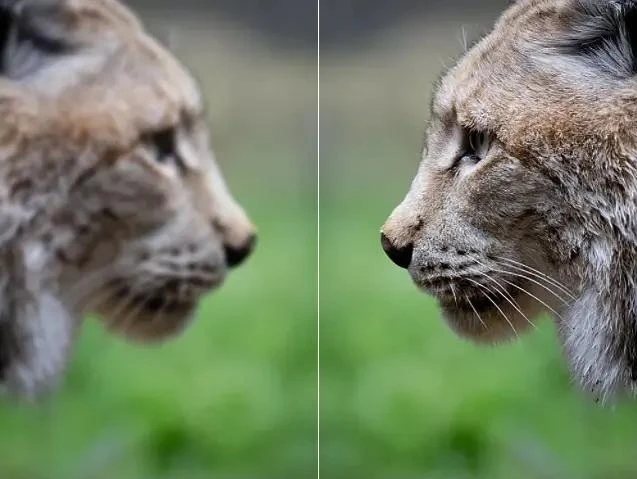
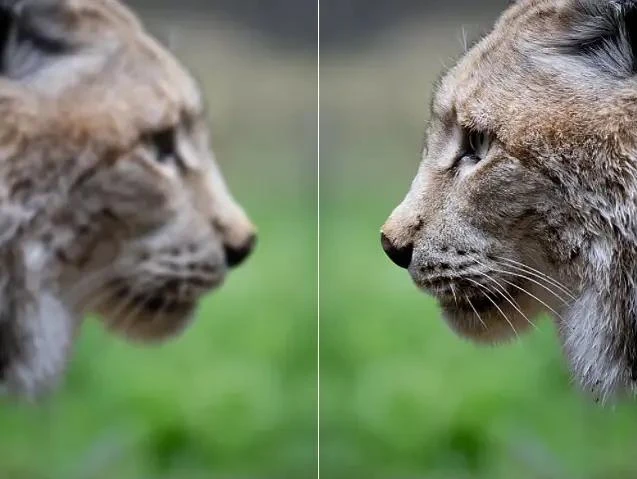
In today’s digital world, images are everywhere. From social media posts and marketing materials to personal photography, high-quality pictures are essential for making a strong impression. However, not every photo comes out perfect. Blurry shots, low-resolution images, and faded colors can make even the most memorable pictures look dull or unprofessional. Fortunately, AI image enhancers have become powerful tools that can help anyone sharpen, restore, and perfect their images quickly and easily. This guide will explain how these tools work and show you how to get the best results from them.
What is an AI Image Enhancer?
An AI image enhancer is software that uses artificial intelligence to automatically improve the quality of digital images. Unlike traditional photo editing software, which often requires manual adjustments and technical skills, AI image enhancers analyze each image and make improvements on their own. They can fix blur, enhance details, correct colors, and even restore old or damaged photos. The “AI” part comes from machine learning and neural networks, which allow the software to learn from millions of images and predict how your picture should look at its best.
These tools are not just for professional photographers—they are designed for anyone who wants to create high-quality visuals, from social media users to business owners and hobbyists.
Key Functions of AI Image Enhancers
AI image enhancers offer several key functions that can transform your pictures:
1. Sharpening Images
One of the most useful features is image sharpening. AI tools can detect blurry areas in a photo and enhance the details. This is especially helpful for pictures taken in low light, with shaky hands, or with older cameras. Sharpening ensures that your images look crisp, clear, and professional.
2. Restoring Old or Damaged Photos
AI image enhancers can also restore old, faded, or damaged photos. Scratches, dust, and low resolution are common issues in old pictures, but AI tools can repair these problems. This makes it possible to preserve precious memories or historical images in high quality.
3. Color Correction and Enhancement
Sometimes photos don’t capture colors accurately, or they may appear dull. AI image enhancers can adjust brightness, contrast, and saturation automatically. They can make colors more vibrant, correct lighting issues, and produce a natural-looking result without the need for complicated manual editing.
4. Upscaling and Resolution Improvement
Another great feature is image upscaling. AI tools can increase the size of an image without losing quality. This is perfect for printing photos, creating large banners, or simply improving the resolution of older digital images.
Benefits of Using AI Image Enhancers
There are many advantages to using AI image enhancers. First, they save time. Manual photo editing can take hours, but AI tools can improve your images in seconds.
Second, they provide consistent, professional-quality results. AI software follows trained patterns and algorithms, ensuring that each image is enhanced reliably. This is particularly useful for businesses and content creators who need multiple images to look uniform.
Third, AI enhancers can make old or low-quality photos usable again, giving new life to images that would otherwise be discarded.
Finally, improved images can boost engagement on social media, websites, and marketing campaigns. Clear, attractive visuals capture attention and make a strong impression on viewers, which can increase likes, shares, and sales.
Step-by-Step Guide to Enhancing Your Images
Here’s how to get the best results from an AI image enhancer:
1. Choosing the Right AI Image Enhancer
Select a tool that fits your needs. Consider features, ease of use, pricing, and whether it works on your devices. Some tools are web-based, while others are downloadable software for desktops or mobile devices.
2. Preparing Your Images
Start with the highest-quality image you have. Avoid heavily compressed files, as they can limit the enhancement. Keep a backup of the original image in case you want to revert changes.
3. Applying Enhancements
Use the AI tool to apply sharpening, restoration, color correction, and upscaling. Most software provides one-click options, but you can also adjust settings manually for finer control.
4. Fine-Tuning for Best Results
Preview your changes and make small adjustments as needed. Avoid over-editing, as too much enhancement can make images look unnatural.
5. Saving and Exporting Your Enhanced Images
Once satisfied, save your images in the desired format. Many AI tools allow you to export high-resolution files suitable for printing, online use, or professional projects.
Real-Life Applications
AI image enhancers have practical uses in many areas:
- Photography: Professionals and hobbyists can quickly improve photo quality.
- E-commerce: Clear product images attract more buyers and improve sales.
- Social Media and Marketing: Eye-catching visuals increase engagement and brand visibility.
- Personal Memories: Restore old family photos or improve low-quality snapshots.
Tips and Best Practices
To get the most out of AI image enhancers:
- Avoid over-editing to keep images looking natural.
- Test different tools to find the one that works best for you.
- Keep original files as backups.
- Combine AI enhancements with minimal manual adjustments for perfection.
Future of AI Image Enhancement
AI image enhancement technology continues to advance. We can expect faster processing, more realistic results, and better integration with video, 3D modeling, and multimedia tools. As AI becomes more powerful, ethical considerations will also become important. Users should apply enhancements responsibly and maintain transparency when necessary.
Conclusion
AI image enhancers have revolutionized the way we work with images. They save time, improve quality, and make professional-level visuals accessible to everyone. Whether for personal use, business, or content creation, these tools allow anyone to sharpen, restore, and perfect their pictures with ease.
For anyone looking to take their images to the next level, exploring an AI image enhancer is a smart choice. With just a few clicks, ordinary photos can be transformed into stunning, high-quality visuals, making memories, marketing materials, and social media content more impactful than ever.





























Sign in to leave a comment.