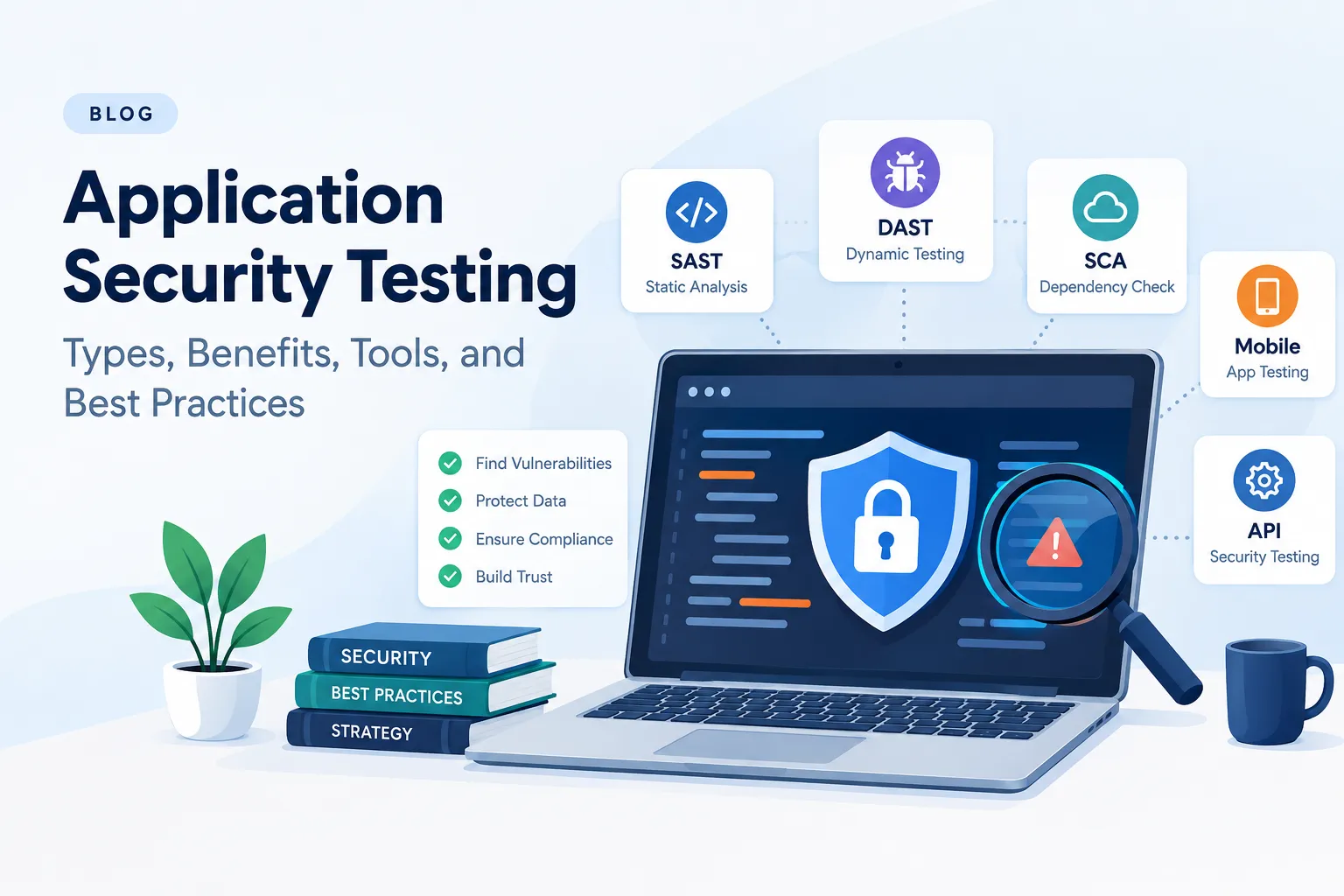

Applications handle sensitive information such as customer details, login credentials, payment records, and business data. If an application contains security weaknesses, attackers may exploit them to access information, misuse user accounts, or disrupt business operations. Application Security Testing helps organizations identify and fix these weaknesses before they lead to security incidents.
Whether you operate a business website, mobile application, API, or SaaS platform, regular security testing is an important part of protecting your application and its users.
What is Application Security Testing?
Application Security Testing (AST) is the process of identifying, analyzing, and validating security vulnerabilities in software applications. It examines how an application handles authentication, authorization, user input, data storage, API requests, and other security-sensitive operations.
The objective is to discover weaknesses before attackers can exploit them.
For example, an e-commerce application may allow customers to view their orders. If the application does not verify order ownership, one customer might access another customer's order by changing an order ID in an API request. Application security testing helps identify this type of access control weakness.
Testing can be performed during development, before deployment, and after an application goes live. The approach depends on the application's architecture, business requirements, and security risks.
Why is Application Security Testing Important?
Application security testing helps businesses reduce security risks while maintaining customer trust and application reliability.
1. Identifies security vulnerabilities
Testing can uncover weaknesses such as SQL injection, cross-site scripting (XSS), broken authentication, insecure configurations, and improper access controls.
2. Protects sensitive information
Applications often process personal information, financial records, and confidential business data. Testing helps identify vulnerabilities that could expose this information to unauthorized users.
3. Detects business logic flaws
Not every vulnerability can be identified through automated scanning. For example, a booking application might allow a user to apply the same discount multiple times or complete a transaction without satisfying the required conditions. Manual testing helps evaluate these application-specific risks.
4. Supports security and compliance requirements
Organizations may need to demonstrate security controls to customers, partners, auditors, or regulators. Application security testing can provide evidence of identified risks, remediation efforts, and retesting results. The specific requirements depend on the applicable framework and industry.
5. Reduces the cost of fixing vulnerabilities
Identifying a security issue during development can make it easier to address before it affects production systems. Early testing also helps teams prioritize vulnerabilities based on their potential business impact.
Types of Application Security Testing
Different testing methods identify different categories of security weaknesses. Organizations can combine multiple approaches to build a more complete security testing process.
1. Static Application Security Testing (SAST)
SAST analyzes source code or compiled code without executing the application. It helps developers identify insecure coding patterns, such as unsafe input handling and potential injection vulnerabilities.
It is particularly useful during development, although findings may require manual validation to determine their actual exploitability.
2. Dynamic Application Security Testing (DAST)
DAST tests a running application by sending requests and examining its responses. It can identify vulnerabilities that appear during execution, including certain injection flaws, security misconfigurations, and authentication-related issues.
3. Interactive Application Security Testing (IAST)
IAST combines aspects of static and dynamic testing by observing application behavior while tests are running, often using an instrumented application environment. It can help teams connect runtime behavior with the code responsible for a potential vulnerability.
4. Software Composition Analysis (SCA)
SCA examines third-party libraries, open-source packages, and other software dependencies. It helps identify known vulnerabilities in components that an application relies on.
5. Mobile Application Security Testing
Mobile application testing examines Android and iOS applications for weaknesses involving local data storage, API communication, authentication, reverse engineering, and insecure platform configurations.
6. API Security Testing
API security testing focuses on endpoints, request parameters, authentication, authorization, rate limiting, and data exposure. It is especially important for applications that rely on APIs to connect their frontend, backend, mobile clients, and external services.
7. Manual Penetration Testing
Manual penetration testing involves security professionals actively investigating and validating vulnerabilities in an application. Testers may examine role-based access controls, business logic, session handling, and tenant isolation to determine whether weaknesses can be exploited in realistic scenarios.
For example, in a multi-tenant SaaS application, a tester may create two accounts belonging to different customers and check whether one account can access or modify the other customer's records.
Best Practices for Effective Application Security Testing
An effective testing strategy combines automated tools, manual investigation, secure development practices, and regular remediation.
1. Integrate security testing into the development lifecycle
Include security checks during development rather than waiting until the application is ready for production. SAST and dependency scanning can run during code reviews and continuous integration, while DAST and manual testing can be scheduled for suitable environments.
2. Prioritize high-risk application areas
Focus on features that could create significant business impact if compromised. These often include login and account recovery, payment processing, administrative functions, sensitive data access, and APIs that modify customer records.
3. Test authentication and authorization separately
Successful login does not automatically mean a user should have access to every resource. Verify that users can perform only the actions permitted by their roles and that each request enforces the correct ownership and permission checks.
4. Combine automated and manual testing
Automated scanners can efficiently identify many known vulnerability patterns. Manual testing is needed to investigate complex workflows, business logic, and access control issues that depend on application-specific behavior.
5. Validate findings before prioritizing fixes
Review each finding to determine whether it is reproducible, exploitable, and relevant to the application's environment. Prioritize remediation based on severity, exploitability, exposure, and potential business impact rather than relying only on a scanner's severity label.
6. Retest after remediation
Once developers fix a vulnerability, test it again to confirm that the issue is resolved. Also check whether the change has introduced new problems or affected related functionality.
7. Maintain an ongoing testing schedule
Repeat testing after significant code changes, new integrations, major releases, and changes to authentication or authorization logic. Periodic assessments are also useful for applications that handle sensitive data or support critical business operations.
Top Tools for Application Security Testing
Application security tools help teams automate checks, discover potential weaknesses, and monitor risks throughout the software development lifecycle. The appropriate tool depends on the application, programming language, testing objective, and available resources.
Here are several widely used tools and platforms:
1. OWASP ZAP
OWASP ZAP is an open-source web application security testing tool. It supports automated scanning, request inspection, and manual testing workflows, making it useful for developers and security testers.
2. Burp Suite
Burp Suite provides tools for inspecting and modifying HTTP requests, testing web application behavior, and investigating vulnerabilities. Its proxy and manual testing capabilities are particularly useful when examining authentication, access control, and business logic.
3. Snyk
Snyk helps development teams identify vulnerabilities in open-source dependencies and supported codebases, containers, and infrastructure configurations, depending on the product and integration used.
4. SonarQube
SonarQube supports code quality analysis and, depending on the edition and configuration, security-focused static analysis. It can help development teams identify potentially unsafe coding patterns during development.
5. Checkmarx
Checkmarx provides application security testing capabilities for identifying vulnerabilities in source code and other parts of the software development lifecycle, depending on the products deployed.
6. Invicti
Invicti provides automated web application security testing capabilities to help identify and validate certain vulnerabilities in running applications.
7. Nessus
Nessus is primarily used for vulnerability assessment of systems, networks, and infrastructure. It can contribute to an organization's broader security assessment, but it is not a substitute for comprehensive application-specific penetration testing.
How should you choose an application security testing tool?
Consider the type of application, supported technologies, integration with your development workflow, reporting requirements, and the level of manual investigation needed.
One important point: no single tool can identify every application security vulnerability. A scanner may detect a known technical weakness but miss a flaw in how a business process handles user permissions or transaction states. Combining suitable tools with manual security testing provides broader coverage.
Common Challenges in Application Security Testing
Although application security testing is essential, organizations often face practical challenges when implementing it.
1. False positives
Automated tools may report issues that are not exploitable in the actual application. Security teams need to validate findings and distinguish genuine risks from incorrect or context-dependent alerts.
2. Complex application architecture
Modern applications may use microservices, third-party APIs, cloud infrastructure, mobile clients, and multiple authentication mechanisms. Testing these interconnected components requires a clear understanding of how data and permissions move between them.
3. Business logic vulnerabilities
Business logic flaws depend on how an application is designed to operate. For example, an application might allow a user to cancel an already completed transaction or access a feature without meeting the required business conditions. These issues frequently require manual exploration and realistic test scenarios.
4. Limited time and resources
Development teams may struggle to balance security testing with release deadlines and other engineering priorities. Risk-based testing helps teams focus first on the areas where a vulnerability could cause the greatest harm.
5. Keeping up with changing threats
New vulnerabilities, software dependencies, attack techniques, and application features continually change the security landscape. Organizations need to update their testing processes and review their security controls regularly.
6. Remediation without regression
Fixing one vulnerability can affect other application functions. Developers should verify the fix and run appropriate regression tests to ensure that the application remains secure and functional.
Future Trends in Application Security Testing
Application security testing continues to evolve as software development practices and attack techniques change.
1. AI-assisted security testing
AI-assisted tools can help analyze code, identify suspicious patterns, explain findings, and support vulnerability investigation. However, their results still require verification because automated analysis can produce inaccurate findings or overlook application-specific context.
2. Security integrated into DevSecOps
Organizations are increasingly incorporating security checks into development and deployment workflows. This approach helps teams identify problems earlier and establish repeatable security checks throughout the software lifecycle.
3. Greater focus on API security
As applications depend on APIs for communication between services and clients, testing authentication, authorization, excessive data exposure, and request handling will remain important.
4. Cloud-native application security
Containers, microservices, serverless functions, and cloud-managed services introduce additional configuration and access control considerations. Application security testing is increasingly being combined with dependency, container, and cloud configuration assessments.
5. Continuous security validation
Instead of relying exclusively on occasional assessments, organizations can use automated checks, ongoing monitoring, and risk-triggered testing to respond to application changes more quickly. Periodic manual assessments remain important for complex vulnerabilities.
6. Identity and access control testing
Applications increasingly support multiple roles, integrations, and customer environments. Testing whether each identity can access only the resources and operations it is authorized to use will remain a central part of application security.
These trends do not eliminate the need for experienced security professionals. Effective testing still depends on understanding application behavior, validating evidence, and assessing real-world business impact.
Conclusion: Strengthening Your Application Security Strategy
Application security testing helps organizations identify vulnerabilities, protect sensitive information, and reduce the risk of application compromise. A practical security strategy combines automated testing, dependency analysis, secure coding practices, API testing, and manual penetration testing.
Start by identifying your application's most sensitive data and critical workflows. Choose testing methods that match your architecture, validate reported vulnerabilities, prioritize meaningful risks, and retest fixes before closing security findings.
For applications that handle customer information, payments, or multiple user accounts, do not rely solely on automated scans. Manual application security testing can help uncover access control weaknesses, business logic flaws, and authorization issues that automated tools may not fully understand.
A consistent testing and remediation process makes application security part of everyday software development rather than a one-time activity before launch.





















Sign in to leave a comment.