
Ever watched an accounting team spend a whole day writing and managing checks manually? It happens more often than you think, especially when a business is in its growing stage. As soon as a business scales past a handful of vendors, writing checks by hand stops being a quick task and turns into a bottleneck.
That’s often the point when people start considering ordering business computer checks. Printed checks are not just faster to produce, but they also cut down on minor mistakes that come with tired hands and rushed signatures.
This guide covers why businesses make the switch, what you need to know before ordering, a few things worth double-checking, and how to move from manual checks to printed ones without tripping over the transition.
Why Businesses Are Switching to Computer Checks
Writing checks yourself works just fine if you require five checks a month. But once this number climbs to dozens or hundreds, manually managing checks is not the smartest decision for any organization.
Every check written by hand takes a few minutes: filling in payee information, date, amounts, signature, and all. Multiply this by a growing vendor list and payroll run, and it will take a significant amount of time to manage it all. And the chances of errors still remain high.
Mistakes such as smudged numbers, misspelled names, and mismatched logs are common. These errors not only cost money but also vendor trust, adding another layer of complication. Switching to computer checks solves most of these problems. Checks are printed straight from software, leaving no room for human errors and making record-keeping easier.
This way, since software does the heavy lifting, accountants get time to focus on more critical areas like reconciling accounts, chasing overdue invoices, and reviewing cash flow.
What to Know Before Ordering Business Computer Checks
Before ordering business computer checks, you should be aware of the following things:
- Check compatibility with your accounting software: QuickBooks, Sage, Xero, and desktop-based systems each expect checks laid out a specific way (voucher, standard, or wallet-style). So, confirm your software’s check-printing settings first and match the format exactly. Ordering the wrong layout is the single most common reason people end up reordering.
- A verified, up-to-date MICR line: The routing numbers, account number, and check number printed in that magnetic ink at the bottom have to align with your bank regulations. Most online check printers pull this from a voided check or a document you upload, so have one ready to scan or photograph rather than typing it from memory.
- Business details as they’ll appear on the check: Legal name, address, and phone number, plus a logo file if you want one printed. Reputable sites will ask for a logo as a high-resolution PNG or vector file, not a screenshot, so track that down beforehand if branding matters to you.
- Starting check number: If you are transitioning from an existing checkbook or a previous printing service, note the last number used so the new order picks up without a gap or an overlap.
- Printer type and check stock: Laser and inkjet checks are cut and coated differently. Laser stock resists smudging in a laser primer’s heat, whereas inkjet stock is designed to absorb ink without bleeding. Ordering the wrong one for your printer is a quick way to waste an entire box.
- Bank sign-off: Some banks want to be notified when checks are printed through a third party, particularly for business accounts. A quick call before the order goes out avoids any hold-up when checks start clearing.
One more thing worth doing before you check out: Confirm the site is legitimate and established, check the printer, and look for security certifications, encrypted checkout, and real customer reviews. Business computer check orders involve handing over your bank account details, so this isn’t a step to rush through just to save five minutes.
Tips for Ordering Business Computer Checks
Even small mistakes can lead to severe consequences when it comes to ordering computer checks. So, here are a few tips to order the right checks:
- Double-check business and bank details: Before placing an order, make sure to check your business and bank details again.
- Think about quantity: Ordering too few means reordering sooner than expected; ordering too many means tying up cash in stock you might not use for a year.
- Confirm the layout: Match your printer and your accounting software’s template, not just what looks good on screen.
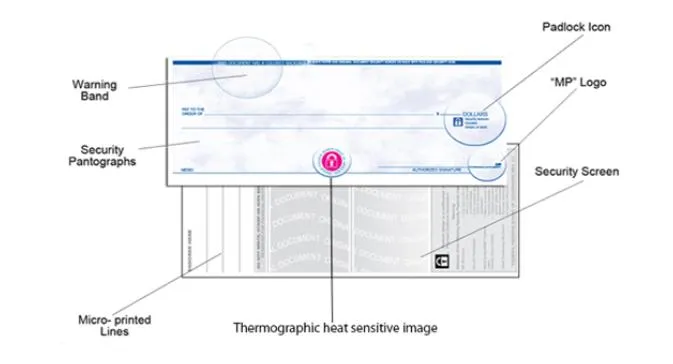
- Consider security features: Watermarks, microprint, chemical-sensitive paper, and holograms all make checks harder to forge, which matters more than people expect until fraud actually happens.
- Ask for a proof or sample if the provider offers one: Seeing an actual printed sample catches alignment or formatting issues before you’ve committed to a full batch.
None of this takes long, but skipping it usually means dealing with a problem later that should’ve taken two minutes to catch earlier. A little patience at the ordering stage is what separates a smooth business computer check rollout from one that needs a recorder within the first month.
Make the Switch to Business Computer Checks Smoothly
The transition from handwritten to printed checks doesn’t have to be messy, but it does help to treat it like a real changeover instead of just swapping paper. Start by testing the first batch on plain paper before running actual check stock through the printer. This catches alignment issues (text landing in the wrong box, amounts printing off-center) without wasting real checks in the process. Once the alignment looks right, run a small batch of actual checks and review them closely before using any of them for real payments.
From there, it’s worth setting up a consistent process: who prints checks, how often, how they’re numbered and logged, and how payments get recorded against the accounting system. Without the structure, even a good computer check setup can drift back into the same disorganization manual checks caused in the first place.
Once the process is dialed in, most businesses find they don’t think about it much anymore; checks print correctly, records match automatically, and the hours that used to go into manual writing get spent somewhere more useful. That’s really the whole point of making the switch.
At the end of the day. A business computer check is not just a faster way to pay a vendor; it is one less thing standing between a growing business and the paperwork that used to slow it down. Get the setup right once, and it keeps paying off every single payment run after that.



















Sign in to leave a comment.