CompTIA IT Fundamentals+
CompTIA IT Fundamentals+ certification introduces beginners to core IT concepts across hardware, software, networking, and security. Many start with CompTIA IT Fundamentals+ certification Training to master basics needed for entry-level roles or advanced paths like A+. Focusing on practical knowledge without prerequisites. Certification builds confidence in IT terminology and troubleshooting for non-technical professionals or students. SterlingNext offers live online at or classroom, including labs and mock tests aligned to domains. Global acceptance opens doors to support positions worldwide.
Exam Domains Breakdown
IT Concepts and Terminology weighs 17% with notational systems like binary and hexadecimal. Data types cover char, strings, numbers, and boolean characteristics. Computing basics explain input, processing, output, and storage cycles. Troubleshooting methodology identifies problems, tests theories, and plans resolutions. Infrastructure domain at 22% classifies input/output interfaces and peripheral setups. Internal components include motherboard, BIOS, RAM, CPU, storage, and GPU. Networking concepts compare cable, DSL, fiber, and wireless services. Storage types contrast volatile RAM with non-volatile SSDs and cloud options. Common devices range from laptops to IoT gadgets.
Training Options Details
SterlingNext live online training features virtual labs for hardware setup and security practice. Flexible schedules include recorded sessions for review. Mock quizzes prepare for multiple-choice format directly. Classroom workshops provide hands-on access to devices and networks. Printed handbooks detail examples by domain. Faculty offers direct mentoring for exam success. Customization fits group needs with 24x7 support. Payment after completion eases access. Both formats map to official objectives for balanced coverage.
- Interactive labs build practical skills.
- Scenario-based assignments simulate jobs.
- Recorded materials support self-paced review.
- Career counseling follows completion.
Core Skills Learned
Participants grasp IT vocabulary for business discussions. Installation covers peripheral connections and basic configs. Maintenance includes cleaning and firmware updates. Networking setup secures wireless with best practices. Software use spans productivity suites and collaboration tools. Web browsers handle caching, extensions, and private modes. Programming concepts introduce identifiers, containers, and functions. Databases explain records, relational structures, and query methods. Security summarizes CIA concerns and password rules.
Entry-Level Career Paths
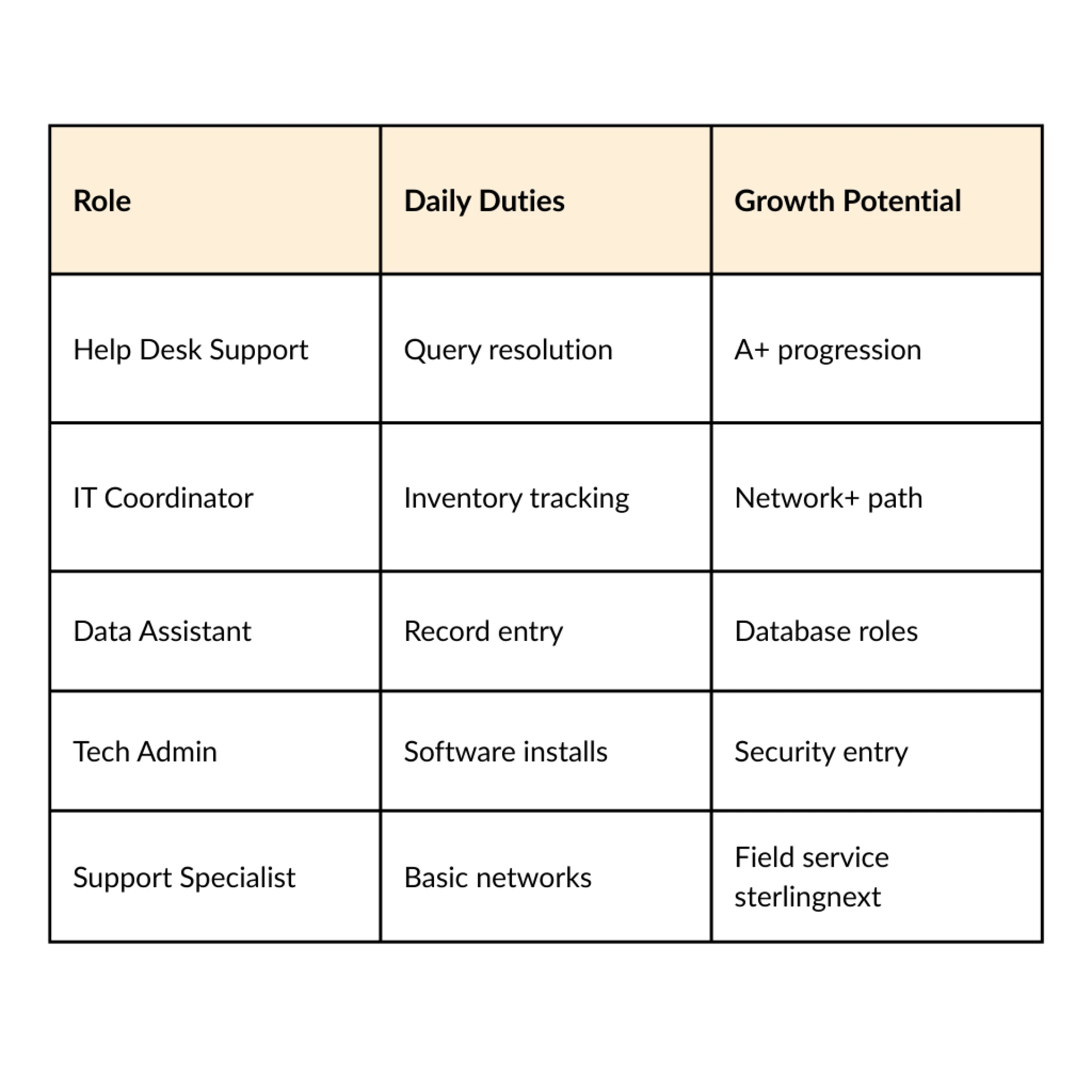
Help desk roles handle basic user queries. IT support positions manage device setups. Data entry jobs apply database fundamentals. Administrative roles use productivity software effectively. Junior analysts assist with troubleshooting. Non-technical staff transition to tech teams. Demand exists in education, retail, and small businesses.
Practical Applications
Professionals set up laptops with peripherals safely. Wireless networks configure via standard protocols. Storage choices balance speed and capacity needs. OS interfaces manage files and processes. Applications deliver through local or cloud models. Security practices secure devices with strong passwords and encryption. Troubleshooting follows structured steps for efficiency. Behavioral concepts stress policy adherence. Continuity plans cover fault tolerance basics.
Industry Applications
Education sectors equip teachers with device knowledge. Healthcare trains staff on secure systems. Retail manages POS and inventory tools. Government uses for basic compliance training. Small businesses build in-house support. Startups onboard non-tech hires quickly. Lifetime credential supports ongoing relevance. No expiration aids long-term value. Pathways lead to vendor-specific roles.
Preparation Strategies
Review syllabus for domain priorities. Practice tests time 75 questions accurately. Labs reinforce infrastructure hands-on. Flashcards memorize units like storage throughput. Scenarios test logic in development section. Security checklists cover best practices. Group study clarifies database structures. Official samples gauge difficulty. Schedule after consistent 70% scores.
- Prioritize high-weight domains.
- Simulate full exam sessions.
- Document weak areas daily.
- Review encryption uses.
Unique Value
Course aligns precisely to FC0-U61 objectives. Instructors share industry examples. Mock exams match real passing thresholds. Online flexibility suits students and workers. Classroom immersion accelerates retention. Post-course support handles retakes and apps. Graduates report smooth A+ transitions. Global recognition boosts resumes. Structured path reduces study time.
Progression Roadmap
ITF+ launches to A+ for hardware depth. Network+ follows for connectivity focus. Security+ targets threat management. Server+ suits infrastructure pros. Cloud+ explores virtualization. Each builds sequentially for specialization. Employers recognize stacks favorably. Communities offer exam tips. Events connect certified peers.
- ITF+ for basics.
- A+ for support skills.
- Network+ for cabling.
- Security+ for protection.
Real-World Examples
User faces slow PC check storage space, clear cache, scan threats. No connection verify cables, reset modem, test protocols. App crashes restart process, update software. Database query fails check structure, export data. Password issues enforce complexity rules. Device setup match interfaces correctly. Teams log resolutions for patterns. Policies guide secure behaviors. Backups ensure availability.
Demand Drivers
Digital shifts create basic IT needs everywhere. Remote work demands home network skills. IoT growth multiplies device types. Entry shortages favor quick certifiers. Vendor-neutral status fits diverse environments. Annual job growth supports steady entry. CompTIA IT Fundamentals+ certification kickstarts IT journeys effectively. Beginners achieve job-ready skills swiftly. Ready to launch your IT career with CompTIA IT Funadamentals+ for live online or classroom sessions, complete with labs, mocks, and 24x7 support.










Sign in to leave a comment.