DLIMS Punjab E-License Online Apply 2024: A Step-by-Step Guide
The Driving License Issuance Management System (DLIMS) in Punjab has made it easier than ever to apply for a driving license online. DLIMS Punjab’s E-License system, designed to simplify the application process, allows residents of Punjab to apply, renew, and track their driving licenses from anywhere with an internet connection. Here’s a complete guide on how to use DLIMS Punjab to apply for your E-license in 2024.
What is DLIMS Punjab?
DLIMS Punjab is an initiative by the Punjab government to digitize the process of issuing, renewing, and tracking driving licenses. With DLIMS, applicants can manage their driving license needs entirely online, saving time and reducing the need for physical visits to licensing centers. This digital approach improves transparency, speeds up processing times, and makes license-related services more accessible across the province.
Benefits of DLIMS Punjab E-License System
Here are some reasons why DLIMS Punjab’s E-license system is worth using:
- Convenience: Apply for or renew your license from the comfort of your home, eliminating the need to spend hours at the licensing office.
- Reduced Processing Time: DLIMS has streamlined license issuance, meaning applications are processed faster, and users can track their application status online.
- Transparency and Security: Since the system is run by the Punjab government, it ensures the authenticity and security of your personal information.
- Automatic Reminders: DLIMS also provides reminders for license renewals and updates on license status, helping users stay compliant.
How to Apply for a DLIMS Punjab E-License Online in 2024
Applying for a driving license through DLIMS Punjab is straightforward. Here’s a step-by-step guide:
Step 1: Visit the Official DLIMS Punjab Website
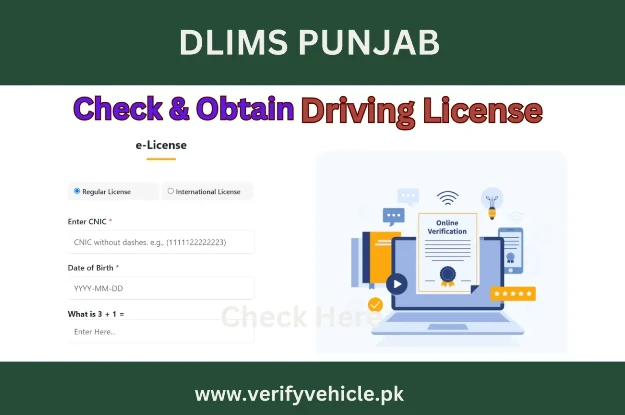
To start, go to the official DLIMS Punjab website. This is the central portal where you can access all driving license services, including new license applications, renewals, and verification.
Step 2: Choose the Relevant License Type
DLIMS Punjab offers several types of licenses, including:
- Learner’s License: This is for individuals learning to drive and is typically the first step before applying for a permanent license.
- Permanent License: This is the standard license after successfully completing the learner’s phase and passing the driving test.
- International License: This license is for those who plan to drive abroad and need an internationally recognized document.
Click on the type of license you wish to apply for and proceed to the application page.
Step 3: Fill Out the Online Application Form
The next step involves completing an online application form. You’ll need to provide various details, including:
- Personal Information: Full name, date of birth, and CNIC (Computerized National Identity Card) number.
- Contact Details: Address, phone number, and email address.
- Vehicle Category: Specify the type of vehicle for which you are applying for a license (e.g., car, motorcycle, etc.).
Double-check your information before submitting, as errors could delay the processing of your application.
Step 4: Upload Required Documents
DLIMS Punjab requires specific documents for license processing. Generally, you’ll need:
- Scanned Copy of CNIC: Ensure the image is clear and the information is visible.
- Medical Fitness Certificate: This is especially required for applicants over a certain age or for specific vehicle categories.
- Recent Passport-Size Photograph: Ensure the photo meets the specifications provided on the portal.
Ensure all your documents are up to date and correctly scanned to avoid delays in the verification process.
Step 5: Pay the Application Fee
DLIMS Punjab allows you to pay the application fee online through various payment methods, including mobile wallets, credit/debit cards, and bank transfers. Be sure to confirm the amount and payment method on the portal. Once the payment is made, save the transaction ID or receipt as proof of payment.
Step 6: Schedule a Driving Test (For New Licenses)
For new applicants (especially those upgrading from a learner’s to a permanent license), DLIMS will require you to schedule a driving test. Select a suitable date and time from the available options. This test typically assesses your driving skills and understanding of traffic laws.
Step 7: Track Your Application Status
After submitting your application, you can track its progress through the DLIMS Punjab portal. Simply log in and enter your application ID to view real-time updates on processing stages.
Step 8: Collect Your License
Once your application is processed and approved, DLIMS Punjab will notify you when your license is ready for pickup. You can collect it from the designated office or, in some cases, have it delivered to your registered address.
Additional Services on DLIMS Punjab
Besides new license applications, the DLIMS Punjab portal offers several other useful services:
- License Renewal: Renew your license easily before it expires by submitting a renewal application on the portal.
- License Verification: Verify the authenticity of your license or check its current status.
- Duplicate License Request: Apply for a duplicate license if yours is lost or damaged.
Tips for Applying for Your DLIMS E-License
- Use Accurate Information: Double-check all details, especially your CNIC number, address, and contact information, to avoid delays.
- Keep Document Copies: Save copies of all uploaded documents and your application details for reference.
- Schedule Tests Early: If a driving test is required, book your slot as early as possible to avoid scheduling conflicts.
- Check for Updates: Regularly track your application status and watch for any additional document requests or requirements.
Final Thoughts
The DLIMS Punjab E-license system in 2024 offers a hassle-free way to apply for a driving license in Punjab, making the process accessible and transparent. Whether you’re a new driver applying for a learner’s license or renewing an existing license, DLIMS Punjab has made it easier than ever to manage your license requirements online. By following the steps above, you can navigate the application process confidently, knowing your license needs are in good hands.










Sign in to leave a comment.