
1. Background
Due to the needs of the project, dual-screen display is needed. The original project uses STM32 + littlevgl + RGB screen display. The PCB board of this project has a serial port to connect to the serial screen, so in order to complete the project quickly, we use STONE Brand STVC050WT-01 serial port screen, this article will introduce how to port littlevgl to the serial port screen and realize dual-screen display with RGB displayer.
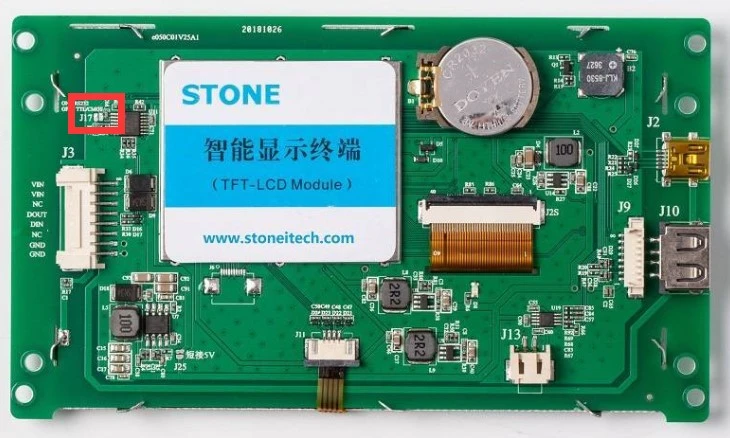
2. STONE Intelligent TFT LCD Module Description
The Intelligent TFT LCD Module with Cotex-M4 32bit CPU can be controlled by Any MCU via simple Hex Instruction through UART port.
STONE supply the TOOL BOX Software for engineer to Easy & Visually set various functions on Graphical User Interface, Such as Text, Number, Curve, Image switching, Keyboard, progressbar, slider, Dial, Clock and Touch button, Data storage, USB downloading, Video & Audio.
So it is much Easy for engineer to adopt TFT-LCD Colorful User Interface & Touch control function on various industrial equipments, And it also can reduce much Development Time and Cost.
Product Parameters:
Physical Parameter
Model
Size (Inch)
5.0 inch
Resolution
480×RGB×272
Color
65536 colors (16 bit)
Viewing Area
110.9mm× 62.8mm
Pixel Spacing
0.1905mm×0.0635mm (H×V)
Overall Dimension
140mm×80.9mm×13.9mm(N)/15.2mm(T)
Net Weight
195g(N)/200g(T)
TFT Panel
A Class Industry Panel
Touch Screen
Industry Level 4 wire resistance
Or without touch screen is optional.
Performance Parameter
CPU
CortexM4
LCD Controller
CPLD EPM240
Refresh Rate
200MHz
Picture Switching Speed
19 ms/frame (53 images/s)
Flash Memory
Standard 128MB, Extension 1GB
Memory Amount for picture
According to the capability of the image, Suggest "JPG" format.
Interface
RS232/ RS485/ TTL /USB Interface
Image downloading
USB2.0 (12Mbps) & U storage Disk downloading
Voltage Range
DC6.0V ~ 35V (typical value: 12V)
Power
1.3 W
3. littlevgl Description
The LVGL is a lightweight embedded library for displays and touchscreens providing everything required to build a fully featured-embedded GUIs.
Small fooprint:64 kB flash and 8 kB RAM is enough for a simple user interface.Many widgets: Choose from 30+ ready to use widgets and customize them with ease.Any platform: Use LVGL on any platforms, such as STM32, NXP LPC or i.MX, PIC, Arduino, ESP32, Raspberry and so on.MicroPython: Do you like Python? Create your UI in MicroPython with LVGL.Any display: Drive monochrom, OLED, TFT displays, monitors or any other displays.Open source, free, c, LVGL is hosted on GitHub with MIT license, It's really free to use
4. STM32F429 description
Core: Arm® 32-bit Cortex®-M4 CPU with FPU, Adaptive real-time accelerator (ART Accelerator™) allowing 0-wait state execution from Flash memory, frequency up to 180 MHz, MPU, 225 DMIPS/1.25 DMIPS/MHz (Dhrystone 2.1), and DSP instructions
Memories– Up to 2 MB of Flash memory organized into two banks allowing read-while-write
– Up to 256+4 KB of SRAM including 64-KB of CCM (core coupled memory) data RAM
– Flexible external memory controller with up to 32-bit data bus: SRAM, PSRAM, SDRAM/LPSDR SDRAM, Compact Flash/NOR/NAND memories
– 1.7 V to 3.6 V application supply and I/Os
– POR, PDR, PVD and BOR
– 4-to-26 MHz crystal oscillator
– Internal 16 MHz factory-trimmed RC (1% accuracy)
– 32 kHz oscillator for RTC with calibration
– Internal 32 kHz RC with calibration
Low power– Sleep, Stop and Standby modes
– VBAT supply for RTC, 20×32 bit backup registers + optional 4 KB backup SRAM
3×12-bit, 2.4 MSPS ADC: up to 24 channels and 7.2 MSPS in triple interleaved mode2×12-bit D/A convertersGeneral-purpose DMA: 16-stream DMA controller with FIFOs and burst supportUp to 17 timers: up to twelve 16-bit and two 32-bit timers up to 180 MHz, each with up to 4 IC/OC/PWM or pulse counter and quadrature (incremental) encoder inputDebug mode– SWD & JTAG interfaces
– Cortex-M4 Trace Macrocell™
Up to 168 I/O ports with interrupt capability– Up to 164 fast I/Os up to 90 MHz
– Up to 166 5 V-tolerant I/Os
Up to 21 communication interfaces– Up to 3 × I2C interfaces (SMBus/PMBus)
– Up to 4 USARTs/4 UARTs (11.25 Mbit/s, ISO7816 interface, LIN, IrDA, modem control)
– Up to 6 SPIs (45 Mbits/s), 2 with muxed full-duplex I2S for audio class accuracy via internal audio PLL or external clock
– 1 x SAI (serial audio interface)
– 2 × CAN (2.0B Active) and SDIO interface
Advanced connectivity– USB 2.0 full-speed device/host/OTG controller with on-chip PHY
– USB 2.0 high-speed/full-speed device/host/OTG controller with dedicated DMA, on-chip full-speed PHY and ULPI
– 10/100 Ethernet MAC with dedicated DMA: supports IEEE 1588v2 hardware, MII/RMII
8- to 14-bit parallel camera interface up to 54 Mbytes/sTrue random number generatorCRC calculation unitRTC: subsecond accuracy, hardware calendar96-bit unique ID5. Hardware connection
First use solder to remove the place as shown in the figure, which means UART using TTL level. If short it means RS232, as we are using TTL level, so we disconnect it.
Connect the displayer with the connector which provided by STONE, disconnect the jumper cap, and connect the voltage to 12v DC voltage, the red wire is connected to the RXD of STM32F429 and the yellow wire is connected to the TXD of STM32F429, as shown in the figure below.
At this point, our hardware circuit has been connected.
5. Software Design
Open "STONE TOOL 2019.exe" and create a new project named STONE as flow picture showing.
Then you will get the following window
click right key to remove the 0.jpg and add bkgd.jpg picture which create by Photoshop with back background.
click compiling button to build the project. Then plug in USB port.
if you see these words on the screen, it means you can download the software now.
click download online button the it will show the Download Configuration File dialog, you can see USB has been detected and click Download button.
So far, Stone module part has been finished. now we are going to design STM32 part, as we have implement littltevgl, so here we only descript how the add support for the intelligent TTF LCD module. ok let's go.
First new "drv_lcd_stone.c" and implement two interface, one is "lcd_stone_init" the other is "lcd_stone_color_fill" the code are showing below:
/*********************************************************************
*
* MODULE NAME:
* drv_lcd_stone.c - [File Declaration]
*
* DESCRIPTION:
* [File Description]
*
* PUBLIC PROCEDURES:
* Name Title
* ----------------------- --------------------------------------
*
* PRIVATE PROCEDURES:
* Name Title
* ----------------------- --------------------------------------
*
* LOCAL PROCEDURES:
* Name Title
* ----------------------- --------------------------------------
*
* Copyright 2020 by SmallKun <[email protected]>.
*********************************************************************/
/*--------------------------------------------------------------------
INCLUDES
--------------------------------------------------------------------*/
#include "system.h"
/*--------------------------------------------------------------------
LITERAL CONSTANTS
--------------------------------------------------------------------*/
/*--------------------------------------------------------------------
TYPES
--------------------------------------------------------------------*/
/*--------------------------------------------------------------------
MEMORY CONSTANTS
--------------------------------------------------------------------*/
/*--------------------------------------------------------------------
MACROS
--------------------------------------------------------------------*/
/*--------------------------------------------------------------------
PROCEDURES
--------------------------------------------------------------------*/
/*********************************************************************
*
* PROCEDURE NAME:
* lcd_stone_init - [Procedure Name]
*
* DESCRIPTION:
* [File Description]
*
*********************************************************************/
void lcd_stone_init(void)
{
uart_init(&uart2_hndl, 921600);
}
/*********************************************************************
*
* PROCEDURE NAME:
* lcd_stone_color_fill - [Procedure Name]
*
* DESCRIPTION:
* [File Description]
*
*********************************************************************/
void lcd_stone_color_fill(uint16_t sx,uint16_t sy,uint16_t ex,uint16_t ey,uint16_t *color)
{
// Note: encoding with big-endian
uint8_t buffer[256];
uint8_t remain;
uint16_t i;
uint16_t j;
uint16_t k;
uint16_t x;
uint16_t *pcolor;
uint16_t width;
width = ex - sx + 1;
if(ex >= 480)
{
ex = 480;
}
else
{
ex = ex + 1;
}
if(ey >= 272)
{
ey = 272;
}
else
{
ey = ey + 1;
}
buffer[0] = 0xA5;
buffer[1] = 0x5A;
buffer[3] = 0x85;
buffer[4] = 0x00;
for(i = sy; i < ey; i++)
{
pcolor = color + width * (i - sy);
x = sx;
for(j = 0; j < (ex - sx) / 100; j++)
{
buffer[2] = 206;
buffer[5] = x >> 8;
buffer[6] = x & 0xff;
buffer[7] = i >> 8;
buffer[8] = i & 0xff;
for(k = 0; k < 100; k++)
{
buffer[9 + 2 * k] = (*pcolor) >> 8;
buffer[10 + 2*k ] = (*pcolor) & 0xff;
pcolor++;
}
uart_write(&uart2_hndl, buffer, 209);
x = x + 100;
}
remain = (ex-sx) % 100;
if(remain)
{
buffer[2] = 6 + 2 * remain;
buffer[5] = x >> 8;
buffer[6] = x & 0xff;
buffer[7] = i >> 8;
buffer[8] = i & 0xff;
for(k = 0; k < remain; k++)
{
buffer[9 + 2 * k] = (*pcolor) >> 8;
buffer[10 + 2*k ] = (*pcolor) & 0xff;
pcolor++;
}
uart_write(&uart2_hndl, buffer, 2 * remain + 9);
}
}
}
Then navigate to file "lv_port_disp.c"
static void disp_init(void)
{
/*You code here*/
lcd_stone_init();
}
/* Flush the content of the internal buffer the specific area on the display
* You can use DMA or any hardware acceleration to do this operation in the background but
* 'lv_disp_flush_ready()' has to be called when finished. */
static void disp_flush(lv_disp_drv_t * disp_drv, const lv_area_t * area, lv_color_t * color_p)
{
/*The most simple case (but also the slowest) to put all pixels to the screen one-by-one*/
LTDC_Color_Fill(area->x1, area->y1, area->x2, area->y2, (uint16_t *)color_p);
lcd_stone_color_fill(area->x1, area->y1, area->x2, area->y2, (uint16_t *)color_p);
/* IMPORTANT!!!
* Inform the graphics library that you are ready with the flushing*/
lv_disp_flush_ready(disp_drv);
}
compile the code and download the software.
Now we have finished our project, it's only took a few hours to finish it. so the STONE Intelligent TFT LCD Module is very efficient and convenient.









Sign in to leave a comment.