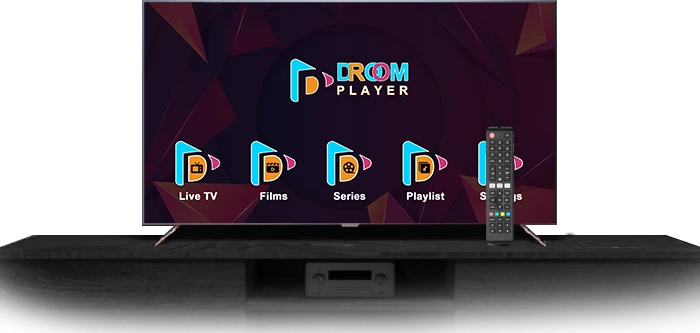

In an era where streaming services dominate the entertainment landscape, having a reliable and feature-rich platform is crucial for an optimal viewing experience. Droom Player, a leading OTT solution, has emerged as a top choice for enhancing TV viewing. This article will explore how Droom Player for TV can transform your entertainment experience, offering tips and insights to help you make the most of its features.
What is Droom Player for TV?
Droom Player is a sophisticated OTT (Over-The-Top) platform designed to deliver high-quality video streaming across various devices. With its advanced features and user-friendly interface, Droom Player is tailored to provide an exceptional viewing experience on your TV. Whether you’re watching live broadcasts, on-demand content, or enjoying interactive features, Droom Player ensures a seamless and enjoyable experience.
Key Features of Droom Player for TV
- High-Definition Streaming: Enjoy content in HD and 4K resolution for stunning picture quality.
- User-Friendly Interface: Navigate effortlessly through a sleek and intuitive interface.
- Customizable Options: Personalize your viewing experience with customizable settings and preferences.
- Multi-Device Sync: Sync your viewing across multiple devices for a cohesive experience.
- Interactive Features: Engage with interactive content and features, including live polls and social sharing.
Setting Up Droom Player for TV
To get started with Droom Player for TV, follow these steps to ensure a smooth setup and optimal performance.
Step-by-Step Installation Guide
- Check Compatibility: Ensure your TV is compatible with Droom Player. Most smart TVs and devices with HDMI ports will work.
- Download the App: Visit the app store on your TV or streaming device and search for “Droom Player.” Download and install the app.
- Create an Account: Open the Droom Player app and create an account or log in if you already have one. Follow the prompts to complete the registration process.
- Connect to the Internet: Ensure your TV or streaming device is connected to a stable internet connection. For optimal performance, a high-speed connection is recommended.
- Log In and Sync: Log in to the Droom Player app using your account credentials. Sync your account with your TV to start exploring the features.
Maximizing Your Viewing Experience
Once you’ve set up Droom Player for TV, it’s time to explore its features and optimize your viewing experience. Here are some tips to help you get the most out of your Droom Player experience.
Explore High-Definition Streaming
Droom Player supports high-definition and 4K streaming, providing a superior viewing experience. To fully enjoy these features:
- Check Your Internet Speed: Ensure you have a high-speed internet connection (at least 25 Mbps for 4K streaming) to avoid buffering and enjoy smooth playback.
- Adjust Display Settings: Access your TV’s display settings to ensure it’s configured for the best possible resolution.
Personalize Your Interface
Droom Player offers various customization options to tailor your viewing experience:
- Customize the Home Screen: Arrange your favorite channels, shows, and movies on the home screen for quick access.
- Set Preferences: Adjust settings such as language, subtitles, and theme to suit your preferences.
Utilize Multi-Device Sync
Droom Player allows you to sync your viewing experience across multiple devices:
- Install on Multiple Devices: Install Droom Player on your smartphone, tablet, or laptop to access your content anytime, anywhere.
- Sync Your Progress: Continue watching your favorite shows from where you left off, regardless of the device you’re using.
Advanced Features of Droom Player for TV
Droom Player is packed with advanced features that enhance your TV viewing experience. Here’s how to make the most of these features:
Interactive Content
Engage with interactive content through Droom Player:
- Live Polls and Surveys: Participate in live polls and surveys related to the content you’re watching.
- Social Sharing: Share your favorite moments and content on social media directly from the app.
On-Demand Content
Droom Player offers a vast library of on-demand content:
- Browse Categories: Explore different categories such as movies, TV shows, sports, and documentaries.
- Create Watchlists: Add content to your watchlist for easy access and organization.
DVR Functionality
Droom Player’s DVR functionality allows you to record live TV and watch it later:
- Record Live TV: Schedule recordings for live TV shows and events so you can watch them at your convenience.
- Manage Recordings: Access your recorded content from the DVR section and manage your recordings.
Troubleshooting Common Issues
While Droom Player offers a seamless experience, you may encounter occasional issues. Here are some common problems and their solutions:
Buffering and Playback Issues
If you experience buffering or playback issues:
- Check Internet Speed: Ensure your internet connection is stable and meets the recommended speed for streaming.
- Restart Your Device: Restart your TV or streaming device to resolve temporary glitches.
- Update the App: Make sure you have the latest version of the Droom Player app installed.
Login Problems
If you have trouble logging in:
- Verify Credentials: Double-check your login credentials and ensure they are correct.
- Reset Password: Use the “Forgot Password” option to reset your password if needed.
- Contact Support: Reach out to Droom Player’s support team for assistance if you continue to experience login issues.
Display and Audio Issues
For issues with display or audio:
- Check Connections: Ensure all cables and connections between your TV and streaming device are secure.
- Adjust Settings: Access your TV’s settings to adjust display and audio settings for optimal performance.
- Update Firmware: Make sure your TV’s firmware is up to date to ensure compatibility with the Droom Player app.
Enhancing Your Viewing Environment
Creating an enjoyable viewing environment can enhance your overall experience with Droom Player for TV:
Optimize Viewing Area
- Choose the Right Spot: Select a comfortable viewing area with a clear line of sight to the TV screen.
- Adjust Lighting: Reduce glare and ambient light to improve picture quality and reduce eye strain.
Invest in Quality Accessories
- Sound System: Consider investing in a high-quality sound system or soundbar for an immersive audio experience.
- Streaming Device: Use a reliable streaming device with good performance to enhance your viewing experience.
Staying Updated with Droom Player
To make the most of Droom Player, stay informed about the latest updates and features:
Follow Droom Player on Social Media
Stay connected with Droom Player on social media for updates, tips, and exclusive offers.
Subscribe to Newsletters
Subscribe to Droom Player’s newsletters to receive updates on new features, content additions, and special promotions.
Participate in User Communities
Join online forums and user communities to share experiences, seek advice, and discover new tips and tricks from fellow Droom Player users.
Conclusion
Droom Player for TV offers a comprehensive and immersive viewing experience with its advanced features and customizable options. By setting up the platform correctly, exploring its features, and optimizing your viewing environment, you can enhance your entertainment experience and enjoy high-quality content effortlessly. Stay updated with the latest features and make the most of your Droom Player experience in 2024.





Sign in to leave a comment.