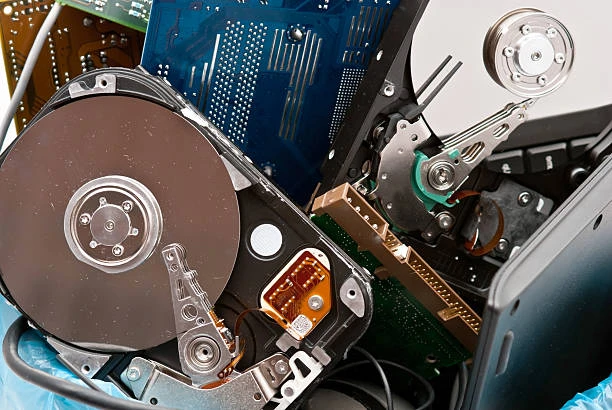

Are you concerned about the security of your sensitive information stored on old hard drives? If so, then it's time to learn everything about hard drive shredding! A hard drive is a crucial component that stores important information in electronic form. However, when it comes to disposing of an old or damaged hard drive, simply deleting files and formatting the device does not guarantee the complete destruction of data. That's where hard drive shredding comes into play - a process that physically destroys the disk platters inside the device, rendering all data irretrievable. Through this blog post, you'll explore everything you need to know about hard drive shredding and how it can protect your confidential information from falling into the wrong hands.
Basics of Hard Drives
A hard drive is a device that stores digital data on spinning magnetic disks. It's a crucial component of computers, laptops, and other electronic devices where data storage is required. The disk platters inside the hard drive are coated with a magnetic material that can hold large amounts of information in binary form.
Types of hard drives
Well, there are two main types: solid-state drives (SSD) and mechanical hard disk drives (HDD).
Solid-state drives use flash memory, which is a type of non-volatile storage. This means that the data stored on an SSD remains even when the power is turned off. They are faster than HDDs because they have no moving parts, making them more reliable.On the other hand, mechanical hard disk drives store data on rotating disks with read/write heads that move across them. While they can hold more data and are generally less expensive than SSDs, they are slower due to their physical limitations.There are also hybrid hard drives that combine elements of both SSDs and HDDs. These hybrid drives typically have a small amount of flash memory for frequently accessed files while using traditional spinning disks for larger file storage.What can go wrong with a hard drive?
A hard drive is an essential part of your computer system. It stores all the data that we create and accumulate over time. However, there are a few things that can go wrong with a hard drive.One common issue is physical damage to the disk. Hard drives have moving parts, and any damage to them can cause the disk to fail or become corrupt. Another possibility is electrical failure which can be caused by power surges or lightning strikes.Another problem that can occur with hard drives is logical failure where data becomes inaccessible due to corruption or formatting errors. This could happen if you accidentally delete files or if viruses infect your computer.Software issues like operating system crashes and malfunctioning drivers could also lead to problems with your hard drive.It's important to take preventive measures such as backing up your data regularly and ensuring that your computer has proper surge protection in place. If you suspect any issues with your hard drive, seek professional shredding companies that can help immediately before it's too late!How to safely shred a hard drive?
When it comes to disposing of your old hard drives, simply deleting files or formatting the drive might not be enough. This is because deleted data can still be recovered using specialized software. If you want to ensure that your sensitive information remains secure, then shredding your hard drive is the way to go.
The first step in safe hard drive shredding is to wipe all existing data from the drive using a wiping program. There are various free and paid programs available for this purpose, such as DBAN and CCleaner. These programs overwrite all sectors on the hard disk with zeros or random characters multiple times, making it virtually impossible for anyone to recover any data.Once the wiping process is complete, physically destroying the hard drive is recommended as an extra measure of security. There are several methods you can use to do this such as drilling holes through the platters, crushing them with heavy machinery or even melting them down if possible.If you don't have access to heavy-duty equipment like drills or crushers, there are professional services that specialize in securely destroying electronic devices including hard drives.
Safely shredding a hard drive involves two main steps:
wiping all existing data from the device and physically destroying it beyond repair. With these measures in place, you can rest assured that your sensitive information won't end up in unintended hands.
Conclusion
Safeguarding personal and business data should always be a top priority regardless of how old or new the technology may seem. Proper hard drive shredding is one way to achieve this goal since it ensures all sensitive information is safely destroyed beyond recovery.




Sign in to leave a comment.