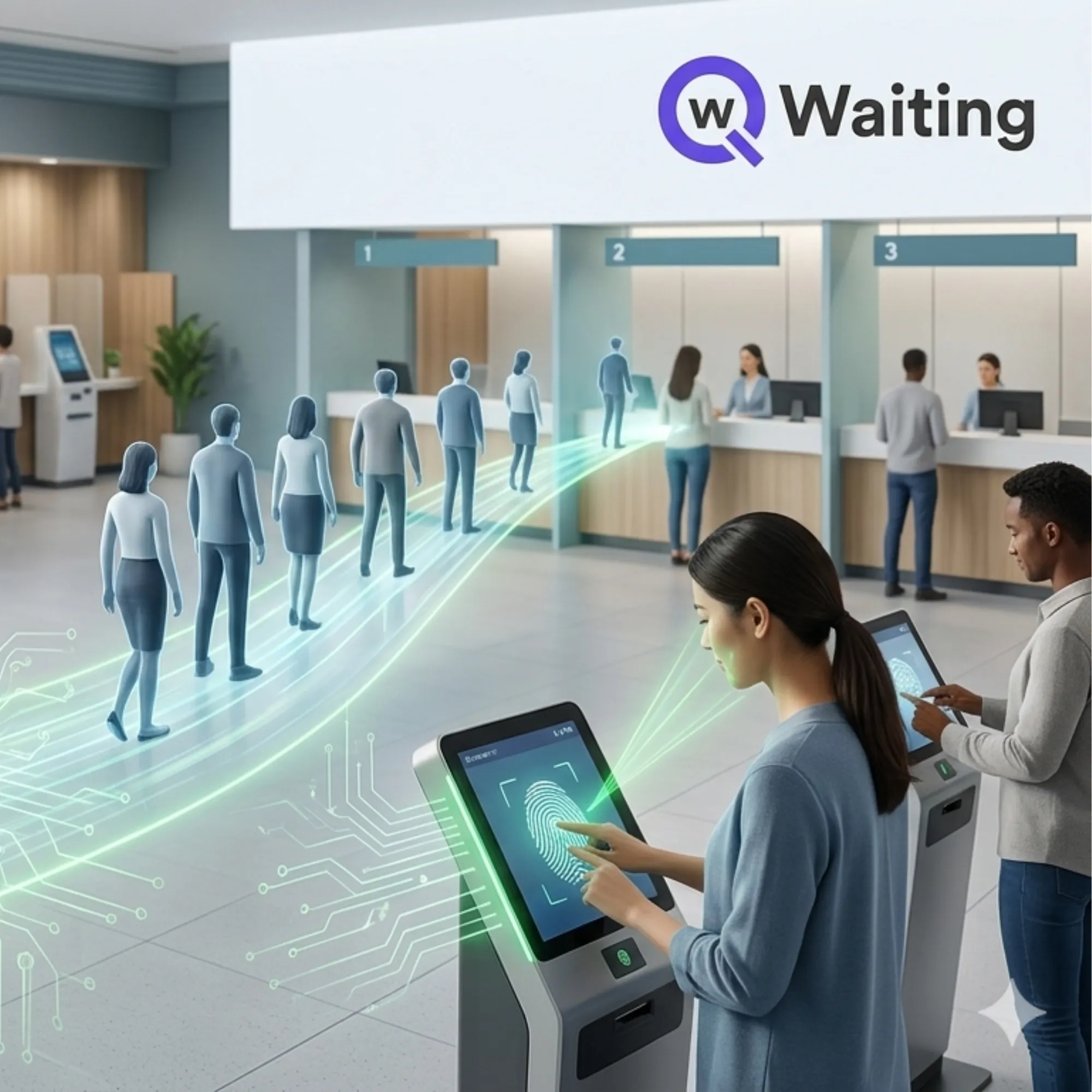

A facial recognition system is software that identifies or verifies a person by analyzing the unique features of their face, then matching that data against a stored profile to confirm who they are. In a business setting, it's most often used to replace manual ID checks, paper tickets, or swipe cards at a check-in point. The camera captures a face, the software converts it into a mathematical template, and it compares that template to existing records in under a few seconds.
That's the short version. The rest of this guide covers how the matching actually happens, where these systems are already doing real work, and the security and privacy questions worth asking before you sign a contract.
How Does a Facial Recognition System Work?
Every facial recognition system follows roughly the same four steps, even though the underlying models differ from vendor to vendor.
- Detection. A camera locates a face within the frame and separates it from the background.
- Analysis. The software maps facial landmarks such as the distance between the eyes, the shape of the jawline, and the position of the nose, then converts those measurements into a numeric template. This is the part people usually mean when they say "biometric data."
- Matching. The template is compared against a database of enrolled faces to find a match or confirm identity against a claimed record.
- Liveness check. Better systems also run a liveness test, looking for natural movement like a blink or a slight head turn, so a photo or video held up to the camera doesn't fool the system.
None of this requires the person to touch anything, which is why facial recognition has become popular for check-in points that used to rely on ID cards, tickets, or fingerprint scanners.
Action: if you're comparing vendors, ask each one to walk you through their liveness detection method specifically. Detection and matching are fairly standardized at this point. Liveness is where accuracy and fraud resistance actually diverge.
Where Are Facial Recognition Systems Used?
The use case shapes what "good" looks like, so it's worth separating this out by industry rather than treating facial recognition as one generic feature.
Healthcare
Hospitals and clinics use facial recognition to verify a patient's identity at check-in, which cuts down on duplicate medical records and reduces the chance that one patient's insurance gets billed under another person's file. It also speeds up registration for returning patients who no longer need to hand over a physical ID at every visit. Qwaiting's healthcare facial recognition system is built around this exact problem: matching a face to an existing record instead of asking front desk staff to do it manually.
Banking and Financial Services
Branches use facial recognition to confirm a customer's identity before high-value transactions, reducing reliance on physical ID documents that can be forged or lost. Paired with a queue management system, it also lets a branch route a verified customer straight to the right teller or advisor instead of making them wait in a general line.
Government and Public Services
Public sector offices, from passport services to benefits offices, use facial recognition to confirm that the person requesting a service is actually who they claim to be, which matters for fraud prevention and for prioritizing urgent cases fairly. Qwaiting's facial recognition system for government agencies is designed around exactly this: verified identity, then a fair, ordered queue.
Retail and Airports
Retailers use it for loyalty recognition and loss prevention at self-checkout. Airports use it for biometric boarding, which is one of the fastest-growing search terms in this category, since it lets a passenger walk to the gate without repeatedly presenting a boarding pass and ID.
Facial Recognition vs Other Check-In Methods
None of these methods is universally "best." The right one depends on your environment, your customers, and how much friction you're willing to accept in exchange for extra security.
| Method | Speed | Touchless | Best for |
|---|---|---|---|
| Facial recognition | Very fast | Yes | Repeat visitors, high security check-in |
| QR code | Fast | Yes | First-time visitors, low-cost rollout |
| Fingerprint | Moderate | No | Access control where a shared device is acceptable |
| ID card or badge swipe | Moderate | No | Employee-only environments with issued credentials |
Most organizations that adopt facial recognition don't replace everything else. They layer it on top of QR check-in or appointment scheduling so a walk-in customer without an appointment still has a fast, contactless option.
Is a Facial Recognition System Secure and Private?
It can be, but security depends entirely on how the vendor stores and protects the biometric template, not on the camera itself. Ask about three things specifically:
- Encryption. Facial templates should be encrypted both in storage and in transit, not just protected by login credentials.
- Data retention. Ask how long a face template is kept after a visit, and whether you can request deletion.
- Access controls. Confirm which staff roles can view raw images versus just a match or no match result.
Action: request the vendor's data flow diagram, not just their marketing page. If they can't show you where the facial template is stored and for how long, that's a real gap, not a formality.
What Privacy Rules Should You Check Before You Deploy One?
Facial recognition counts as biometric data under most privacy frameworks, which puts it in a stricter category than a name or an email address. A few rules worth checking against your own deployment plan, not as legal advice but as a starting checklist:
- Illinois' Biometric Information Privacy Act (BIPA) requires written consent before collecting a facial template and sets specific rules for how long it can be stored, with private right of action for violations.
- Texas and Washington both have their own biometric privacy statutes with consent and notice requirements, though enforcement differs from Illinois.
- GDPR in the EU classifies biometric data as a special category requiring an explicit legal basis, usually consent, before processing.
- CCPA in California gives residents the right to know what biometric data is collected and to request deletion.
None of this means facial recognition is off limits. It means consent needs to happen before the first scan, not after, and it needs to be documented. A visible sign at the check-in point and a clear opt-out path for people who'd rather use a QR code or badge instead covers most of this in practice.
If your organization operates in a regulated industry, ask your vendor directly which compliance frameworks they hold and ask for documentation, not just a claim on their website. Qwaiting's security page and compliance page list the current certifications and audit reports available on request.
What to Look for in a Facial Recognition System
Before you commit to a vendor, run through this list:
- Liveness detection, so a photo can't be used to spoof a match.
- Consent and opt-out flow built into the check-in process, not bolted on afterward.
- Encryption at rest and in transit for every stored facial template.
- Integration with your existing queue or appointment system, so facial recognition feeds directly into routing instead of sitting as a separate silo.
- Published compliance documentation you can hand to your own legal or procurement team.
- A fallback option such as QR code or ID check-in for visitors who decline facial recognition.
How Qwaiting's Facial Recognition System Works
Qwaiting's facial recognition system scans a visitor's face at check-in and matches it against their existing profile, so returning customers, patients, or citizens can move straight into the queue without re-entering their details at the counter. It includes a liveness check to confirm a real person is present rather than a photo or video, and it connects directly into Qwaiting's queue management and appointment scheduling tools, so a verified visitor is automatically routed to the right counter, doctor, or service window.
It's used the same way across industries, verifying identity fast, but the reason for using it differs: hospitals use it to cut duplicate patient records, government offices use it to keep service allocation fair, and banks use it to route verified customers to the right advisor without a manual ID check.
Frequently Asked Questions
How does a facial recognition system identify a person?
A facial recognition system identifies a person by analyzing unique facial features and converting them into a mathematical template. This template is then compared against a database of stored profiles to confirm the individual's identity quickly, typically within seconds.
What industries commonly use facial recognition technology?
Facial recognition technology is used across various industries, including healthcare for patient verification, banking for secure transactions, government services for fraud prevention, and retail or airports for customer service and boarding processes. Each industry utilizes the technology to enhance efficiency and security.
What measures ensure the security and privacy of facial recognition data?
The security of facial recognition data largely depends on how the vendor encrypts and stores biometric templates. It's crucial to ask about data encryption, retention policies, and access controls to ensure that sensitive information is protected adequately.
What privacy regulations should I consider before implementing facial recognition?
Before deploying facial recognition, consider regulations such as Illinois' BIPA, Texas and Washington's biometric privacy statutes, GDPR in the EU, and CCPA in California. These laws often require consent for data collection and have specific guidelines on data storage and user rights.
What features should I look for in a facial recognition system?
When evaluating a facial recognition system, look for features like liveness detection to prevent spoofing, built-in consent processes, encryption for data security, and integration capabilities with existing systems. Additionally, having a fallback option for those who opt out is essential.
Can facial recognition systems be used alongside other check-in methods?
Yes, many organizations use facial recognition in conjunction with other check-in methods, such as QR codes or ID cards. This layered approach provides flexibility and ensures that visitors who prefer traditional methods still have a fast and contactless option.
How fast is the identification process in facial recognition systems?
Facial recognition systems can identify individuals in under a few seconds, making them a very fast option for check-in processes. This speed is especially beneficial in environments where efficiency is critical, such as airports and busy retail settings.






















Sign in to leave a comment.