Discover the best flight sim controls for your setup. From joysticks to yokes and pedals, find the equipment that enhances your flight simulation experience.
Flight simulation is one of the most immersive and challenging experiences you can enjoy from the comfort of your home. Whether you're a beginner just starting to explore the skies or an experienced pilot looking to upgrade your setup, understanding flight sim controls is crucial. In this guide, we will delve into everything you need to know to improve your flight simulation experience, from basic controls to advanced setups.
What Are Flight Sim Controls?
Flight sim controls refer to the hardware and software that allow you to interact with a flight simulator. These controls mimic the actions a real-world pilot would use, providing a realistic simulation of flying an aircraft. They include a variety of devices such as joysticks, yokes, rudder pedals, throttle quadrants, and buttons, each serving a specific purpose in the cockpit.
Types of Flight Sim Controls
- Joysticks and Yokes
- Joysticks are more commonly used for smaller aircraft simulations, while yokes are better suited for larger commercial aircraft simulations. Both types of controls allow you to pitch and roll the aircraft, simulating real-world controls.
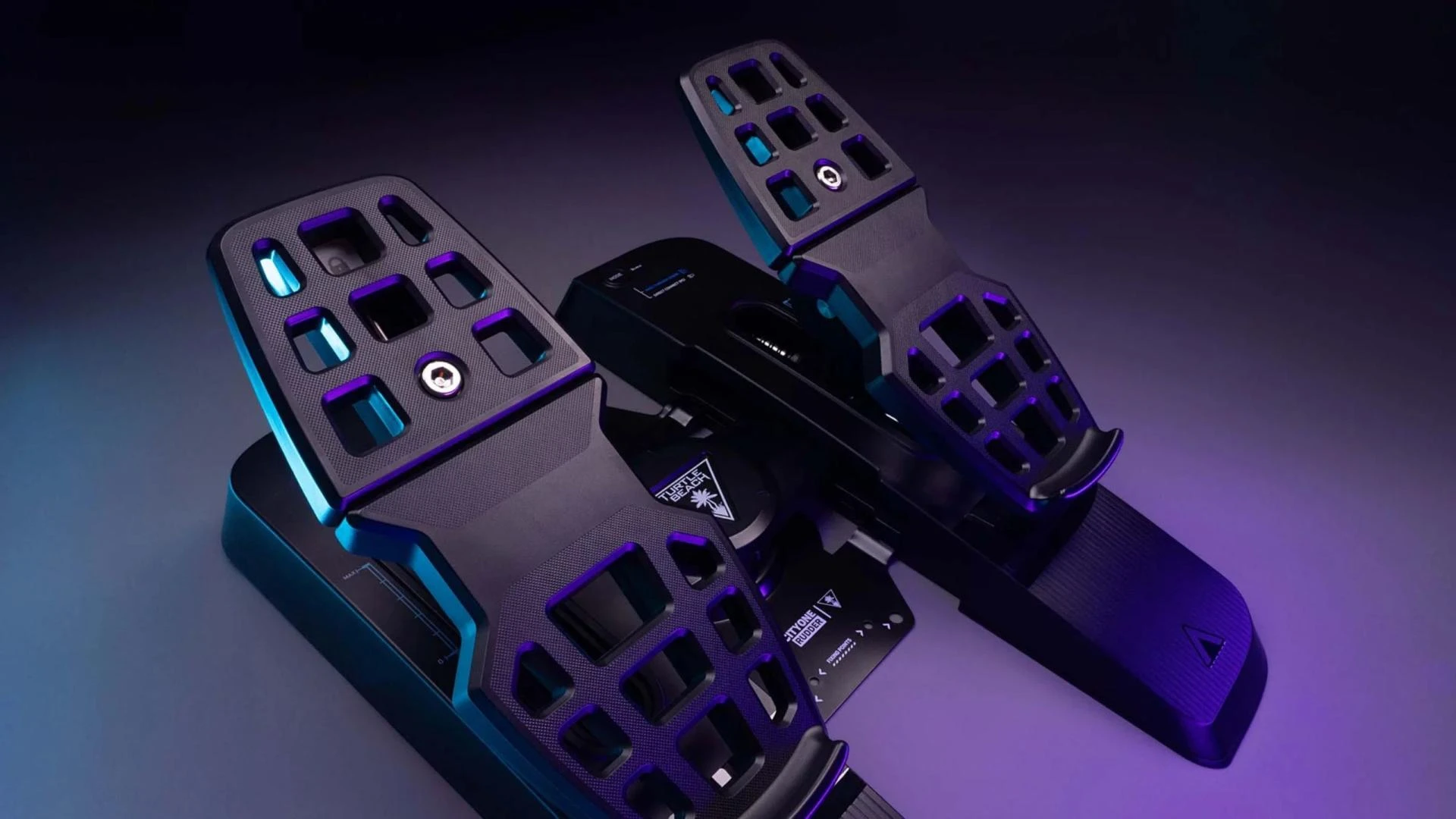
- Rudder Pedals
These controls are used for managing yaw or the left and right movement of the aircraft. They are essential for controlling an aircraft on the ground during taxiing and while in flight for making coordinated turns. - Throttle Quadrants
A throttle quadrant allows you to control the engine power, adjusting the thrust to climb, cruise, and descend. It is a fundamental part of managing an aircraft's speed and altitude. - Cockpit Buttons and Switches
Flight simulators often include a wide range of cockpit buttons and switches that allow you to control various systems within the aircraft, from navigation and autopilot to engine management.
Why Flight Sim Controls Matter
The right set of flight sim controls can significantly improve your overall experience. Not only do they enhance the realism of the simulation, but they also provide more precise control, which is especially important in complex maneuvers and flight scenarios. For example, using rudder pedals in combination with a joystick or yoke allows for more accurate turns, better control during takeoff and landing, and smoother overall handling.
Factors to Consider When Choosing Flight Sim Controls
- Compatibility
Before purchasing any controls, ensure they are compatible with the flight simulator software you plan to use. Some systems are plug-and-play, while others may require custom setups or drivers. - Ergonomics
Flight simulation can require long hours of sitting, so comfort is key. Look for controls that are ergonomically designed to support extended use without causing discomfort. - Durability
High-quality flight sim controls should be built to last. Durable materials ensure your equipment can handle frequent use over time without losing its precision. - Customization
Many flight sim controllers come with programmable buttons that allow you to customize the setup according to your preferences. This feature is especially useful for simulating different aircraft, each of which may require different controls. - Price
While advanced flight sim controls can get expensive, it's essential to find a balance between quality and cost. Look for controllers that offer good value for money based on your simulation needs.
Frequently Asked Questions (FAQ)
What are the best flight sim controls for beginners?
For beginners, a joystick or basic yoke setup with a throttle quadrant and pedals is a good start. These systems are affordable and easy to learn, providing the essential controls needed for most flight simulations.
Can I use flight sim controls with a console?
Yes, many flight sim controls are compatible with consoles such as the Xbox or PlayStation. However, check the specifications of your controller before purchase to ensure compatibility with your system.
Do I need a full cockpit setup for flight simulation?
While a full cockpit setup can be an immersive experience, it is not necessary for most flight simulation users. A joystick, throttle quadrant, and pedals are sufficient for most home flight simulation setups.
How do I calibrate my flight sim controls?
Calibration typically involves following a setup guide in your flight simulation software. Most modern controls automatically calibrate when plugged in, but it's a good idea to double-check within the simulator’s settings.
Are rudder pedals essential for flight simulation?
Rudder pedals are not strictly essential, but they are highly recommended for more realistic control, especially during takeoff, landing, and turns. They help ensure your aircraft is balanced and more responsive to movements.
Can I use my mouse and keyboard instead of dedicated flight sim controls?
Yes, mouse and keyboard controls can be used, but they don't provide the same level of precision and immersion as dedicated flight sim controls like yokes and pedals.
Conclusion
Choosing the right flight sim controls can take your virtual flying experience to new heights. From joysticks to full cockpit setups, there are options available for every level of experience and budget. By understanding the importance of these controls and how they impact your simulation, you can make an informed decision and invest in the equipment that best suits your needs.





















Sign in to leave a comment.