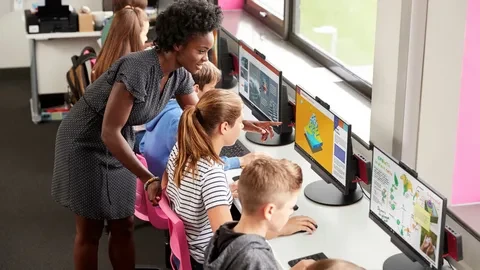

Classroom management software allows teachers to view, monitor, and control student device activity. The software offers teachers a centralized view of students' device screens and the ability to close underrated tabs, lock device screens, etc.
With online school software, you get increased visibility and control to minimize these distractions and manage device usage to help students stay focused on the current lesson.
Teachers can monitor student activities while lecturing, during exams, or when students complete their assignments.
Easy Communication Between Teacher and Students:
Using a class management system can help improve communication between the teacher and the student by providing an easy way to interact virtually. This allows them to stay connected even when they’re not in the same physical space This ensures that there is always open communication between teacher and student. By implementing this type of system, teachers can easily send messages, assignments, resources, and reminders quickly without having to wait for the next class session.
For example, emails can be sent directly through the system without switching tabs or programs! Additionally, parents can access their child’s grades at any point via the same platform their child’s teacher used—making it easier for everyone involved to stay connected throughout the school year.
Real-Time Insights into Student Progress:
A classroom computer monitoring software makes it easy for teachers to track student progress in real-time and provide feedback when needed. The data collected through this system allows teachers to easily track which students need more help or extra support to ensure they meet their goals. This also helps teachers identify areas where students may need additional guidance or tutoring so that they can intervene early if necessary.
Reduced Paperwork:
One of the most tedious aspects of teaching is dealing with paperwork—and thanks to a CMS, this is no longer necessary! Documents such as lesson plans, test results, and progress reports can all be stored safely within the system. This means less time spent organizing physical papers and more time spent teaching your students!
Managing Remote Classrooms:
Remote learning means less structure and supervision, making it easier for students to lose focus and disengage from a day's lesson. The classroom management software can smoothly turn a distributed teaching and learning experience into a more structured curriculum delivery.
However, most parents feel disconnected from their child’s progress and daily activities during remote learning. Teachers can use online school software to bridge that gap by generating progress reports and sending reminders to students and parents.
Handling in-person classrooms:
Teachers can benefit from having greater visibility into student devices during in-person instruction. From the front of the classroom, teachers rely primarily on body language and non-verbal cues to identify when a student becomes disengaged or distracted.
With the help of online school software, teachers can view all student screens within a single platform and manage device usage, redirecting student attention and activity back to the lesson or assignment.
How is classroom management software implemented?
Most K-12 school implements classroom management software at a centralized level. With the help of LMS(Learning Management Systems), educators can effectively develop courses, deliver instruction, facilitate communication, and foster collaboration between students and teachers.
How does online school software work closely with security and device management solutions?
Most K-12 schools work together for excellent security and ease of administration. Web filtering and mobile device management solutions are commonly paired with classroom management software.
● Web Filtering:
To safeguard school users and networks, it protects students from accessing objectionable, inappropriate, or harmful content on their devices. Moreover, policies can be enforced on networked and mobile devices in the classroom and at home. Web filtering and classroom management solutions provide in-depth insights into student activity and device security for safer, more effective teaching and learning.
● Mobile Device Management:
It protects technology investment and keeps school info out of the wrong hands. MDM solutions allow IT administrators to set device policies, manage application deployment, reset passwords, locate lost or stolen equipment, lock machines from a distance, and restrict unauthorized access to prevent data breaches.
























Sign in to leave a comment.