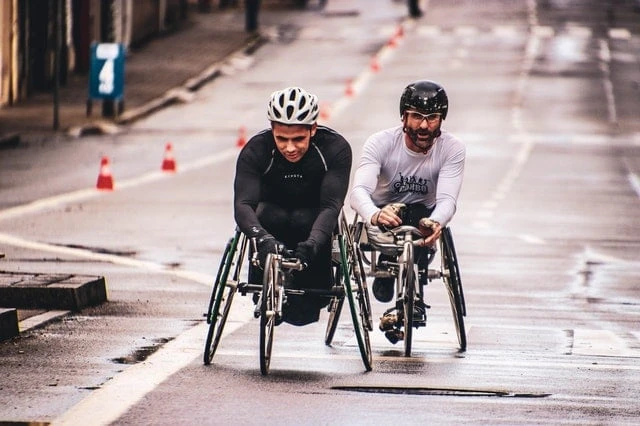

People with disabilities are huge minority groups usually starved of essential services, live in isolation, and live in pity or segregation. Because of discrimination, they avoid going to the public to get the rights and services that the non-disabled get. But with advancements in technology, this will change.
The World Health Organization-WHO estimates about 1.5 billion people worldwide with some form of disability. Therefore, it prompted companies to design their products with this inclusivity in mind.
Increasing awareness about assistive technology (AT) has led leading software and hardware companies to design hardware or software products that address the needs of people with disabilities.
In the following sections of this article, we will look at how these technological advancements have helped people with disabilities.
Vehicle Advancements for the Disabled
People with disabilities now can have access to a growing number of adaptive technologies that help make driving both comfortable and safe. These adaptive technologies include swivel seats that allow easier access or the electric wheelchair that allows the disabled to take on taxis and public transport.
Some drivers may also need to use hand controls to operate their vehicles safely. Whatever your driving requirements, you can probably find adaptive equipment to suit your needs while maintaining the freedom granted by open roads.
Google Live Captioning
Live captions are now available for videos, podcasts, and even phone calls on Google. People with hearing disabilities can benefit from this feature. Live Caption will automatically start captioning on your phone screen when it detects sound playing on your phone.
It would be best if you had an active internet connection to use it. It supports up to 70 different primary languages to reach many geographies worldwide. You can find Google live Caption on various smartphones and the Chrome browser.
Be My Eyes App For the Blind
Be My Eyes is an app that connects blind and visually impaired individuals with sighted volunteers through a remote video connection through its free platform. It allows them to perform various tasks.
Hans Jorgen Wiberg, a Danish furniture maker who is visually impaired, developed the app to enable blind people to communicate with volunteers who can help them with vision-related problems using the phone’s camera.
You could troubleshoot a simple technical problem or read the printed text on a coffee pack. Over 150 countries worldwide have had access to Be My Eyes since it debuted in 2015. There are currently 266,991 people who are blind or low-vision and over four million volunteers. Users can simply download the app from Google Play and the Apple App Store.
The GPS that Leads the Blind
With this technology, blind or visually impaired people no longer rely solely on a cane or seeing-eye dog to get around. A cane or guide dog is not the only device that makes navigation easier. There are several other devices as well.
The Kapten PLUS Navigation Device is an inexpensive and straightforward GPS device. Using accurate and updated map technology can provide directions and pinpoint a user’s location even while walking down a street.
Another extensively used GPS app, BlindSquare, was created for blind, deafblind, or partially sighted people. When used with third-party navigation apps, the application’s self-voicing app provides details on places of interest and intersections outside and inside, ensuring safe and reliable travel both ways. BlindSquare gives you the power to be more independent.
How BlindSquare Works to Help People with Disabilities
Here are key features in BlindQuare that help people with disabilities:
Location
As soon as BlindSquare determines your location, it gathers details on your surroundings from Foursquare and OpenStreetMap.
Interests
Algorithms determine which information, such as post offices, local cafés, and libraries, is most helpful to you.
Navigation
When you shake your device, you’ll hear details about the intersections and venues around you, along with your current address. It keeps track of your destination and announces your progress periodically.
The Device that Gives You a Hand
In the US, 2 million people have lost a limb. Every year, nearly 185,000 Americans have their limbs amputated. The numbers are pretty steep, but someone has found a solution to the collective problem amputees encounter every day.
Researchers led by Dean Kamen developed a technologically advanced prosthetic arm weighing nearly eight pounds. It is even possible to peel a grape with utmost precision and control with this arm.
Aside from being a technologically impressive feat, it is also a significant step toward restoring complete control to amputees.
Turning AirPods into a Hearing Aid
Because of its “Live Listen” feature, the AirPods can serve as a suitable alternative for a hearing aid. Users with hearing impairments can take advantage of this feature. People with disabilities can use Airpods as a hearing aid by going to:
Settings on their iPhone, Choosing Control Center, Then Customize Controls, and Select the green plus button next to Hearing.Once you have enabled Live Listen, connect your AirPods to your iPhone, open Control Centre and select the Live Listen icon.
After activating Live Listen, connect the AirPods to your iPhone, open Control Centre, and tap Live Listen.
Conclusion
For a long time, disabled people have lived in isolation and segregation. Because of their condition, many people shun and look down upon them with pity.
But recent technological advancements mentioned above have helped them conquer some of these challenges.









Sign in to leave a comment.