
Introduction
When building a gaming PC, many focus on GPUs and CPUs, but what about power supplies? A reliable power supply ensures your gaming rig runs smoothly and efficiently. But with so many options available, how do you pick the right one? This guide will walk you through everything you need to know, from wattage and efficiency to brand recommendations like the ROG-THOR-1000P2-GAMING.
Why Power Supplies Matter in Gaming PCs
Your power supply (PSU) is the heart of your gaming PC. Just like a car needs a good engine, your gaming rig needs a reliable PSU to power its components. A weak or low-quality PSU can lead to crashes, overheating, and even hardware damage.
How to Determine the Right Wattage for Your Setup
Wattage is crucial. Too little power, and your system won’t function properly; too much, and you waste energy. A simple rule of thumb:
- Entry-level gaming: 400W-600W
- Mid-range gaming: 600W-800W
- High-end gaming: 800W-1200W (like ROG-THOR-1000P2-GAMING)
Use PSU calculators online to estimate your needs accurately.
Understanding Efficiency Ratings: 80 Plus Bronze, Gold, Platinum
Efficiency ratings determine how much power is wasted as heat. Higher ratings mean better performance and lower electricity bills.
- 80 Plus Bronze: Decent for budget builds
- 80 Plus Gold: Great balance of performance and efficiency
- 80 Plus Platinum & Titanium: Best for high-performance rigs like those using ROG-THOR-1000P2-GAMING
Modular vs. Non-Modular Power Supplies: Which One to Choose?
- Modular PSUs: Let you connect only the cables you need, keeping the build clean.
- Non-Modular PSUs: Have fixed cables, often messier but cheaper.
- Semi-Modular PSUs: A mix of both.
For a premium gaming build, modular PSUs like ROG-THOR-1000P2-GAMING are ideal.
Why ROG-THOR-1000P2-GAMING is a Top Choice for Gamers
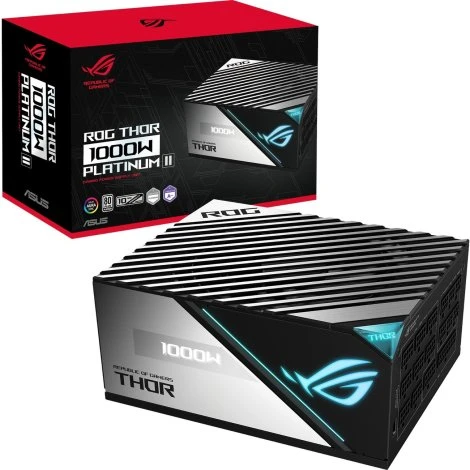
The ROG-THOR-1000P2-GAMING is a high-performance power supplies offering 1000W of stable power, 80 Plus Platinum efficiency, and an OLED power display. It’s built for enthusiasts who want top-tier performance and reliability.
Voltage Regulation and Protection Features
A good PSU should have:
- Overvoltage protection (OVP)
- Undervoltage protection (UVP)
- Short-circuit protection (SCP)
These features prevent damage to your hardware and ensure stable power delivery.
Single Rail vs. Multi-Rail Power Supplies: What’s the Difference?
- Single Rail: Delivers all power from one source; good for overclocking.
- Multi-Rail: Divides power across multiple lines; offers better safety.
ROG-THOR-1000P2-GAMING uses multi-rail design for superior protection.
Cooling Mechanisms: Silent vs. Performance Fans
- Silent fans: Ideal for noise-conscious gamers.
- Performance fans: Provide better cooling but can be louder.
- Hybrid fans (like in ROG-THOR-1000P2-GAMING): Adjust cooling as needed.
The Importance of Brand and Warranty
Stick to reputable brands like ASUS ROG, Corsair, EVGA, and Seasonic. Also, look for at least a 5-year warranty.
Top 5 Power Supplies for High-Performance Gaming PCs
- ROG-THOR-1000P2-GAMING – Best overall
- Corsair RM1000x – Reliable choice
- EVGA SuperNOVA 1000 G5 – Budget-friendly
- Seasonic PRIME TX-1000 – High-end option
- Thermaltake Toughpower GF3 1000W – Great for overclocking
Final Thoughts: Making the Right Choice
Choosing the right power supply ensures stability, longevity, and peak performance for your gaming PC. The ROG-THOR-1000P2-GAMING is an excellent option if you want high efficiency and reliability.
FAQs
1. What happens if my power supply is too weak?
Your system may shut down, crash, or even suffer hardware damage.
2. Is a 1000W power supply overkill for gaming?
For most builds, yes. But if you have multiple GPUs or overclock, it’s a good choice.
3. How long does a power supply last?
A good PSU can last 5-10 years, depending on usage and brand.
4. Do I need an 80 Plus Platinum PSU?
It’s not mandatory, but it helps with efficiency and reliability, especially for high-performance PCs.
5. Can a faulty power supply damage my PC?
Yes! A bad PSU can cause voltage fluctuations, which might damage components like the motherboard and GPU.









Sign in to leave a comment.