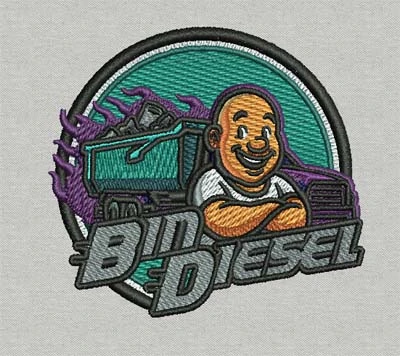
Embroidery remains one of the most popular methods for branding apparel. Businesses often add embroidered logos to uniforms, hats, jackets, and promotional clothing. However, embroidery machines cannot read standard image files such as JPG or PNG. Before a design can be stitched, it must first be converted into a stitch file that embroidery machines understand.
This process is known as digitizing a logo for embroidery. Digitizing transforms a graphic design into a series of stitch instructions that guide the embroidery machine. These instructions determine stitch direction, stitch density, and thread changes.
Understanding how to digitize a logo for embroidery helps businesses prepare their artwork properly before production. When the digitizing process is handled correctly, the final embroidery appears clean, balanced, and professional.
What Does It Mean to Digitize a Logo for Embroidery
Digitizing a logo for embroidery means converting artwork into a machine-readable embroidery file. Instead of pixels, the embroidery machine reads stitch commands created during the digitizing process.
Each element of a logo must be translated into stitches that work well on fabric. This includes determining where stitches start and stop, how dense they should be, and what type of stitch should be used.
Common stitch types used in embroidery include:
- Satin stitches for lettering and borders
- Fill stitches for large areas of the design
- Running stitches for outlines and fine details
Digitizing requires both technical knowledge and practical embroidery experience. Every fabric and design behaves differently, so the stitch settings must be carefully adjusted to achieve the best result.
Preparing the Logo Artwork
Before starting the digitizing process, the artwork must be prepared properly. Clean artwork helps ensure accurate stitching and prevents unnecessary corrections later.
Vector files are usually preferred because they maintain clear shapes when resized. If the logo is available only as a raster image such as JPG or PNG, it may need to be cleaned up or converted into vector format before digitizing begins.
Designers also simplify certain elements of the artwork. For example, gradients and extremely thin lines may not translate well into embroidery stitches. Adjusting these details helps maintain the clarity of the design when it is stitched onto fabric.
Using Embroidery Digitizing Software
Once the artwork is ready, it is imported into embroidery digitizing software. The digitizer traces the shapes of the design and assigns stitch types to each section.
During this stage, the digitizer determines stitch directions and angles. Proper stitch angles help the embroidery lie smoothly on fabric and prevent puckering.
Underlay stitches are also added at this stage. Underlay provides a foundation for the top stitches and stabilizes the fabric during embroidery. This step improves the overall appearance and durability of the stitched design.
Many businesses choose to work with experts who know how to digitize a logo for embroidery correctly, especially when preparing logos for uniforms, hats, or promotional garments. Professional digitizing helps ensure the design stitches cleanly and maintains consistent branding.
Adjusting Stitch Density and Test Stitching
Stitch density plays a major role in embroidery quality. If stitches are too dense, the design may become stiff and cause thread breaks. If stitches are too loose, the embroidery may appear uneven.
Digitizers carefully adjust stitch density depending on the fabric type and design complexity. For example, hats require slightly different settings compared to flat garments such as t-shirts or jackets.
After digitizing is complete, a test stitch is usually performed. Testing allows the digitizer to see how the design behaves on fabric and identify any adjustments that may be needed.
Test stitching helps ensure the final embroidery meets quality standards before full production begins.
Why Accurate Digitizing Matters
Accurate digitizing plays a critical role in embroidery production. Even a high-quality embroidery machine cannot produce good results if the digitized file is poorly prepared.
Poor digitizing can lead to several problems, including:
- uneven stitching
- thread breaks
- distorted shapes
- unreadable small text
Properly digitized designs ensure the embroidery machine follows smooth stitch paths and maintains the correct proportions of the logo.
Businesses that rely on embroidered branding often prioritize professional digitizing to maintain consistent results across different garments.
Conclusion
Learning how to digitize a logo for embroidery is an important step in producing high-quality embroidered designs. Digitizing converts artwork into stitch instructions that embroidery machines can follow.
The process includes preparing artwork, assigning stitch types, adjusting stitch density, and testing the final design. When these steps are handled correctly, embroidery machines can reproduce logos accurately on a wide range of garments.
Whether for corporate uniforms, promotional merchandise, or custom apparel, proper digitizing ensures that embroidered logos look professional and maintain consistent branding.


























Sign in to leave a comment.