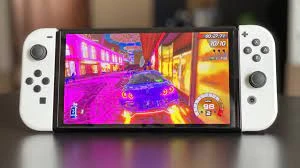

Getting the most out of your Nintendo Switch OLED involves optimizing your gaming experience and making the most of the features the device offers. Here are some tips to help you maximize your enjoyment:
Calibrate the Display:
When you first set up your Nintendo Switch OLED, take a moment to calibrate the display settings to your preference. Adjust brightness, color, and sharpness to enhance visual quality.Explore the OLED Difference:
OLED displays offer rich, vibrant colors and deep blacks. Play games that make the most of this technology to fully appreciate the improved visual experience.Use the Dock:
The Nintendo Switch OLED comes with an improved dock that offers better audio output, additional USB ports, and an Ethernet port. Make sure to use the dock for enhanced gameplay and connectivity.Optimize for Handheld Mode:
If you enjoy playing in handheld mode, take advantage of the OLED screen's clarity and vibrancy. This mode is perfect for gaming on the go.Utilize the Kickstand:
The improved kickstand on the OLED model provides greater flexibility for tabletop gaming. It's especially useful for multiplayer games or for propping up the device for a more comfortable viewing angle.Consider Multiplayer Games:
The Nintendo Switch is known for its local multiplayer capabilities. Gather friends and family for games like Mario Kart, Super Smash Bros., or Mario Party to enjoy the OLED display together.Invest in Accessories:
Consider investing in accessories like a pro controller, Joy-Con grip, or third-party peripherals to enhance your gaming experience. These can improve control and comfort during extended play sessions.Customize Your Joy-Cons:
Nintendo offers a variety of Joy-Con colors and designs. Personalize your Switch by selecting Joy-Con color combinations that reflect your style.Expand Your Game Library:
The Nintendo Switch has a vast library of games, from popular first-party titles to indie gems. Explore different genres and game types to get the most out of your OLED experience.Enjoy Portable Multiplayer:
Many games offer portable local multiplayer options. Use the detachable Joy-Cons for impromptu gaming sessions with friends, whether at home or on the go.Take Advantage of Handheld Controls:
The Switch's touchscreen can be useful in certain games. Use it for selecting items, navigating menus, or playing touchscreen-based games.Stay Up-to-Date:
Keep your Nintendo Switch system and games updated to access the latest features and improvements. Check for firmware updates and game patches regularly.Use the Capture Button:
The Capture Button on the Joy-Con controllers allows you to take screenshots and record video clips of your gameplay. Share your gaming moments with friends and on social media.Consider Nintendo Switch Online:
Subscribe to Nintendo Switch Online to access a library of classic NES and SNES games, enjoy online multiplayer, and back up your game save data in the cloud.Participate in Special Events:
Stay tuned for special in-game events, collaborations, and updates in your favorite games. These events can add extra excitement to your gaming experience.Explore the eShop:
Visit the Nintendo eShop to discover new games, demos, and exclusive content. The eShop is a treasure trove of gaming opportunities.Discover Indies:
Don't overlook indie games. Many indie developers create unique and innovative titles that can be just as engaging as big-budget releases.Join Online Communities:
Connect with other Nintendo Switch users through online communities, forums, and social media. Share tips, strategies, and gaming experiences with fellow enthusiasts.Remember that the Nintendo Switch OLED is designed for both solo and multiplayer gaming, offering versatility and an excellent display. Make the most of this gaming console by exploring a wide range of games and customizing your experience to suit your preferences.

























Sign in to leave a comment.