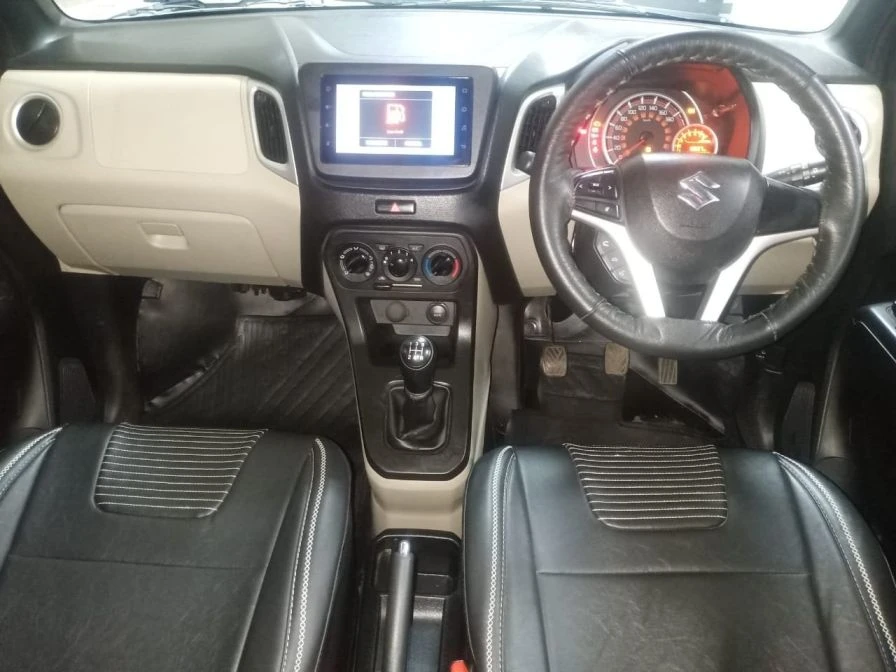

If you\'re the proud owner of a Wagon-R and you\'re looking to enhance your driving experience, installing an Android stereo is a fantastic choice. Not only does it add modern functionality to your vehicle, but it can also improve your overall safety and convenience. In this comprehensive guide, we\'ll walk you through the step-by-step process of installing an Android stereo Wagon-R. Get ready to enjoy a seamless blend of technology and driving pleasure.
What You\'ll Need
Before we dive into the installation process, it\'s essential to gather all the necessary tools and materials. Here\'s a list of items you\'ll need:
- Android car stereo unit
- Screwdriver set
- Trim removal tools
- Wire stripper and crimper
- Wiring harness adapter
- Wire connectors
- Electrical tape
- Crimp connectors
- Panel clips
- Wagon-R service manual
- Smartphone or tablet with internet access
- Patience and attention to detail
Preparation and Safety
- Safety First: Before you start, ensure that your car is parked in a safe location, the engine is off, and the battery is disconnected. Safety should be your top priority.
- Refer to the Service Manual: Your Wagon-R\'s service manual is your best friend during this installation. It provides detailed instructions on removing panels and accessing the wiring.
- Gather Information: Research your specific Android stereo model and your car\'s make and model. This will help you understand the compatibility and wiring requirements.
Step-by-Step Installation Guide
- Removing the Old Stereo
- Use trim removal tools to carefully pry off the trim panel surrounding the old stereo.
- Unscrew and remove the old stereo unit.
- Disconnect the wiring harness and antenna cable from the back of the old unit.
- Wiring Preparation
- Connect the wiring harness adapter to the wires on your new Android stereo.
- Carefully match the wires using a wiring diagram specific to your car model.
- Use crimp connectors and electrical tape to secure the connections.
- Double-check your wiring to ensure accuracy.
- Mounting the New Android Stereo
- Slide your new Android stereo into the mounting bracket.
- Secure it by following the manufacturer\'s instructions.
- Reconnect the wiring harness and antenna cable.
- Testing and Finalization
- Reconnect your car\'s battery.
- Turn on the Android stereo to check if it powers up and functions correctly.
- Test all the functions, including radio, Bluetooth, and navigation.
- If everything works as expected, carefully reassemble the trim panel, securing it in place with panel clips.
Additional Tips
- When connecting wires, ensure they are tightly crimped and insulated with electrical tape to prevent short circuits.
- Follow the manufacturer\'s instructions for your specific Android stereo, as wiring colors may vary.
With the installation of your new Android stereo, your Wagon-R is now equipped with the latest technology and entertainment features. You can enjoy hands-free calling, GPS navigation, and your favorite music while on the road.
If you encounter any difficulties during the installation process, don\'t hesitate to seek professional help or consult the service manual. Your safety and the proper functioning of your vehicle should always come first.
By following this detailed guide, you can successfully install an Android stereo in your Wagon-R and elevate your driving experience to a whole new level.



























Sign in to leave a comment.