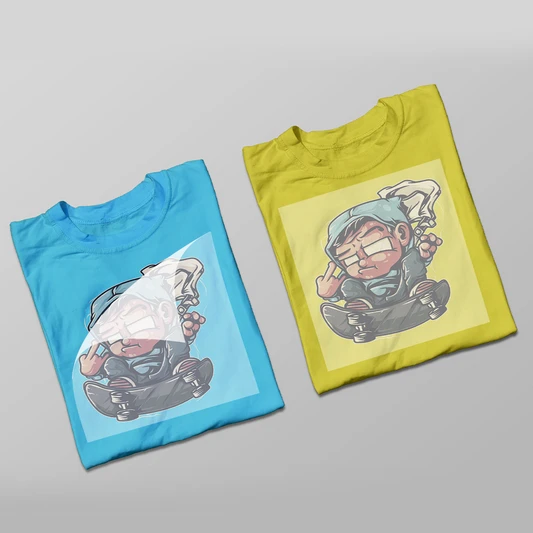

If you’ve been exploring custom apparel printing, you’ve probably come across the term DTF printing. It’s quickly becoming one of the most popular methods for printing designs on fabric because it’s versatile, beginner-friendly, and capable of producing vibrant results.
At the heart of this process are dtf sheets, which make it possible to transfer detailed designs onto clothing and other textiles. If you’re new to this printing method, the process might sound technical—but once you understand the steps, it becomes surprisingly manageable.
This guide will walk you through how to print on dtf sheets step by step, helping beginners understand the basics and start creating high-quality prints.
What Are DTF Sheets?
Before we dive into the printing process, let’s clarify what DTF sheets are.
DTF stands for Direct-to-Film, which means the design is printed onto a special film sheet before being transferred onto fabric using heat and adhesive powder.
Unlike traditional methods that print directly onto the fabric, dtf sheets allow the design to be prepared separately and then transferred later. This provides more flexibility and consistent results.
DTF sheets are typically transparent films that are specially coated to hold ink and adhesive powder. Once printed and cured, they become a transfer ready to be applied to garments.
Why DTF Printing Is So Popular
DTF printing has gained popularity because it offers several advantages compared to other printing methods.
For starters, dtf sheets work on many types of fabrics. You can use them on cotton, polyester, blends, and even darker materials without major issues.
Another advantage is the vibrant color output. DTF printing produces rich colors and detailed designs that hold up well after washing.
It’s also efficient for small businesses because you can prepare multiple transfers in advance and apply them later when needed.
Tools and Materials You’ll Need
Before printing on dtf sheets, you’ll need a few essential tools and materials.
Here’s what beginners typically require:
- A DTF-compatible printer
- DTF transfer film (dtf sheets)
- DTF ink
- Adhesive powder
- Heat press machine
- Graphic design software
- A curing method (heat press or curing oven)
Having the right materials ensures that your prints adhere properly and maintain quality.
Step 1: Create or Prepare Your Design
The first step is designing the artwork you want to print.
You can create your design using graphic design software such as Adobe Illustrator, Photoshop, or other design programs. Your design may include logos, illustrations, text, or graphics.
When preparing artwork for dtf sheets, make sure:
- The resolution is high (300 DPI is recommended)
- Colors are well balanced
- The design fits your intended garment size
Also remember that the design will need to be mirrored before printing. This ensures that it appears correctly once transferred to the fabric.
Step 2: Load the DTF Sheets into the Printer
Once the design is ready, it’s time to prepare the printer.
DTF transfer film sheets are loaded into the printer so that the printable side receives the ink. Most films have a slightly textured surface designed to hold the ink effectively.
Be sure to load the dtf sheets properly according to your printer’s instructions to avoid smudging or misalignment.
Step 3: Print the Design
With everything set up, you can now print the design onto the dtf sheets.
The printer will apply layers of colored ink followed by a white ink layer. The white layer is important because it creates a base that allows colors to appear vibrant even on dark fabrics.
This printing process ensures that the final transfer maintains accurate colors and clear details.
Once printing is complete, avoid touching the printed surface to prevent smearing.
Step 4: Apply Adhesive Powder
After printing, the design must be coated with adhesive powder while the ink is still wet.
The adhesive powder sticks to the printed areas of the dtf sheets and later helps bond the design to the fabric.
To apply the powder:
- Sprinkle adhesive powder evenly over the printed design.
- Gently shake off the excess powder.
- Make sure only the printed areas are coated.
This step is essential for ensuring the design transfers properly during the heat pressing stage.
Step 5: Cure the Design
Once the adhesive powder has been applied, the printed dtf sheets must be cured.
Curing melts the adhesive powder and prepares the design for transfer.
This can be done using:
- A curing oven
- A heat press hovering over the sheet
- A specialized curing machine
The goal is to heat the adhesive until it becomes slightly melted but not fully hardened.
This stage ensures that the design will bond correctly with the fabric later.
Step 6: Prepare the Garment
Before transferring the design, the garment needs to be prepared.
Place the fabric on the heat press and press it for a few seconds to remove wrinkles and moisture. This step ensures a smooth surface for the transfer.
A flat, wrinkle-free surface improves adhesion and print quality.
Step 7: Transfer the Design
Now comes the exciting part—transferring the design.
Place the cured dtf sheets onto the garment with the printed side facing down.
Using a heat press, apply pressure and heat according to recommended settings. Most transfers require temperatures around 300–325°F (150–160°C) for about 10–15 seconds, but settings can vary depending on the material.
The heat activates the adhesive and bonds the design to the fabric.
Step 8: Peel the Film
After pressing, allow the transfer to cool slightly before peeling the film away.
Some dtf sheets require a cold peel, while others allow warm peeling. Always follow the film manufacturer’s instructions.
Once the film is removed, the design should remain cleanly attached to the garment.
Step 9: Final Press for Durability
Many printers recommend performing a final press after peeling the film.
Place a protective sheet over the design and press it again for a few seconds.
This step improves durability, ensuring the design stays secure after washing and regular wear.
Tips for Beginners
If you’re new to using dtf sheets, here are a few tips to improve your results:
- Always use high-quality film and ink.
- Test designs before printing large batches.
- Follow recommended temperature and pressure settings.
- Keep your printer properly maintained.
- Practice on sample garments before production runs.
Like any printing method, mastering DTF printing takes practice.
Final Thoughts
Printing with dtf sheets opens up exciting possibilities for custom apparel and textile printing. With the right tools and a clear understanding of the process, even beginners can produce vibrant and durable designs.
From creating the artwork to curing and transferring the design, each step contributes to the final quality of the print.
Once you become comfortable with the process, dtf sheets can help you create professional-looking apparel, promotional merchandise, and creative fabric designs with ease.







Sign in to leave a comment.