
If you are searching for solving How to Turn an Outlook Email into a PDF File query then you are at the right place that will assist to perform the process of Outlook email to PDF directly. But due to the disadvantages of the direct option, you will also find an alternative PCVARE MSG to PDF Converter solution that is a complete solution for getting Outlook email messages to PDF in batch. So stay on the blog till the end and solve your entire problem regarding how to turn Outlook emails into PDF documents of Adobe Reader.
The outlook is a good mail client for business & personal purposes but PDF is used in every field to represent or show documents, such as – hospitals, colleges, schools, offices, court, legal activities, etc. So there may be a possibility that Outlook users may have a need to solve How to Turn an Outlook Email into a PDF File query. Now the question arises that how to do that. At this time, if users have few mails for saving in PDF from Outlook then they can follow the given direct method but if users have a large backup of MSG files or Outlook PST files for converting into PDF then they should go with an alternative solution that is safe & exact for large Outlook files migration.
How to Turn an Outlook Email into a PDF File Directly
If you have some Outlook emails for changing in PDF then follow the given steps –
- Open Outlook on your desktop screen.
- Select Message which wants to save in PDF.
- Go to File menu & Print Command.
- Then choose Microsoft Print to PDF.
- After that, if you want to save your emails in PDF with attachments; then go to Print-options of Print Microsoft to PDF button.
- Choose, save emails into PDF with attached files option and click on OK button.
Disadvantages of Direct button
- If your printer is not set as the default printer then it will not save emails with attachments into PDF.
- If your Outlook database is large for conversion into PDF then it is not a perfect method.
- If you have separate MSG files (large database of Outlook backup) then it cannot convert them into PDF.
- Sometimes, it fails and doesn’t provide the exact migration result.
- It is suitable only for few Outlook mails.
Automated Solution to convert Outlook Emails to PDF
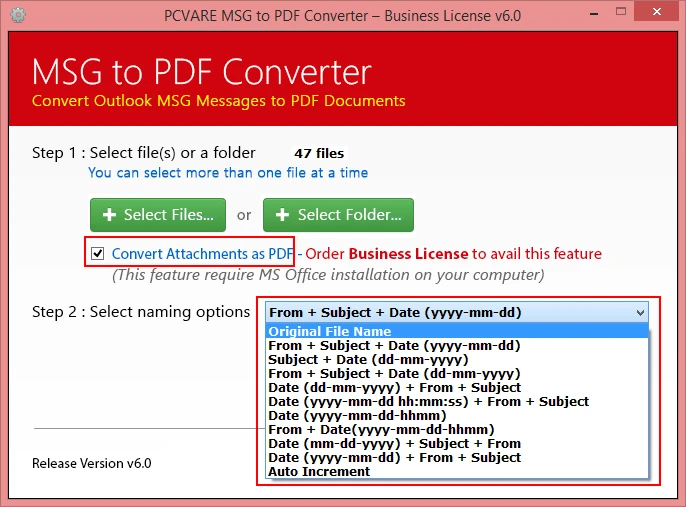
If you have a large backup of Outlook as MSG file format and want to convert them in PDF instantly then you can go with PCVARE MSG Converter that can perfectly turn Outlook MSG files into PDF. The program is an effective utility and provides a safe, quick migration outcome. It simply converts MSG files of Outlook into PDF and also saves it’s all properties without any change. It also provides a "convert attachments as PDF" option that allows us to save attachments of emails in PDF at no data loss. If you want to know about the migration processing of the alternative solution then follow the given steps –
- Download the app on your computer screen.
- Select MSG files by provided two options.
- If you want to save emails’ attachments into PDF then tick on Convert attachments as PDF option and choose File naming option.
- Click on the Convert button and choose location whereas you want to save output files, click on OK button.
- Migration starts and completes with a completion message.
If you have any query or doubt then you can also go with the free MSG Converter demo that allows 25 emails migration to PDF at free of cost so you can also get a free trial to check out its efficiency.










Sign in to leave a comment.