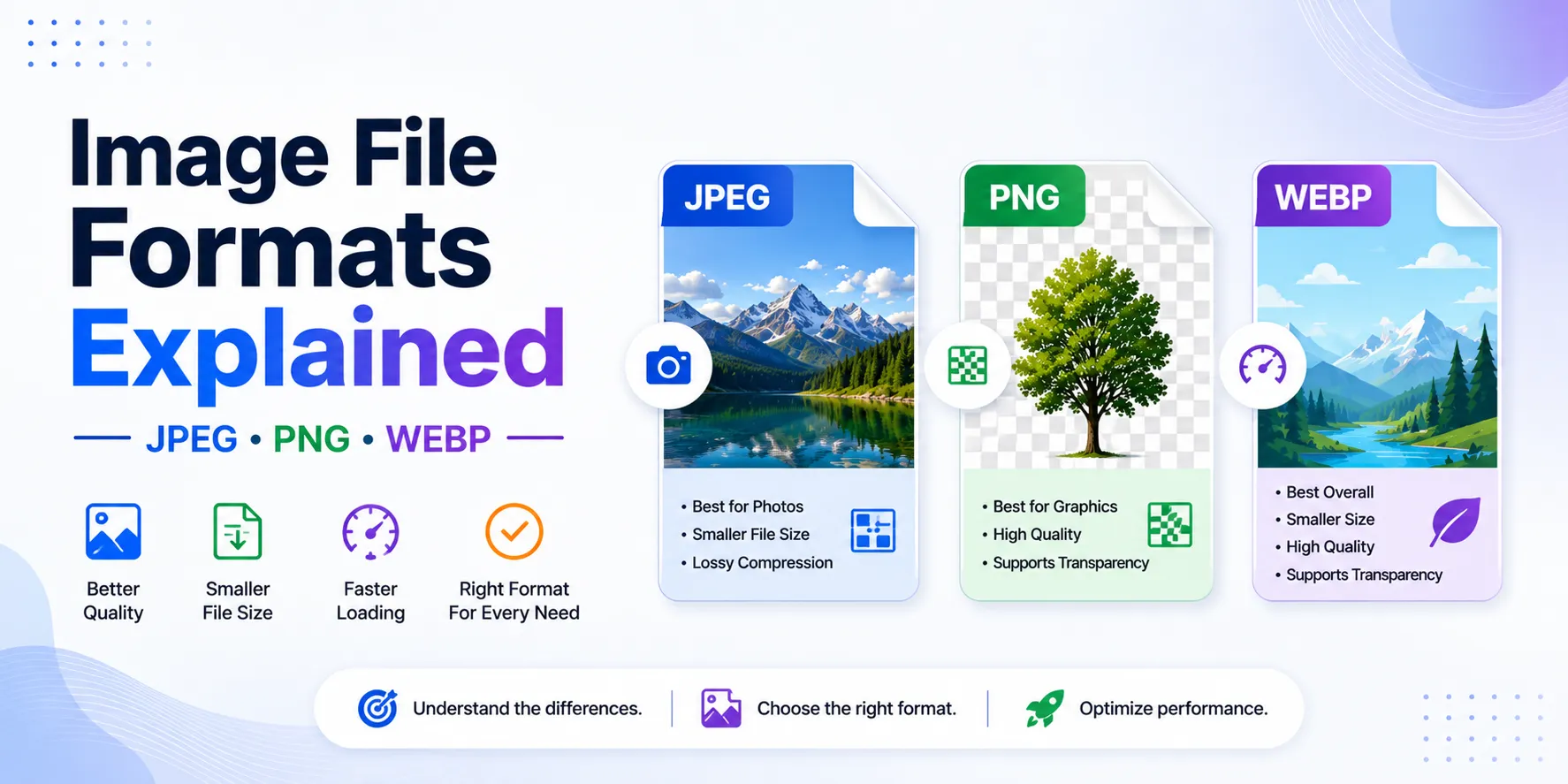

In today’s digital world, images are essential for websites, social media, eCommerce stores, blogs, and marketing campaigns. However, choosing the right image format can significantly impact image quality, website speed, storage, and user experience.
Among the most commonly used image formats are JPEG, PNG, and WEBP. Each format serves a different purpose and offers unique advantages depending on your requirements.
Whether you’re a designer, blogger, developer, or business owner, understanding image formats can help you optimize visuals more effectively. This guide explains the differences between JPEG, PNG, and WEBP and helps you decide which format is best for your needs.
Understanding Image Formats with FileXTool
Managing image files becomes much easier with platforms like FileXTool. Using an image converter online helps users quickly switch between formats while maintaining image quality and compatibility.
Different image formats are designed for different use cases:
- Some focus on smaller file sizes
- Others preserve maximum quality
- Some are optimized for modern websites
Understanding how these formats work helps improve both visual quality and website performance.
What Is JPEG Format?
JPEG (Joint Photographic Experts Group), commonly written as JPG, is one of the most popular image formats worldwide.
It uses lossy compression, meaning some image data is removed to reduce file size.
Advantages of JPEG
- Small file size
- Faster loading speed
- Widely supported across devices
- Ideal for photographs
Disadvantages
- Quality loss after compression
- Does not support transparency
Best Use Cases
- Blog images
- Website photos
- Social media graphics
- Email attachments
JPEG is perfect when you need lightweight images for faster performance.
What Is PNG Format?
PNG (Portable Network Graphics) is a lossless image format that preserves all original image details.
Unlike JPEG, PNG does not reduce quality during compression.
Advantages of PNG
- High-quality output
- Supports transparent backgrounds
- No quality loss
- Great for graphics and logos
Disadvantages
- Larger file sizes
- Slower loading compared to JPEG
Best Use Cases
- Logos
- Icons
- Transparent images
- Graphic design projects
PNG is preferred when image clarity and transparency are important.
What Is WEBP Format?
WEBP is a modern image format developed to improve web performance. It provides both lossy and lossless compression.
Advantages of WEBP
- Smaller file sizes than JPEG and PNG
- High image quality
- Supports transparency
- Optimized for websites
Disadvantages
- Limited support on some older software
Best Use Cases
- Websites and blogs
- eCommerce product images
- Performance-focused platforms
WEBP is becoming increasingly popular because it balances quality and speed effectively.
JPEG vs PNG vs WEBP: Key Differences
Understanding the differences helps you choose the right format for specific tasks.
1. File Size
- JPEG → Small
- PNG → Large
- WEBP → Smallest and optimized
2. Image Quality
- PNG → Highest quality
- WEBP → Excellent quality with smaller size
- JPEG → Good quality but compressed
3. Transparency Support
- JPEG → No
- PNG → Yes
- WEBP → Yes
4. Website Performance
- WEBP → Best for speed optimization
- JPEG → Good performance
- PNG → Slower due to larger size
Why Choosing the Right Format Matters
The image format you choose directly affects:
Website Speed
Smaller images improve loading times and SEO.
Storage Space
Compressed formats reduce storage usage.
Visual Quality
High-quality visuals improve user engagement.
Mobile Performance
Optimized formats work better on mobile devices.
If you want to improve image quality during conversion, learning How to Convert Images Without Losing Quality can help maintain better results while optimizing files.
How Online Image Conversion Tools Help
Modern online tools make image management simple and efficient.
Using an image converter online allows users to:
- Convert files instantly
- Resize images quickly
- Optimize images for websites
- Maintain image quality
Platforms like FileXTool simplify image conversion without requiring software installation.
Best Practices for Image Optimization
To get the best results from your images:
1. Use the Right Format
Choose based on quality, speed, and transparency needs.
2. Avoid Over-Compression
Too much compression reduces clarity.
3. Resize Images Properly
Upload images in the correct dimensions.
4. Optimize for Web
Use WEBP or compressed JPEGs for websites.
5. Use Reliable Tools
Trusted platforms ensure better quality and secure processing.
Common Mistakes to Avoid
Users often make simple mistakes that affect image performance:
- Using PNG for every image unnecessarily
- Uploading oversized images
- Ignoring website speed optimization
- Repeatedly converting files
Avoiding these mistakes improves both image quality and user experience.
How Image Formats Impact SEO
Image optimization is an important ranking factor.
Optimized image formats help:
- Improve page speed
- Reduce bounce rates
- Enhance mobile experience
- Improve Core Web Vitals
WEBP is especially useful for SEO because it delivers high-quality visuals with smaller file sizes.
Future of Image Formats
As technology evolves, image formats continue to improve.
Future developments may include:
- Better compression algorithms
- AI-powered optimization
- Faster cloud-based processing
- Enhanced browser compatibility
However, JPEG, PNG, and WEBP will remain the most important formats for modern digital workflows.
Final Thoughts
Choosing between JPEG, PNG, and WEBP depends on your specific goals.
- JPEG is best for lightweight everyday images
- PNG is ideal for graphics and transparency
- WEBP offers the best balance between quality and performance
Understanding these formats helps improve website speed, image quality, and storage efficiency.
With tools like FileXTool, managing and converting images becomes simple, fast, and efficient in today’s digital environment.


























Sign in to leave a comment.