
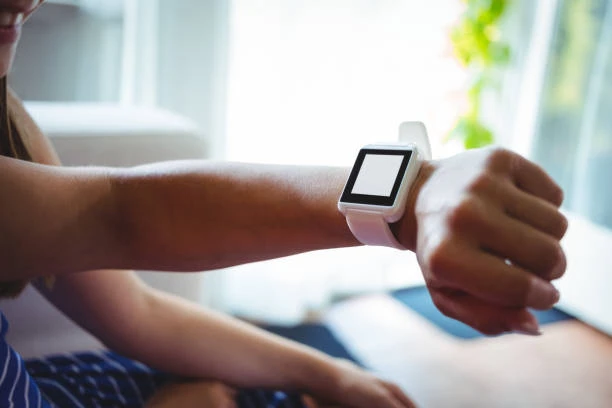
Wear OS, a version of Google's Android operating system designed for smartwatches and other wearables, represents a significant opportunity in the app development landscape. As the wearable technology market grows, so does the demand for apps that can seamlessly integrate with these devices. This article will explore the essentials of Wear OS development, focusing on app development for Android and mobile app development practices.
Understanding Wear OS
Wear OS, previously known as Android Wear, is designed to bring the power and flexibility of Android to wearable devices. It offers a user-friendly interface, a range of pre-installed apps, and access to Google Play, allowing users to download additional applications. Wear OS devices are designed to work in conjunction with Android smartphones, enhancing the overall user experience through synchronization and additional functionality.
The Importance of Wear OS in App Development for Android
Wear OS represents a growing segment of the wearable technology market. For developers focused on app development for Android, mastering Wear OS can open new avenues for innovation and profitability. Here are some reasons why Wear OS is crucial:
Market Growth: The wearable technology market is expanding rapidly, with smartwatches being a significant driver. This growth presents a lucrative opportunity for developers who can create compelling and functional Wear OS apps.Integration: Wear OS apps can extend the functionality of mobile apps, providing a more integrated and seamless user experience. For instance, fitness apps on Wear OS can track workouts and sync data with the mobile app.User Engagement: Wearable devices offer unique ways to engage users, such as through notifications, fitness tracking, and quick interactions, which can enhance user retention and satisfaction.Key Considerations in Wear OS Development
Developing apps for Wear OS involves several key considerations to ensure a smooth and efficient process. Here are the essential aspects to keep in mind:
1. User Interface (UI) Design
The UI design for Wear OS differs significantly from traditional mobile app development due to the smaller screen size and different interaction methods. Here are some UI design principles:
Simplicity: Keep the interface simple and easy to navigate. Users should be able to access the app's core functionalities quickly.Readability: Text should be large and legible. Avoid cluttering the screen with too much information.Touch Targets: Ensure that touch targets are large enough to be easily tapped, considering the limited screen real estate.Consistent Design: Follow Google's Material Design guidelines for Wear OS to maintain consistency with other apps and the overall system.2. User Experience (UX)
User experience is critical in mobile app development, and even more so for wearable devices. Here are some UX considerations:
Contextual Relevance: Provide users with relevant information and actions based on their context. For example, a weather app could show current weather conditions and the forecast for the next few hours.Voice Interactions: Leverage voice commands and Google Assistant integration to allow users to interact with the app hands-free.Notifications: Use notifications wisely to keep users informed without overwhelming them. Wear OS supports various notification types, including actionable notifications and notification stacking.3. Performance Optimization
Performance is crucial in wearable app development due to the limited hardware resources. Here are some tips for optimizing performance:
Efficient Code: Write efficient and optimized code to ensure smooth performance. Avoid unnecessary computations and background tasks that can drain the battery.Battery Management: Wearable devices have smaller batteries, so it's essential to manage battery consumption carefully. Use battery-friendly practices such as reducing screen wake-ups and minimizing background processing.Testing: Regularly test the app on real devices to identify and fix performance bottlenecks. Use tools like Android Studio Profiler to analyze the app's performance.Developing for Wear OS: Tools and Technologies
Google provides a comprehensive set of tools and libraries to facilitate Wear OS development. Here are some of the key tools and technologies:
1. Android Studio
Android Studio is the official Integrated Development Environment (IDE) for Android and Wear OS development. It provides a range of features, including:
Wear OS Emulator: Allows developers to test their apps on virtual Wear OS devices.Code Editor: A powerful code editor with intelligent code completion, refactoring tools, and syntax highlighting.Debugging: Advanced debugging tools to identify and fix issues in the app.Performance Profiling: Tools to analyze and optimize the app's performance.2. Wearable Support Library
The Wearable Support Library offers components and features specifically designed for Wear OS, such as:
Watch Faces: Tools to create custom watch faces.Wearable UI Components: UI components optimized for wearable devices, including action drawers, navigation drawers, and confirmation overlays.Complications API: Allows developers to add interactive elements to watch faces, such as battery status, calendar events, and fitness data.3. Wear OS APIs
Google provides various APIs to enhance the functionality of Wear OS apps, including:
Data Layer API: Enables data synchronization between the wearable device and the paired smartphone.Wearable Messages API: Allows apps to send and receive messages between the wearable device and the smartphone.Fitness API: Provides access to fitness data, such as steps, calories burned, and heart rate.Steps to Develop a Wear OS App
Here's a step-by-step guide to developing a Wear OS app:
Setup Environment: Install Android Studio and set up the Wear OS emulator.Create Project: Start a new project in Android Studio and select the Wear OS template.Design UI: Use the layout editor to design the app's user interface.Implement Features: Write the code to implement the app's features and functionalities.Test: Test the app on the Wear OS emulator and real devices to ensure it works as expected.Optimize: Optimize the app's performance and battery consumption.Publish: Publish the app to the Google Play Store for Wear OS.Best Practices for Wear OS Development
To create successful Wear OS apps, developers should follow these best practices:
Focus on Core Functionality: Prioritize the app's core functionalities and ensure they are easy to access and use.Leverage Voice Commands: Use voice commands to enhance the user experience and allow hands-free interaction.Optimize Battery Usage: Implement battery-saving techniques to extend the device's battery life.Regular Updates: Continuously update the app to fix bugs, add new features, and improve performance.User Feedback: Collect and incorporate user feedback to improve the app's usability and functionality.Conclusion
Wear OS development offers exciting opportunities for developers specializing in app development for Android and mobile app development. By understanding the unique aspects of Wear OS, leveraging the right tools and technologies, and following best practices, developers can create innovative and engaging apps for wearable devices. As the wearable technology market continues to grow, mastering Wear OS development will be a valuable asset for any mobile app developer.






Sign in to leave a comment.