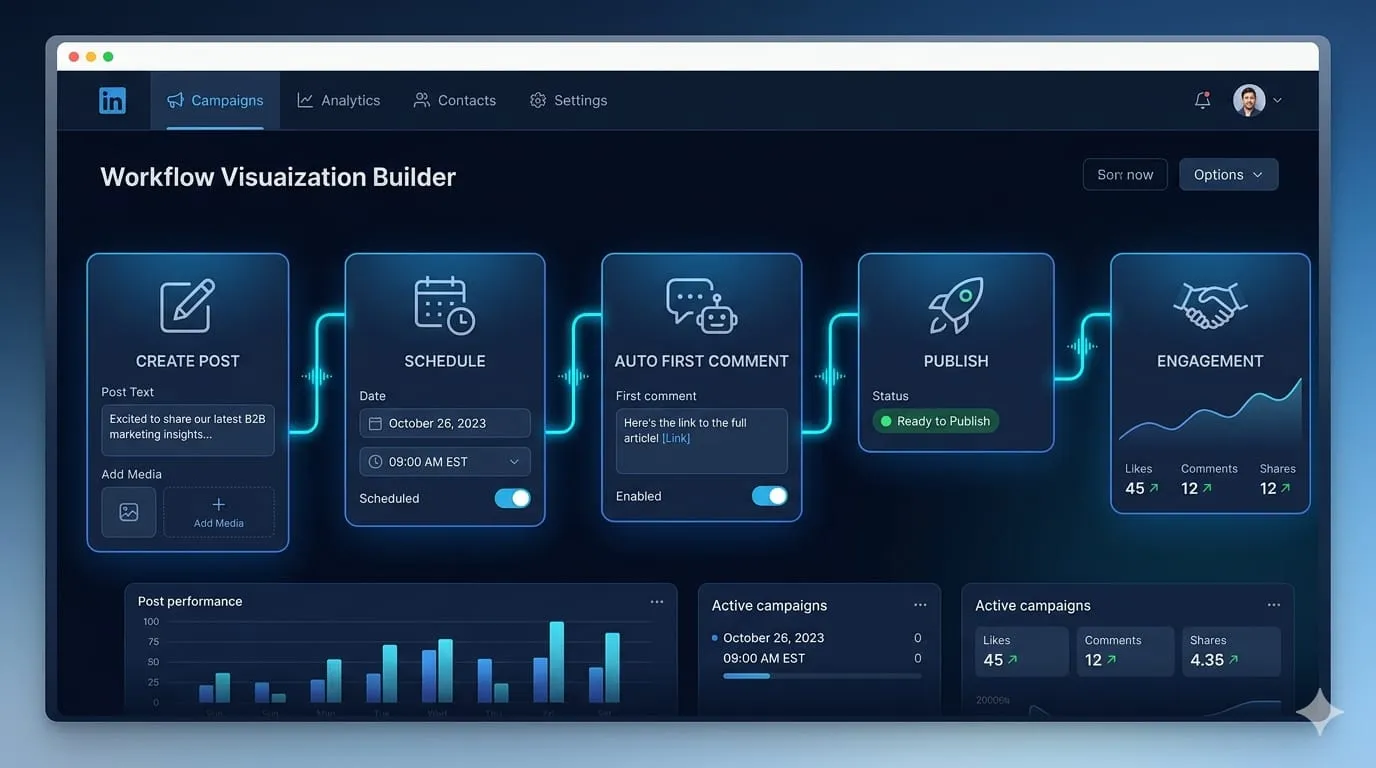

Most LinkedIn schedulers handle the easy part. Write a post, pick a time, press schedule. That workflow covers maybe sixty percent of what professional LinkedIn content actually requires and leaves the other forty percent as a set of manual tasks you have to remember to do at the exact moment the post goes live. Nobody builds that forty percent into the product demo. It shows up later, in the operational friction of running real accounts at real volume.
The first comment is the clearest example. If you manage LinkedIn for B2B brands, you already know the mechanic: the post goes out clean, without a link in the body because links suppress reach, and the first comment contains the CTA, the article link, or the lead magnet. It’s a standard practice, well-established enough that most B2B content managers treat it as a default rather than a tactic. It’s also, on most scheduling tools, a manual task someone has to be at their keyboard when the post publishes, find the post in their feed, and add the comment before the algorithm has already started distributing the content without it.
At scale across multiple accounts, that requirement doesn’t work. I manage LinkedIn for seven B2B clients. Seven first comments, at seven different scheduled times, across a week with sometimes thirty or forty posts going out. Some of those posts publish at 7am. Some at midday. Some in the evening for audiences in different time zones. The manual approach wasn’t a workflow it was a stress test, and it was one that reliably produced missed comments on the days anything else competed for attention.
I moved to ContentStudio specifically because it handled first comment scheduling natively. That was the primary reason. What I found when I got there was that first comments were one part of a broader LinkedIn feature set that covered the other manual gaps I’d been working around PDF carousel publishing, per-account voice management, multi-profile scheduling from a single workspace. The first comment problem led me to the tool. The rest of it made me stay.
Three months in, here's what the workflow actually looks like.
The first comment problem and why it matters more than it sounds
The reach mechanics on LinkedIn are well-documented enough that most content managers know them. External links in the post body reduce distribution. The platform’s algorithm deprioritises posts that take users off LinkedIn, which means any post with a link is starting with a handicap before anyone has even seen it. The workaround post the content clean, drop the link in the first comment is so standard it’s barely worth explaining. Every B2B content manager running LinkedIn has either adopted it or decided the trade-off isn’t worth the operational complexity.
What’s less discussed is the operational cost of that workaround when you’re running volume across multiple accounts. A single person managing their own LinkedIn profile can handle the first comment manually without much friction. A team managing seven client accounts cannot, at least not reliably.
A first comment needs to land within the first few minutes of the post publishing. Too late and the algorithm has already made its initial distribution decision without the comment present. The early engagement window on LinkedIn is narrow. The first comment, the first few reactions, the initial shares these happen in a compressed period after publishing that determines how broadly the content gets distributed. For a single account posting twice a week, that’s manageable. For seven accounts posting four to five times each, across scheduled times spread through the day, it requires either a dedicated person watching a publishing queue in real time or a tool that handles it automatically.
The scheduled first comment removes the real-time dependency entirely. Draft the post, write the first comment in the same composer window, schedule both together. The post publishes, the first comment lands automatically within seconds. No one needs to be watching. No one needs to have the publishing queue open on their phone. The comment arrives at the right moment because the scheduling infrastructure delivers it, not because someone happened to be free when the post went live.
For the clients where the first comment carries the conversion CTA the link to a gated report, the booking page, the product demo request having that comment land on time rather than fifteen minutes late is not a minor optimisation. By fifteen minutes, the post has already moved through its initial distribution cycle. The people who engaged early, who might have clicked a link in the first comment, have moved on. It’s the difference between a post that drives action and one that generates impressions.
PDF carousels and why they break most schedulers
LinkedIn PDF carousels are the highest-engagement format on the platform for most B2B content categories. Educational content, frameworks, case study summaries, step-by-step guides the carousel format outperforms standard image posts and text posts on both engagement rate and dwell time for almost every account I manage. The swipe mechanic encourages extended interaction. Each slide is an opportunity to hold attention. For content that needs to convey a framework or a structured argument, the carousel format is simply better than any alternative LinkedIn offers.
They also break most third-party schedulers. Not because the format is technically complex, but because most schedulers weren’t built with native PDF support as a priority. The assumption was that LinkedIn content meant text posts and images. PDF carousels were a later addition to the platform and many tools simply never caught up.
The native LinkedIn interface handles PDF uploads directly. Third-party tools have historically either excluded PDF support entirely, required a workaround involving converting the PDF to individual images and then uploading those as a standard image carousel (which is not the same format and performs differently), or supported it in a limited way that lost formatting or required manual intervention at publishing time. In practice this meant that for most of the tools the market offered, the highest-performing LinkedIn content format was either unavailable through the scheduler or required extra steps that made it impractical for regular use.
The PDF carousel scheduling in ContentStudio handles the upload natively upload the PDF in the composer, preview how it renders as a carousel, schedule it. No conversion step, no format loss, no manual intervention at publishing time.
For one client that publishes a weekly framework post in carousel format, that feature alone changed the production workflow materially. Previously, the carousel had to be published natively, which meant either the client handled it themselves or someone from the team was logging into the client’s LinkedIn account at publish time. Neither was sustainable. The content was already being created. The distribution was being bottlenecked by a tool limitation. Removing that bottleneck meant the highest-performing format in their content mix became as easy to schedule as a text post, and consistent enough to build into the weekly cadence reliably.
Multi-profile LinkedIn management without the account bleed
Managing multiple LinkedIn profiles personal profiles, company pages, or both from a single tool introduces a category of risk that single-account operators don't think about: account bleed.
Content drafted for one client’s company page accidentally queued on another. Voice and tone guidelines from a technology brand bleeding into a financial services account. Scheduling cadences set for a high-volume account overriding the more selective calendar of a thought leadership profile. At small account counts, you can manage this manually by staying vigilant. At seven accounts, vigilance isn’t a system. It’s a bet on consistent human attention that eventually fails.
The workspace separation structure meant each LinkedIn profile operated independently. Voice guidelines, posting cadence, approval flow, content queue all segmented per account. Switching between clients in a drafting session didn’t carry the risk of one account’s settings contaminating another’s. The AI drafting tools pulling from per-workspace voice settings meant that drafting content for seven different clients in a single session didn’t require manually re-briefing the tone for each one. The brief was already there, stored in the workspace, applied automatically.
That separation matters more as account count grows. At two or three accounts it’s manageable without it, though not comfortably. At seven it isn’t. The operational risk of account bleed isn’t theoretical at that scale it’s a recurring near-miss that eventually becomes an actual miss, usually at the worst possible moment.
What the approval flow looks like for LinkedIn specifically
LinkedIn content for B2B clients carries a different approval weight than Instagram or X. A post on a founder’s personal profile can move markets, affect hiring, or generate press coverage in a way that a retail brand’s Instagram post simply doesn’t. The stakes of a poorly-worded LinkedIn post, or one that makes a claim the client hasn’t signed off on, are materially higher. The approval requirement isn’t bureaucratic it’s appropriate. Getting it right means the approval process needs to be built into the workflow, not bolted on as an afterthought.
The in-platform approval flow meant clients could review scheduled LinkedIn posts including the first comment, including the PDF carousel preview before anything published. The review was contextual. Clients saw the post as it would appear, alongside the first comment it would generate, alongside the carousel as it would render. Comments were attached to the specific post rather than in a separate email thread that had to be cross-referenced. Changes were made in the same interface, by the reviewer, rather than communicated back through a chain and re-entered by the content team.
For clients with legal or compliance review requirements, that workflow replaced an email chain that had previously involved exporting draft content, sending it for review, receiving feedback in a format that required manual translation back into the scheduling tool, making changes, and re-sending for sign-off. The approval cycle that had been taking two to three days for some clients compressed to same-day for most.
What three months of full LinkedIn workflow looks like
The practical result: first comments land on time for every post that requires one, including the 7am posts and the ones that go out while the team is in other meetings. PDF carousels schedule and publish without a conversion step, which means the highest-engagement format in the content mix is running at the same cadence as everything else. Client approvals happen inside the tool rather than across an email chain, which means the review cycle is faster and the feedback is attached to the right post rather than buried in a thread. Seven LinkedIn profiles managed from one workspace without the accounts bleeding into each other.
The posts that drive the most direct action the ones with the conversion CTA in the first comment, the carousel content with the highest engagement rate are running on the same reliable schedule as everything else. Not because anyone is watching the queue at publishing time. Because the scheduling infrastructure handles it. The manual overhead that had previously made these the most stressful posts to manage is gone. They’re just posts in a queue now, same as every other post.
If you’re managing LinkedIn at volume multiple profiles, first comment requirements, PDF carousel content, client approvals and you’re still handling any part of that manually, the operational cost compounds in ways that are easy to undercount until you stop. Each manually-timed first comment is a dependency on someone being free at a specific moment. Each PDF published natively is a workflow exception that breaks the batch. A purpose-built LinkedIn Scheduler that covers the full workflow closes the gap between what you’re publishing and what you’re leaving on the table. The gap isn’t just about missed first comments. It’s about how much of your operational capacity is going into compensating for tool limitations instead of into the content itself.
Who this matters most to
Solo operators managing a single personal LinkedIn profile with straightforward text and image content will find most schedulers adequate. The first comment can be handled manually without significant disruption. The PDF carousel can be published natively without breaking a workflow that involves one account. The feature depth described here is built for a specific level of operational complexity, and at lower complexity levels, simpler tools serve perfectly well.
The value compounds with account count, content format variety, and approval requirements. If you’re managing three or more LinkedIn profiles, publishing PDF carousels regularly, running first comment CTAs, and operating any kind of client review process the workflow gaps in a basic scheduler are not minor inconveniences. They’re a recurring tax on the highest-leverage content format on the platform. The first comment that lands fifteen minutes late, the carousel that had to be published natively, the approval email that took three days to resolve these aren’t isolated problems. They’re the predictable output of a tool that wasn’t built for the workflow you’re actually running.
Read More Artcles:
https://medium.com/@kristyjames1/the-hootsuite-dashboard-fatigue-that-made-me-switch-cf6f051e7053
https://issuu.com/alyanapatrick/docs/why_buffer_s_removed_features_finally_made_me_leav
https://form.jotform.com/261602715101039
https://note.com/hucu/n/n80d292f7f63b
https://documenter.getpostman.com/view/55817268/2sBXwsL9fc
https://heyzine.com/flip-book/dd8fa35d9e.html
https://infogram.com/moving-off-socialpilot-for-an-ai-first-workflow-1h9j6q7qyj8e54g












Sign in to leave a comment.