
Introduction
Contemporary organizations rely on digital systems that should be able to adapt to their internal processes, rather than forcing the business to change around software limitations. Microsoft Dynamics 365 provides this flexibility through tools and layers that allow for very precise tailoring to each organization's structure, workflow, and compliance model.
Professionals enrolled in the Microsoft Dynamics 365 Finance and Operations Course get to learn how to technically configure these layers so that the platform will align with real operational requirements and not some generic templates.
Core Customization Framework
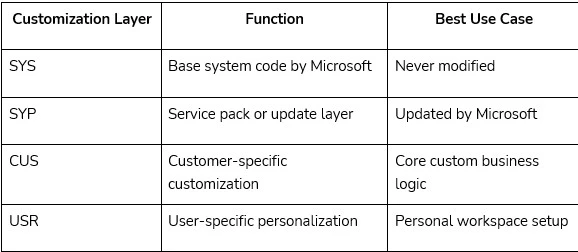
Microsoft Dynamics 365 follows a layered and extensible architecture to handle system customization safely. The system separates the application into multiple layers: SYS, SYP, CUS, and USR. Changes are meant to be isolated and independently maintained so that core upgrades can happen without overwriting custom work.
The customization in this case is mainly achieved by the extension model that allows developers and consultants to extend the functionality without touching the source code. Event handlers, metadata extensions, and class augmentations enable organizations to extend forms, tables, and classes while preserving core integrity.
Workflow Configuration and Business Rules
In the workflow editor, the configuration model is drag-and-drop-enabled, thus allowing customization without direct coding.
Business rules go a step further in that they extend this automation by allowing data validation and control logic to be specified directly in forms. These rules execute automatically based on user input to ensure consistency in data integrity across the system. Microsoft Dynamics 365 Online Training teaches how such rules interact with metadata to enable real-time process control without code dependency.
Data Entities and Integration
Data entities are the structured layer for data management and data integration. Each data entity represents a logical collection of related data from multiple tables, making it easier to import, export, and synchronize data across systems.
DMF helps in the creation of custom data entities, supporting batch jobs, transformations, and validations. These entities also expose data through OData services for the purpose of third-party system integrations.
This is what learners usually do in Microsoft Dynamics CRM Online Training: define these entities and map them to API endpoints so that there is a unified data environment.
Extending Business Logic and Application Behavior
Beyond configurations, Dynamics 365 enables technical extensions to modify or extend the business logic by event-driven programming and making use of pre- and post-event handlers.
For instance, a pre-event handler can validate the data before saving the record while a post-event handler can trigger other system activities like logging and synchronization after the transaction is committed. The developer uses attributes such as [PreHandlerFor] and [PostHandlerFor] in X++ to define such logic injections.
Other Related Course:
Microsoft Dynamics Online Training
Microsoft Playwright Test Automation with C# Training
Power Platform and Advanced Customization
With Power BI integration, real-time analytics come right inside the Dynamics dashboards. It lets users set up real-time reports within forms to present actionable data at operational points. This connects transactional data to analytical insight, hence improving decision-making.
Students taking Microsoft Dynamics 365 Online Training often create a localized version of financial workflows in order to accommodate country-level regulations and accounting structures.
Sum Up
The customization of Microsoft Dynamics 365 virtually makes it an organization's property. It helps each department to work in tandem with the actual business requirements rather than aligning with the set rules of the software. These customization, if made with proper knowledge and planning, enhance the accuracy, speed, and flexibility of nearly all operations when done correctly.

























Sign in to leave a comment.