
In the middle of 2026, U.S. companies are feeling the full weight of modern security expectations. NIST continues to push organizations toward post-quantum readiness, reminding everyone that sensitive data encrypted with today’s algorithms could be sitting in an attacker’s archive waiting for tomorrow’s quantum breakthrough. At the same time, compliance teams are digging deeper into how companies actually protect data when it’s not moving on file servers, backup drives, shared folders, or staging areas before secure transfer.
Automation has become non-negotiable too. Teams in finance, healthcare, manufacturing, and government contractors are running hundreds or thousands of file-based operations every day: generating reports, exchanging EDI files with partners, archiving audit trails, pushing updates to remote sites. Adding encryption manually at any of those steps slows everything down and creates human-error risks.
OpenPGP command line encryption software solves this cleanly. It lets you encrypt files, add verifiable digital signatures, and decrypt later all from straightforward commands that plug directly into scripts, Windows Task Scheduler, batch files, or any orchestration tool you already use.
TurboPGP is built for exactly these production environments. As a PGP command line tool and PGP software for Windows, it delivers fast native performance on Windows systems, supports batch and folder-level operations, includes detailed audit logging that auditors actually accept, and integrates smoothly with TurboFTP and TurboFTP Server so you get true end-to-end protection: encrypt before files leave your network, transfer securely, decrypt only on the trusted side.
This guide is written for busy U.S.-based IT admins, developers, and operations leads who need practical, reliable ways to make encryption automatic and defensible. No theory overload—just what works in real environments right now.
Why Command-Line OpenPGP Is Still the Right Choice in 2026
Graphical tools have their place for one-off tasks, but when you need encryption to happen reliably at scale and without supervision, command-line is king. You get:
- Zero GUI dependencies → runs on headless servers
- Scriptable output → easy to log, monitor, and alert on failures
- Predictable behavior → no surprises during scheduled runs
- Low resource footprint → doesn’t bog down production machines
Today’s main pressures driving adoption include:
- Preparing data for a post-quantum world (even if full algorithm swaps are still years away, hybrid thinking starts now)
- Satisfying auditors who want proof that encryption is applied consistently (HIPAA Security Rule, PCI-DSS 4.0, CMMC 2.0 Level 2, FedRAMP moderate baselines)
- Handling growing file volumes without performance cliffs
- Staying productive in Windows-heavy shops where Active Directory already manages users and permissions
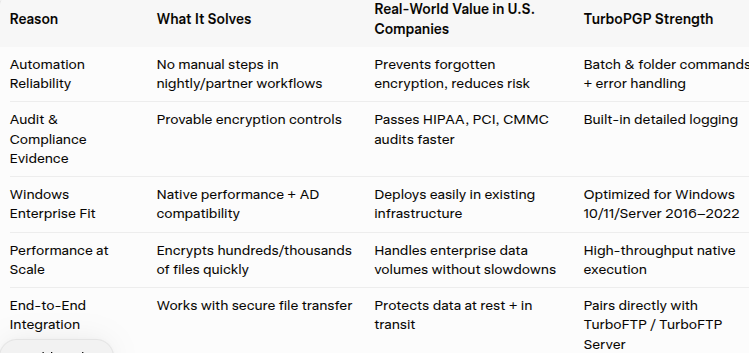
TurboPGP checks all these boxes. It runs natively on Windows, avoids unnecessary cross-platform complexity, offers high-throughput batch processing, and logs operations in a format that makes compliance evidence straightforward.
Here’s a summary of the key reasons U.S. teams rely on this approach:
Installing TurboPGP and First Commands
Installation couldn’t be simpler.
- Visit turboftp.com and download the TurboPGP 30-day evaluation (MSI package).
- Run the installer on your target Windows machine.
- Launch Command Prompt or PowerShell with admin rights.
Create your first key pair (use a strong, unique passphrase):
text
tbpgp --gen-key "IT Security <[email protected]>" --key-type rsa --bits 4096
Verify it exists:
text
tbpgp --list-keys
Quick test—encrypt a sample file:
text
tbpgp --encrypt Q2_2026_budget_projections.xlsx -r [email protected]
Decrypt (after the recipient shares their public key with you):
text
tbpgp --decrypt Q2_2026_budget_projections.xlsx.pgp -o restored_budget.xlsx
Add a signature for integrity:
text
tbpgp --sign internal_audit_trail.pdf
Practical Automation Examples Used in U.S. Environments
Example 1: Encrypt Backups Every Night
Many teams use a short PowerShell script scheduled via Task Scheduler:
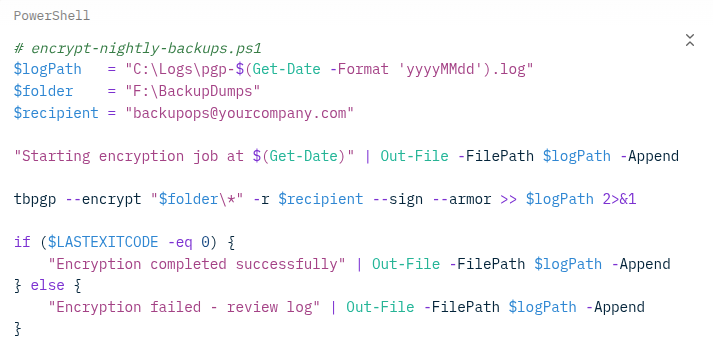
Run this at 1:30 a.m. daily. The log file becomes part of your compliance package.
Example 2: Encrypt → Transfer → Decrypt Workflow
- Internal process drops files into C:\SecureOutbound
- Scheduled TurboPGP job encrypts everything there
- TurboFTP scheduler picks up the .pgp files and sends via SFTP/FTPS/HTTPS
- Receiving side decrypts with their private key
This pattern is common in supply-chain, healthcare, and financial data exchanges.
Example 3: Logging for Compliance Reviews
TurboPGP writes clear, timestamped logs for every operation. Point auditors to the log folder and they can see exactly which files were encrypted, when, with which key, and whether it succeeded.
Security Habits That Prevent Headaches
From working with many U.S. customers:
- Passphrases: Minimum 20 characters, no dictionary words, stored in a password manager or HSM
- Key rotation: Replace encryption subkeys every 12–24 months
- Revocation: Generate and store revocation certificates offline the day you create keys
- Testing: Quarterly dry-run decrypt/verify on sample files
- Updates: Apply TurboSoft maintenance releases promptly
- Key storage: Never on synced cloud drives or shared folders
- Algorithm choice: Stick with 4096-bit RSA or ECDSA unless you have specific hardware constraints
FAQs
How ready is OpenPGP for post-quantum?
The standard is being updated with hybrid and post-quantum drafts. TurboPGP uses strong modern algorithms today and is built to adopt new ones as they mature.
Why choose TurboPGP over completely free options?
In serious Windows production use, the combination of native speed, Active Directory support, trustworthy logging, and direct TurboFTP integration usually outweighs the zero-cost alternative.
Can it really handle large-scale batch jobs?
Yesdesigned for it. Folder wildcards and efficient processing keep CPU and I/O reasonable even on thousands of files.
Does TurboPGP integrate tightly with TurboFTP?
Yes one of its biggest strengths. Encrypt once, transfer securely, decrypt on arrival. Many customers run this exact pattern daily.
Closing Thoughts
Strong, automatic endpoint encryption is no longer a nice-to-have in 2026 it’s how responsible U.S. companies protect their data, their partners, and their reputation. OpenPGP command line encryption software makes that protection reliable and invisible to day-to-day operations.
TurboPGP gives you everything you need: speed on Windows, logging auditors respect, batch power for real workloads, and seamless connection to TurboFTP for full-cycle file security.
Download the 30-day trial right now at TurboSoft, Inc. Setup takes minutes, and if you need guidance on Windows deployment, scheduling, or TurboFTP pairing, TurboSoft support is based here in the U.S. and ready to assist.


























Sign in to leave a comment.