
Power BI vs Tableau: Detailed Comparison
Power BI and Tableau stand as two of today's leading business intelligence tools, each with unique strengths appealing to different user needs. Power BI fits well within Microsoft environments, offers budget-friendly options, and provides extensive training resources through Microsoft Learn, making it easier for teams to quickly adopt and master. Tableau excels in producing rich, custom visuals and handling large data volumes efficiently, backed by robust training programs and professional certifications that help users unlock advanced analytics capabilities. Choosing depends on budget, data size, user skill level, integration preferences, and the availability of training support to upskill your team effectively. Both platforms invest heavily in education and certification programs, ensuring users can maximize their BI investment through continuous learning and skill development.
Performance
Power BI operates smoothly with moderate data sizes but may slow with big data unless using Premium capacity. Tableau’s Hyper engine manages massive datasets swiftly without row limits in reports. This makes Tableau preferred for large enterprises, while Power BI suits small to midsize businesses needing quick insights.
Core Features
Power BI integrates seamlessly with Excel, Azure, and Office 365 for quick setup in familiar environments. Users build reports using Power Query for data prep and DAX for calculations. Tableau offers drag-and-drop interfaces for custom charts, maps, and layered visuals without coding.
- Power BI: Free desktop app, real-time refresh via gateways.
- Tableau: In-memory engine processes queries fast, supports live connections to Hadoop or Google BigQuery.
Organizations handling Microsoft stacks prefer Power BI for its native compatibility. Tableau draws analysts needing pixel-perfect designs.
Performance Breakdown
Power BI handles moderate datasets smoothly but slows on massive volumes without Premium scaling. Tableau's Hyper engine manages big data efficiently, avoiding row limits in visuals.
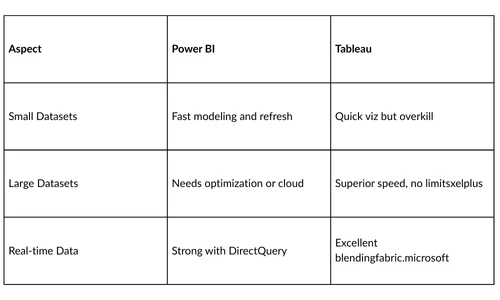
Tableau wins for enterprises crunching terabytes daily. Power BI fits SMBs or teams prioritizing speed over scale.
Ease of Use
Power BI's ribbon interface mirrors Excel, lowering barriers for beginners. Drag fields to visuals, apply slicers instantly. Tableau demands more clicks for advanced layouts but rewards with flexibility.
Power BI training focuses on DAX and gateways in weeks. Tableau requires practice for Show Me suggestions and calculated fields. Analysts from non-tech backgrounds adopt Power BI faster.
Data Connectivity
Power BI links to 100+ sources out-of-box, strongest in Microsoft ecosystem like Dynamics 365. Gateways enable on-prem pulls. Tableau connects to 100 sources too, shining with non-relational like Salesforce or custom SQL.
- Power BI strengths: Azure Synapse, SQL Server.
- Tableau edges: Statistical tools, cloud warehouses.
Blending datasets flows naturally in both, yet Power BI unifies easier within Microsoft.
Visualization Options
Tableau leads with 30+ mark types, treemaps, and heatmaps for storytelling. Animate transitions, overlay sheets seamlessly. Power BI offers 20+ visuals, custom via AppSource, but fewer native advanced types.
Power BI dashboards embed AI like key influencers. Tableau's viz density suits exploratory analysis. Marketers craft executive stories quicker in Tableau; operations teams standardize in Power BI.
Learning Curve and Community
Power BI documentation and YouTube tutorials abound, tied to Microsoft's free learning paths. Certification via PL-300 exam validates skills. Tableau's forums thrive, but official training costs more.
- Power BI: Microsoft Learn modules, low entry.
- Tableau: Viz of Day inspiration, steeper for DAX-like LOD expressions.
Communities on Reddit and Fabric forums help troubleshoot both tools daily.
Integration Capabilities
Power BI embeds in Teams, Power Apps for workflows. Service bus syncs with Fabric for end to end analytics. Tableau integrates Salesforce natively, extends via APIs to Python or R. Power BI scales in Microsoft clouds affordably. Tableau pairs with any stack but lags in Office synergy. Developers automate reports easier in Power BI ecosystems.
Security Features
Power BI row-level security filters data by user roles dynamically. Compliance with GDPR via Purview. Tableau uses Active Directory, encrypts extracts end-to-end.
Both audit access logs. Power BI's sensitivity labels suit regulated industries.
Deployment Options
Power BI Service hosts reports in browser, mobile apps sync changes. On-prem Report Server for air-gapped setups. Tableau Server or Cloud deploys sites, schedules extracts.
Power BI's SaaS model updates automatically. Tableau offers hybrid control.
Use Cases
Power BI powers daily KPIs in finance, sales dashboards. SterlingNext training preps for PL-300 with hands-on DAX. Tableau fits marketing attribution, geospatial analysis in retail.
- Retail: Tableau maps store performance.
- IT Ops: Power BI monitors Azure costs.
Choose Power BI for cost-sensitive reporting. Opt Tableau for viz-heavy exploration.
Pros and Cons
Power BI Pros:
- Low cost entry.
- Microsoft integration.
- Fast for standard reports.
Power BI Cons:
- Weaker on huge data.
- Limited custom visuals.
Tableau Pros:
- Top-tier visuals.
- Big data prowess.
- Flexible connections.
Tableau Cons:
- Pricey licenses.
- Complex mastery.
Market Share and Future
Power BI grows fastest per Gartner, thanks to Fabric unification. Tableau holds viz leadership post-Salesforce buy. AI features like Copilot tip Power BI ahead for 2025.
Enroll in Microsoft Power BI Certification Training for hands-on projects, mock exams, and exam prep. customize, pay post-training. Secure skills opening data analyst roles









Sign in to leave a comment.