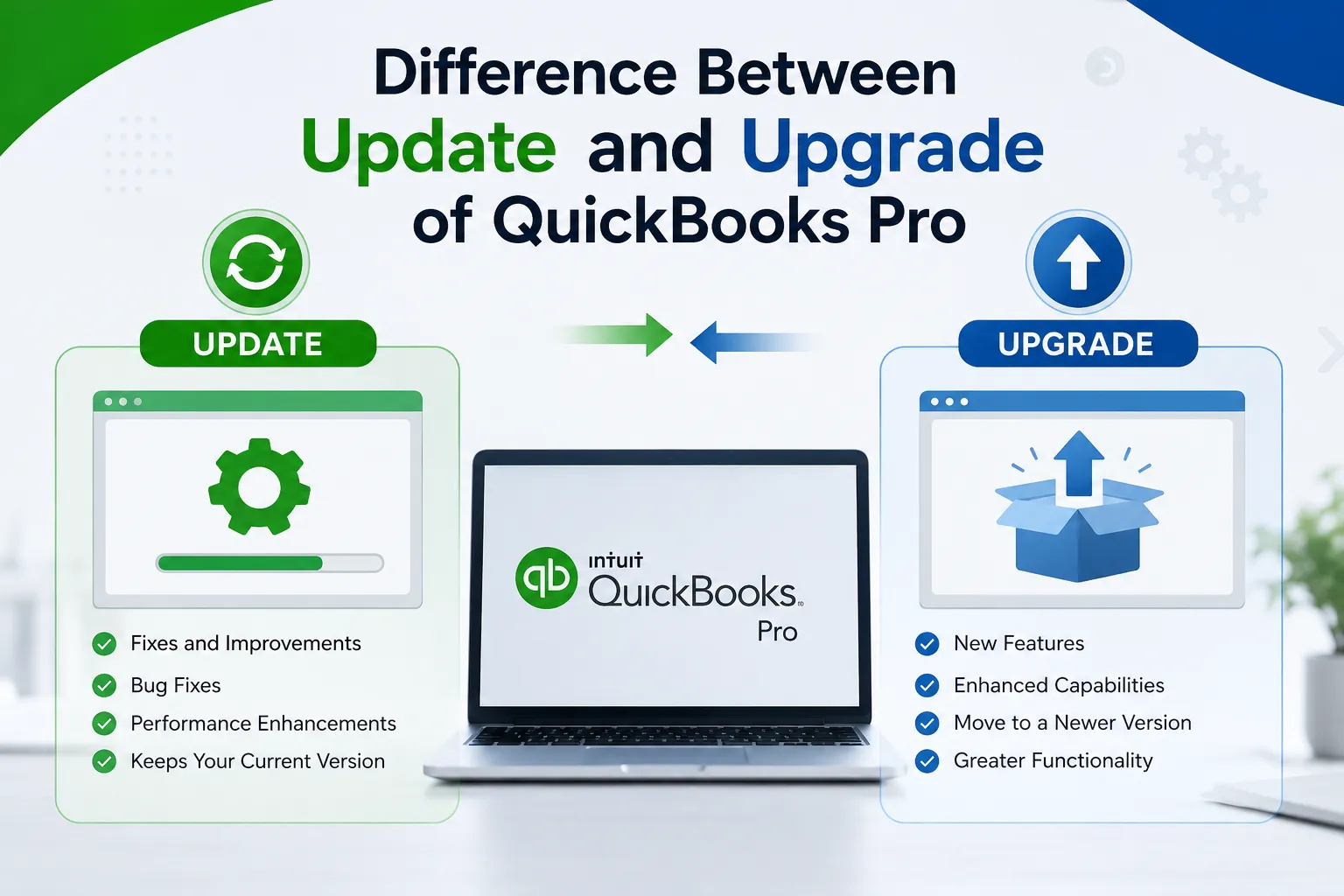

QuickBooks Pro is used by many small businesses and professionals to manage everyday accounting activities, including invoices, expenses, transactions, customer records, and financial reports. Like other software applications, QuickBooks requires regular maintenance and may eventually need a move to a newer version or product.
For many users, the terms update and upgrade can be confusing. An update generally refers to improving the software that is already installed, while an upgrade usually involves moving to a newer version or a different product with additional capabilities.
Understanding how these processes work can help QuickBooks users make informed decisions and avoid unnecessary changes to their accounting setup. This QuickBooks Pro update and upgrade guide explains the differences, preparation steps, common considerations, and situations in which either option may be appropriate.
What Is a QuickBooks Pro Update?
A QuickBooks Pro update is generally a maintenance change to an existing installation. Updates can include bug fixes, security improvements, compatibility changes, performance enhancements, and corrections to known software issues.
The purpose of an update is normally to keep the current software functioning properly rather than replace it with a completely different product.
For example, if a business is using a supported QuickBooks Pro installation and an official maintenance release becomes available, installing that release can help keep the software current.
Updates are therefore a normal part of software maintenance. They can help users benefit from improvements made after the original software release.
What Is a QuickBooks Pro Upgrade?
An upgrade is a more substantial change than a routine update. It may involve moving from an older version to a newer version or changing to another QuickBooks product or edition.
Businesses may consider an upgrade when their current software no longer meets their accounting requirements or when they need capabilities available in a newer release.
An upgrade can involve additional preparation because users may need to review system requirements, company-file compatibility, integrations, subscriptions, and other factors.
The exact upgrade process depends on the QuickBooks product and the current options provided by Intuit.
QuickBooks Pro Update vs. Upgrade
The easiest way to understand the difference is to think of an update as maintenance and an upgrade as a larger product change.
An update generally improves the software already being used. An upgrade generally moves the user toward a newer version, edition, or product.
| Update | Upgrade |
|---|---|
| Maintains the existing software | Moves to a newer version or product |
| May include bug fixes | May provide broader changes |
| Can improve performance | Can introduce newer capabilities |
| May address compatibility issues | May require additional preparation |
| Usually focuses on maintenance | Usually represents a larger change |
| Appropriate for supported existing software | Useful when newer capabilities are required |
Although the distinction is straightforward, the exact behavior can vary by QuickBooks product and licensing model.
Why Are QuickBooks Updates Important?
Accounting software handles important business information, so keeping supported software properly maintained can be valuable.
Fixing Software Problems
Updates can address known bugs and technical problems. If a problem has already been identified by the software developer, a future release may contain a correction.
Improving Compatibility
Operating systems and other technologies change over time. Software updates can include improvements designed to maintain compatibility with supported environments.
Enhancing Reliability
Some releases focus on improving software stability. A more reliable application can make routine accounting work easier.
Security Improvements
Security-related fixes are another important reason to keep supported software maintained. Users should rely on official software releases rather than unofficial downloads.
Performance Improvements
Depending on the release, updates may improve certain performance-related aspects of the application.
Why Might You Need to Upgrade QuickBooks Pro?
An update is not always enough. A business may eventually reach a point where the current product no longer meets its requirements.
One reason can be business growth. A company that initially needed only basic accounting functions may later require additional capabilities.
Another reason may be product support. Older versions can eventually reach the end of their supported service period. In that situation, continuing to search for routine maintenance updates may not address the underlying need.
Other reasons for considering an upgrade can include:
- The business needs newer accounting capabilities.
- The existing version is no longer suitable for the current computer environment.
- The company has expanded its accounting workflow.
- Newer functionality is required.
- The current product does not fit changing business requirements.
- The business wants to move to a newer supported solution.
An upgrade should be considered based on actual requirements rather than simply choosing a newer product because it exists.
How to Check Your QuickBooks Version
Before updating or upgrading, determine exactly which QuickBooks product and version is installed.
This is important because different QuickBooks products can have different requirements and upgrade paths.
Users should review the product information available within their QuickBooks installation and account. Knowing the exact product name and version can help prevent confusion when searching for updates or upgrade instructions.
It is also useful to check whether the current version is still supported.
How to Prepare for a QuickBooks Update
A routine update may be relatively simple, but basic preparation is still recommended.
Create a Backup
Before making changes to accounting software, create a current backup of important company data. A backup provides additional protection if something unexpected occurs during the process.
Close QuickBooks
Follow the installation instructions and close QuickBooks when required before beginning an update.
Check the Computer
Make sure the computer meets the requirements for the QuickBooks version being maintained.
Review Connected Applications
If QuickBooks is connected with other applications, check whether those applications have compatibility requirements.
Use Official Sources
Always obtain QuickBooks updates from legitimate Intuit or QuickBooks resources. Avoid unknown websites offering unofficial installers.
How to Prepare for a QuickBooks Upgrade
An upgrade generally requires more planning than an update.
1. Back Up Company Files
Create a reliable backup before starting. Do not assume that an upgrade alone provides complete protection for your accounting data.
2. Review System Requirements
A newer version may have different operating-system or hardware requirements. Check compatibility before installing anything.
3. Check Third-Party Integrations
Many businesses connect QuickBooks with payment platforms, payroll tools, inventory applications, reporting software, and other services. Confirm that critical integrations will continue to work.
4. Plan Multi-User Access
If several employees access QuickBooks, plan the upgrade across the computers involved. This can help minimize disruption.
5. Review Your Account
Check your QuickBooks subscription, license, and available upgrade options before making a product change.
Can an Update Fix a QuickBooks Error?
Sometimes, but not always.
If an error is caused by a known software problem that has been corrected in an official release, an update may resolve it.
However, QuickBooks errors can also be caused by damaged company files, Windows configuration, network problems, permissions, installation issues, or third-party software.
Therefore, users should identify the actual cause of an error before assuming that an update or upgrade will solve it.
Repeatedly installing software without understanding the underlying problem can waste time and may not resolve the issue.
Can Upgrading Fix Existing QuickBooks Problems?
An upgrade can provide a newer software environment, but it should not be treated as a universal troubleshooting solution.
For example, if a company file is damaged, simply moving to a newer version may not automatically repair that data. Similarly, a network configuration problem may continue after an upgrade.
When a technical issue occurs, first determine whether the problem is related to the QuickBooks version itself or to another part of the computer environment.
Common Mistakes During Updates and Upgrades
QuickBooks users can avoid many problems by planning ahead.
Not Creating a Backup
One of the most important mistakes is making major software changes without a current backup.
Choosing the Wrong Product
QuickBooks has offered different products and editions over time. Users should confirm that they are selecting the appropriate product rather than relying on an outdated guide.
Ignoring System Requirements
A newer software version may require a supported operating system or specific computer configuration.
Forgetting Third-Party Software
An upgrade can affect integrations. Businesses should identify important connected applications before making significant changes.
Using Unofficial Downloads
Unknown download websites can present security and compatibility risks. Official sources are the safer choice.
Assuming an Upgrade Is Always Necessary
A newer version is not automatically required for every user. If the existing supported product meets the business's needs, routine maintenance may be sufficient.
When Should You Update QuickBooks Pro?
An update may be appropriate when the existing software is supported and you want to maintain it with available fixes and improvements.
You may want to update when:
- An official maintenance release is available.
- You want applicable bug fixes.
- A security improvement has been released.
- Compatibility improvements are available.
- You want to keep the current installation maintained.
- The update addresses a known issue affecting your workflow.
The key purpose is to improve the existing environment without necessarily changing to a different product.
When Should You Upgrade QuickBooks Pro?
An upgrade may make more sense when the current product no longer matches your needs.
Consider evaluating an upgrade when:
- Your current version is outdated.
- Your business requires newer capabilities.
- Your existing product no longer fits your workflow.
- You need a newer supported version.
- Your computer environment has changed.
- Your company has grown and its accounting requirements have expanded.
Before upgrading, compare the benefits with the time, cost, and preparation involved.
A Simple Real-World Example
Imagine a small business that uses QuickBooks Pro for invoices, expenses, and financial reporting. The current version works properly and provides everything the company needs.
An official maintenance release becomes available with software fixes and improvements.
In this situation, an update is generally the relevant option because the company wants to maintain its existing software.
Now imagine that the company expands and requires functionality that its current product does not provide. Installing another maintenance release may not add the capabilities the business needs.
In that case, the business should evaluate an upgrade or another suitable QuickBooks solution.
This example shows that updates and upgrades solve different types of needs.
Best Practices for QuickBooks Software Maintenance
A consistent maintenance routine can make accounting software management easier.
Keep regular backups of company data and store them securely. Monitor official QuickBooks announcements and product-support information. Before installing a major version, review system requirements and connected applications.
Businesses should also schedule significant software changes carefully. Avoid making major changes during critical accounting periods unless there is an urgent reason to do so.
For organizations with multiple users, communicate the planned change with employees in advance so everyone knows when the software may be unavailable.
Frequently Asked Questions
Is a QuickBooks update the same as an upgrade?
No. An update generally maintains and improves the existing software, while an upgrade usually involves moving to a newer version, edition, or product.
Do I need to upgrade every time an update is released?
No. An update does not automatically mean that an upgrade is required. Determine whether your existing product remains suitable and supported.
Should I back up my QuickBooks company file?
Yes. Creating a current backup before significant software changes is a sensible precaution.
Can an update add new features?
Some updates can include improvements or changes to existing functionality, but a routine update should not automatically be assumed to provide all capabilities of a newer major version.
Is upgrading QuickBooks difficult?
The complexity depends on the product, version, company setup, operating system, integrations, and number of users. Proper preparation can make the process smoother.
Final Thoughts
A clear understanding of the QuickBooks Pro update and upgrade process can help businesses maintain their accounting software with fewer surprises.
An update is generally focused on maintaining an existing installation through fixes, patches, compatibility improvements, security changes, and other maintenance work. An upgrade is a more substantial change that can involve moving to a newer version or product with capabilities better suited to current requirements.
Before making either change, identify your QuickBooks product and version, back up important company data, review system requirements, check third-party integrations, and confirm the applicable subscription or licensing information.
Most importantly, choose the option based on your actual situation. If your existing supported QuickBooks installation meets your needs, keeping it properly maintained may be enough. If your business has outgrown the current software or requires a newer supported solution, an upgrade may deserve consideration.
Taking a few minutes to understand the difference between an update and an upgrade can help users make a more informed decision and maintain a smoother accounting workflow.
























Sign in to leave a comment.