
You spend hours writing your resume, only to hear nothing back. It's frustrating, especially when you know you’re qualified. Here's something most job seekers never realize: your resume could be getting skipped, not because of what it says, but because of how it looks.
Recruiters often scan hundreds of resumes in one day. Many of them spend just a few seconds on each one before moving on. If your resume template isn’t easy to read or doesn’t work with the systems employers use, your information might never be seen. But there’s a simple trick that can turn this around and it starts with using the right resume template.
This one change can help your resume stand out in a stack and get you more interviews. It’s not about adding flashy colors or fancy designs. It’s about using a template that’s both clean and smart.
Why your resume template can make or break your chances
A resume is more than just a list of your experience. It’s a tool that needs to work fast. The resume template you use controls how clearly your skills and strengths come across.
When a recruiter opens your resume, they’re quickly scanning for job titles, key skills, and dates. If those things are hard to find or hidden in a confusing layout, they’ll move on to the next person. A good resume template organizes everything so that it's easy to follow. The right spacing, font size, and section order can make a huge difference.
There’s another reason the resume template you choose matters: applicant tracking systems, also called ATS. Many companies use ATS software to filter resumes before a human even sees them. These systems don’t like fancy formatting. They can’t read images, charts, or complex tables. If your resume template includes those, it might get rejected automatically.
So even if your experience is perfect for the job, your resume could be blocked simply because of how it’s formatted. That’s why picking the right resume template isn’t just helpful, it’s necessary.
The trick: use a tested resume template that’s both eye-catching and ATS-friendly
Here’s the trick that can boost your chances of getting interviews: use a resume template that’s been tested to work well with both human recruiters and applicant tracking systems. These templates are designed to look clean, highlight the most important details, and avoid the formatting problems that confuse ATS software.
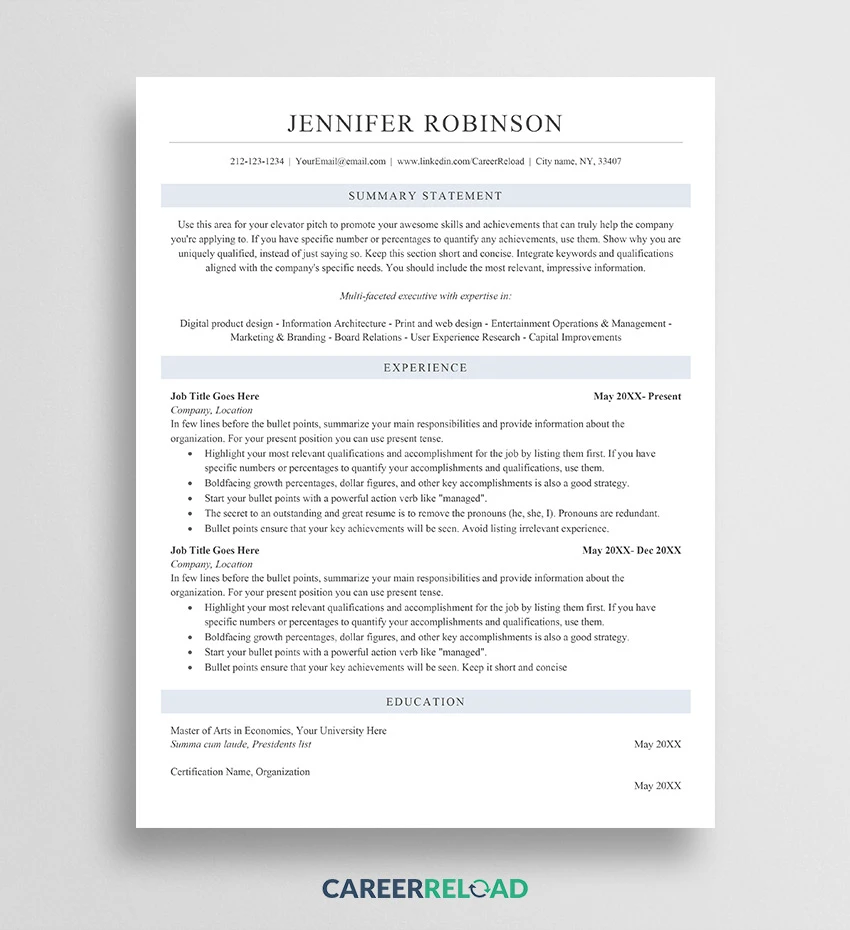
A strong resume template keeps things simple. It uses clear headings like “Work Experience” and “Skills,” sticks to standard fonts like Arial or Calibri, and avoids clutter. Every section has a purpose and everything lines up neatly on the page.
On the other hand, many popular templates include elements that seem creative but actually cause problems. Tables, icons, graphics, and multiple columns can make your resume harder to scan and harder for software to read. The trick is finding a resume template that looks good but still plays by the rules.
By using a smart, clean, and modern template, you make sure that your qualifications come through clearly and that nothing stands in the way between your resume and the interview invitation.
How to customize the template for any job
Even the best resume template works best when you customize it. Think of the template as a strong starting point, it gives you a structure, but what you put inside still matters.
To start, adjust your resume based on the job you’re applying for. Look closely at the job description and pick out the most important skills or keywords. Make sure those appear naturally in your resume. You don’t need to list every job you’ve ever had. Focus on what’s most relevant.
If you’re applying for a marketing job, highlight results like “increased social media engagement by 45%.” For a technical role, show off skills like coding languages or certifications. The template gives you a format, but you need to fill it with content that matches what the employer is looking for.
When customizing, try to:
- Use strong, action-based verbs like “led,” “created,” or “managed”
- Include numbers or results when possible to show your impact
- Keep descriptions short and focused
The beauty of a good resume template is that it lets you make these changes quickly. You won’t have to worry about fixing the layout every time, you just update the content, and you’re ready to go.
Where to find the best resume templates
If you’re looking for a reliable source of clean, easy-to-use resume templates, CareerReload.com is a great place to start. Their templates are designed with both style and function in mind. That means they look modern and professional, but they also work well with applicant tracking systems.
CareerReload offers a variety of resume templates that fit different job levels and industries. Whether you're just starting out or have years of experience, you can find a layout that fits your needs. Best of all, their templates don’t use overly complex designs that confuse employers or get blocked by software.
Here’s why CareerReload’s resume templates stand out:
- They’re simple and easy to edit
- Designed to be compatible with most ATS software
- Come in Word and Google Docs format, so you can update them quickly
- Clear headings and layout to make your information stand out
Instead of wasting time creating a resume from scratch, you can download a proven resume template from CareerReload and focus on writing the best content. It saves time and increases your chances of being noticed.
Final tips for sending your resume
Once your resume is complete and you’ve chosen the right resume template, the last step is making sure you send it out the right way. Even small details can make a difference when applying for jobs, especially when hiring managers are sorting through dozens of files.
First, always check the job listing to see which file format the company prefers. In most cases, saving your resume as a PDF is the safest option. A PDF keeps your layout exactly the way you designed it, so your resume template stays clean and professional when opened on any device. However, if a company asks for a Word file, follow that instruction to avoid being disqualified.
Next, be mindful of how you name your file. A generic name like “Resume123.docx” can look careless. Instead, use a format like “Jane_Smith_Resume” so it’s easy to identify and looks polished.
Also, match your resume template with a short, tailored cover letter. A simple one-page letter that connects your experience to the job shows extra effort and helps you stand out. Make sure the design of your letter matches the style of your resume template for a consistent, professional look.
Here’s a quick list of final steps to follow before you click “send”:
- Save your file in the requested format (PDF is usually best)
- Use a clear, professional file name
- Double-check for spelling and grammar errors
- Attach a cover letter that fits the same visual style as your resume template
These small steps can help make a great impression and keep your application looking sharp from start to finish.
Wrap it up and encourage action
Getting more interviews doesn’t always mean rewriting your whole resume. Sometimes, it just takes one smart change. By using a better resume template, one that’s built for both people and hiring systems, you make it easier for your skills and experience to shine through.
Many job seekers miss out on opportunities because their resume gets buried or rejected by software. But you can avoid that with a layout that’s clear, modern, and easy to read. The resume template you choose can be the difference between getting noticed and getting ignored.
Now that you know the trick, it’s time to take action. Choose a strong resume template, customize it for the job you want, and follow the best practices for sending it. This small change could be the step that leads to your next interview and maybe even your next job.
Don't wait. Give your resume the upgrade it deserves, and see how much more attention it gets.







Sign in to leave a comment.