Is the Ribbon Stealing the Show? — Plan a Clear Product Clip with a Free Image-to-Video Generator, No Signup Required


Imagine styling a pale blue soap dish with a coral ribbon. The colour combination is appealing, so you consider adding a little movement. Before asking the ribbon to flutter, ask a simpler question: will the dish still be easy to see?
A free image-to-video generator with no signup required can help explore a short concept. The useful decision comes first: what information should stay clear, and how much room can decoration have without covering it?
Decide what the product picture needs to show
This is a fictional planning exercise using original AI-created illustrations, not a real listing or a tested video. The example dish has a rounded rectangular rim, pale blue glazing and three raised ridges. For an actual item, start with your own accurate product photograph or an image you have permission to edit and use.
Write one viewing question before arranging props. For this dish: “Can I see the complete outline and count the three ridges?” That gives you something concrete to protect. It is more useful than a brief that only says “make it eye-catching”.
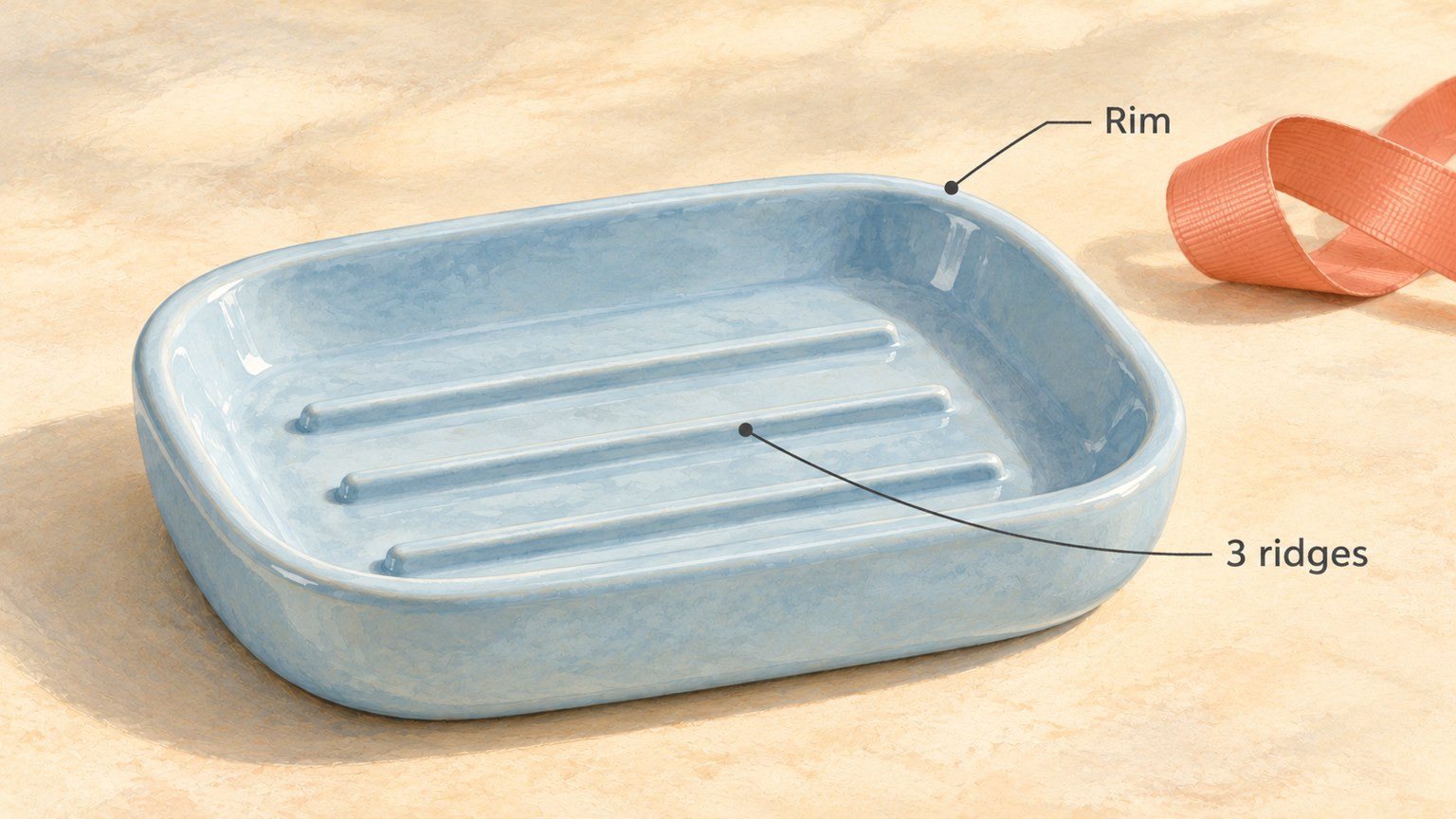
Choose the product details that must remain readable before planning any decorative movement.
Check that question at the size where the image will be viewed. A detail visible in a large working file may be difficult to make out in a small post. If the rim merges into the background or a ribbon covers one ridge, improve the still composition first: change the prop position, simplify the scene or choose a clearer crop.
Keep factual information separate from styling. An illustration of ridges does not demonstrate how well a real dish drains. A ribbon beside an item does not establish that gift wrapping is included.
Give the ribbon a small, separate movement area
For this composition, leave the ribbon behind and to the right of the dish. Keep a visible gap between them. Let only its free tip lift a little, then settle into the intended ending position; the loop and the rest of the ribbon stay put.
The whole route matters. A clear beginning and end would not make a sweep across the dish acceptable halfway through. Plan the tip's movement outside the product outline, with enough spare room that it does not skim the rim.
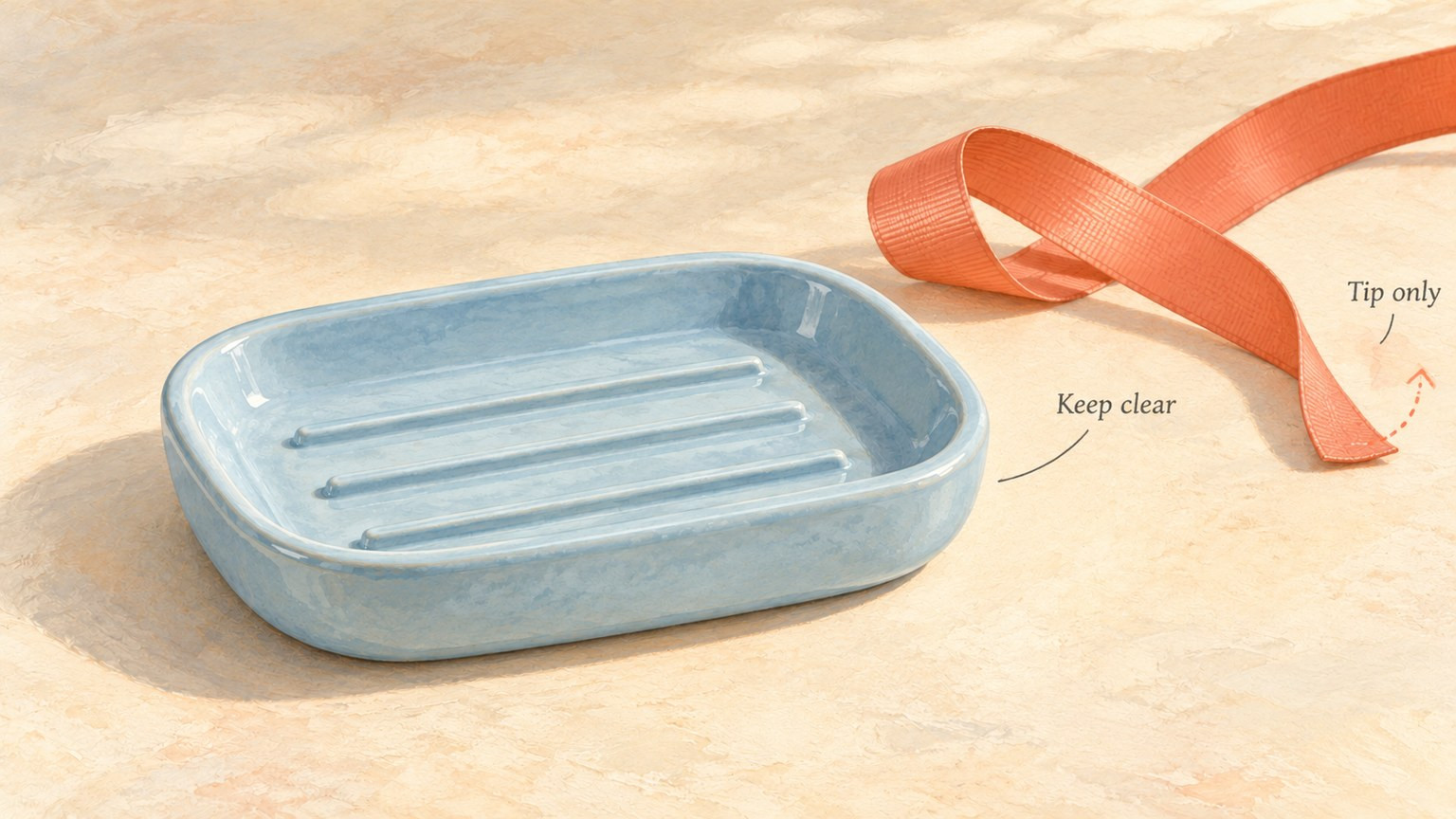
The dotted arc is a planned movement, not a generated result. Leave clearance throughout the route, including between the endpoints.
Use a short motion brief:
- What stays clear: the full rim, three ridges and blue surface.
- What moves: only the free ribbon tip at the right.
- Where it moves: within the empty space beside the dish.
- Where it stops: a slightly lifted position, without another flourish.
- What stays fixed: the dish, ribbon loop, camera, light and background.
This is a composition choice, not a measured claim about where customers will look. If there is too little empty space for the movement, move or remove the ribbon. The product picture can work as a still.
Prepare the two endpoints before opening the generator
Make two separate, completed image files from the same source composition. In the first, the ribbon tip rests on the surface. In the last, only that tip is slightly lifted. Use the same canvas dimensions, aspect ratio and viewpoint.
For an illustration you control, you can prepare an authorised edit of the ribbon in a working copy while retaining the product unchanged. For real product photography, keep the accurate product source intact. Do not redraw the item to make a more convenient endpoint.
These are two clean input images, not a comparison sheet with labels or arrows. The teaching illustrations here explain the decisions; they are not a ready-made pair to upload.
Keep the prompts focused on the planned move. For example:
The free coral ribbon tip at the right lifts slightly toward its position in the final image, then stops. Keep the ribbon loop and the pale blue soap dish still. Preserve the dish's outline, continuous rim, three raised ridges and colour. Keep the camera, lighting and background fixed; do not add objects or lettering.
At this optional generation step, you could use OpenMaker. Tool suggestion: OpenMaker is one option for the optional animation in this example.
OpenMaker's public description, checked on 28 October 2026, specifies first and last images in order, a motion prompt and an aspect ratio, followed by generation, preview and download. Its free route advertises five-second, 480p clips for zero credits, without signup. The term unlimited concerns the total number of generations; requests may queue.
OpenMaker names the associated free workflow MiniMax H3. References to it as powered by MiniMax H3 are a service attribution, not an independent check of the underlying model.
Review the item, not just the ribbon
Keep the accurate still beside any future preview. Look at the opening, the middle and the ending, then watch the complete movement. Ask:
- Does the ribbon stay outside the dish throughout?
- Does the outline retain the same shape and continuous rim?
- Are there still three ridges in the same arrangement?
- Does the item keep its colour without newly invented features?

Compare any future clip with the accurate still. The open questions are a review aid, not recorded test results.
Reject a version that changes the item, even if the decorative movement looks attractive. A fourth ridge, a softened corner or a ribbon crossing the rim changes what the picture communicates. If the review is difficult at the intended display size, keep the still or simplify the concept.
For a real listing or product post, retain an accurate static image and identify which item is being offered. If the ribbon is only a prop, explain that where it could otherwise be mistaken for part of the offer. Label an AI-animated concept as such; it is not a recording of the product in use.
The finished brief should let someone answer three things: what the item must show, what the decoration may do, and what would make a clip unsuitable. That is enough to decide whether the ribbon earns its place—or whether the clearer picture is the quiet one.



Sign in to leave a comment.