
In the rapidly evolving world of digital transformation, cloud computing has moved far beyond simple data storage and infrastructure hosting. Today, the modern tech landscape is dominated by microservices, automated deployment pipelines, and containerized applications. While open-source container orchestration software like Kubernetes has achieved widespread adoption across the tech industry, multi-billion-dollar global enterprises frequently demand much tighter operational control, robust security frameworks, and faster developer environments.
This operational gap is precisely why Red Hat OpenShift has emerged as a premium enterprise technology standard. When you combine the developer-first operational capabilities of OpenShift with the global network footprint and hyper-scale compute power of Google Cloud Platform (GCP), it establishes an incredibly powerful framework for hybrid cloud management.
Whether you are a seasoned DevOps architect planning an infrastructure migration or a technology enthusiast upgrading your professional skills, this complete guide covers everything you need to know about running OpenShift inside the Google Cloud ecosystem.
1. What is OpenShift on Google Cloud (GCP)? Breaking Down Red Hat OpenShift
To truly appreciate the value of this cloud integration, it helps to first understand the core software package. Developed by the engineering teams at Red Hat, OpenShift is an enterprise-hardened, downstream distribution of Kubernetes.
While raw Kubernetes functions purely as an open-source container orchestrator, OpenShift acts as a comprehensive, production-ready platform. It bundles Kubernetes with built-in private registries, secure routing mechanisms, integrated monitoring stacks (like Prometheus and Grafana), and developer-friendly continuous integration tools right out of the box.
The Power of Google Cloud Platform (GCP) Integration
When OpenShift is natively deployed on Google Cloud Platform (GCP), it creates a unified environment where enterprise operations teams no longer have to manage physical server systems.
This infrastructure integration allows businesses to run their mission-critical application workloads on Google Cloud's highly advanced virtual machines and global networking backbones, all while using the familiar operational interface, compliance tools, and administrative dashboards of the Red Hat ecosystem.
2. Structural Architecture: How It Operates on GCP
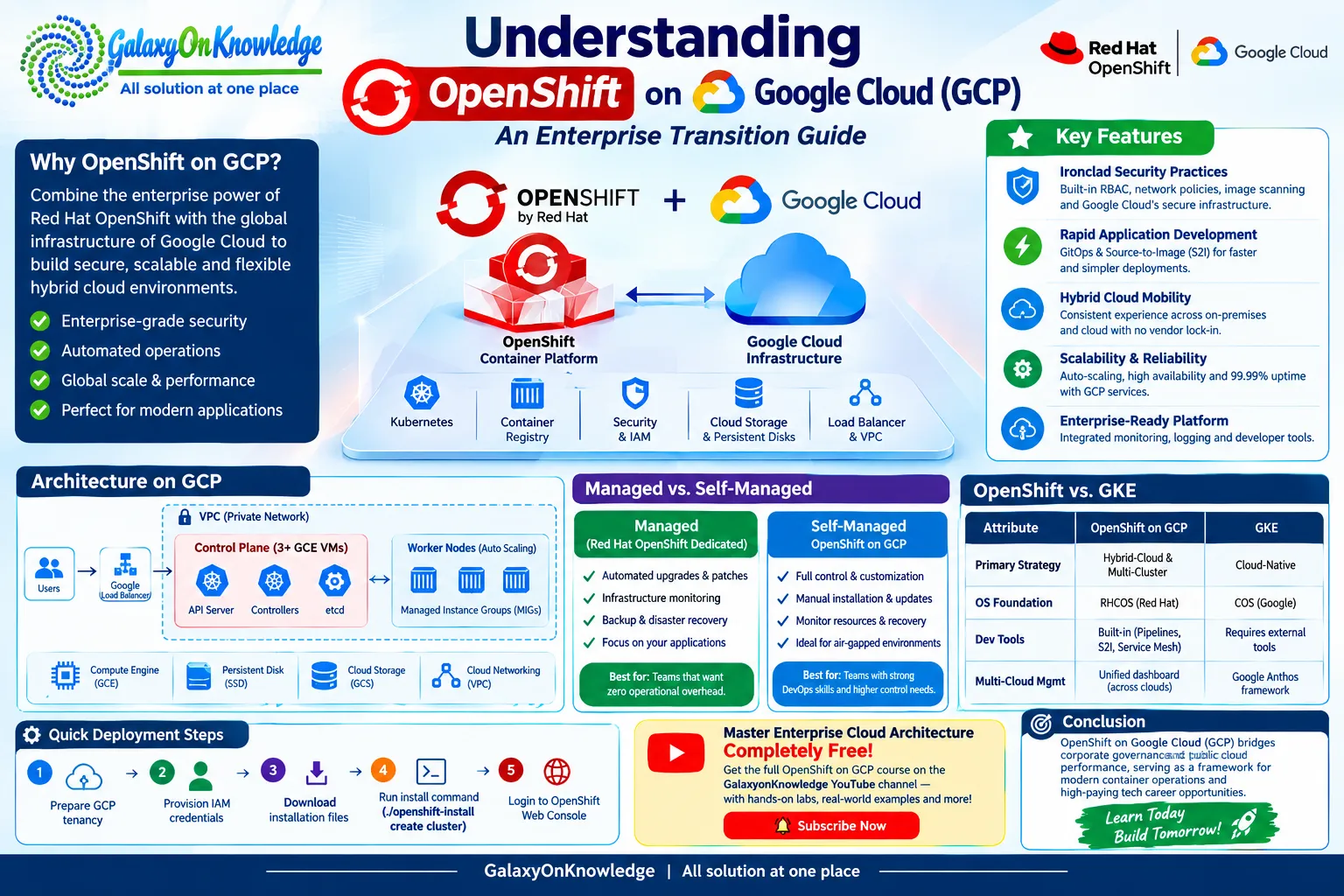
Running a production-ready OpenShift environment within a public cloud provider requires a highly resilient, multi-tiered infrastructure architecture. The system relies heavily on multiple native Google Cloud building blocks to guarantee 99.99% uptime and bulletproof data security boundaries.
The Operational Nodes
- The Management Control Plane: The absolute brains of the cluster are hosted on a minimum of three dedicated Google Compute Engine (GCE) virtual machine instances. These instances operate the central Kubernetes API services, resource controllers, and the secure etcd configuration database that continuously monitors the status of the entire cluster.
- The Scalable Worker Pool: These are the functional virtual machines where your application containers actually execute. By integrating directly with Google Cloud's automated Managed Instance Groups (MIGs), these worker nodes can automatically expand or shrink based on live network traffic spikes.
The Networking and Storage Layers
- Isolated VPC Topologies: Every single component within the cluster communicates through private networks inside a highly secure GCP Virtual Private Cloud (VPC). Public internet traffic is strictly prohibited from interacting with internal application systems unless it passes through automated Google Cloud Load Balancers.
- Persistent Enterprise Storage: Stateful software applications require reliable databases. OpenShift hooks directly into Google Cloud Persistent Disks and high-capacity Google Cloud Storage (GCS) buckets to dynamically assign high-speed solid-state drives (SSDs) to containers, ensuring data is never lost even if a hardware server recycles.
3. Crucial Advantages for Modern Enterprises
Migrating your deployment workflows to a combined OpenShift and Google Cloud software stack delivers substantial competitive advantages over standard raw Kubernetes deployments.
🔒 Ironclad Security Practices
Standard open-source Kubernetes requires systems engineers to manually write complex network access policies, establish Role-Based Access Controls (RBAC), and link third-party software container scanning databases.
OpenShift completely eliminates this manual overhead by enforcing extremely strict security policies straight out of the box. When deployed over Google Cloud's secure hardware infrastructure, it establishes an environment that is highly resilient against unauthorized data breaches.
⚡ Rapid Application Development (GitOps & S2I)
OpenShift dramatically accelerates software engineering velocity through its signature Source-to-Image (S2I) workflows. Instead of forcing your application developers to spend hours writing detailed Dockerfiles or fixing complex Jenkins automation pipelines, they can simply upload their raw programming code to a Git repository.
OpenShift automatically pulls the code, packages it securely into a container image, runs necessary quality checks, and deploys it live to the web.
🌐 Smooth Hybrid Cloud Mobility
The single most attractive business feature of Red Hat OpenShift is its total operational consistency. The user dashboard, command-line interface tools, and underlying system configurations look and behave identically whether they are running on a local on-premise company server or thousands of miles away inside a Google Cloud data center.
This uniform infrastructure layer completely eliminates software vendor lock-in, enabling seamless multi-cloud migrations.
4. Operational Comparison: Managed vs. Self-Managed
When a corporation decides to roll out OpenShift within a Google Cloud environment, they must select between two primary deployment styles based on their internal tech capabilities and monthly cloud budget.
Option A: Managed Deployments (Red Hat OpenShift Dedicated)
Under this operational model, the entire day-to-day administrative burden of running the cloud cluster is completely handed over to dedicated engineering teams at Red Hat and Google.
All routine operating system upgrades, security patches, hardware monitoring tasks, and backup restorations are handled automatically behind the scenes. This is the ideal option for businesses that want their internal software developers to focus 100% on writing product code rather than maintaining complex cloud hardware.
Option B: Self-Managed OpenShift on GCP
With a self-managed environment, your internal corporate DevOps engineering staff assumes absolute control over the platform. Your team is responsible for performing the initial manual installation, monitoring physical resource limits, and designing system recovery pathways.
While this model demands significantly higher engineering hours, it grants you the ultimate freedom to apply hyper-specific operating system changes or run clusters within highly restricted, air-gapped corporate networks.
5. Architectural Breakdown: OpenShift vs. Native GKE
Since Google Cloud already offers its own world-class container service known as Google Kubernetes Engine (GKE), technology leaders often wonder which tool fits their corporate roadmap best.
Let's review a head-to-head architectural comparison to understand their distinct structural differences:
| Core Technology Attribute | Red Hat OpenShift on GCP | Google Kubernetes Engine (GKE) |
|---|---|---|
| Primary Platform Strategy | Hybrid-Cloud & Multi-Cluster Uniformity | Cloud-Native Pure Kubernetes Deployments |
| Operating System Foundation | Red Hat Enterprise Linux CoreOS (RHCOS) | Container-Optimized OS (COS) by Google |
| Integrated Developer Tools | Built-in Pipelines, S2I, and Service Mesh | Requires external tool assemblies |
| Multi-Cloud Management | Unified dashboard across all cloud spaces | Managed via Google Anthos framework |
The Definitive Choice
Organizations invested in the Red Hat ecosystem with hybrid needs should choose OpenShift on GCP, whereas teams building new cloud-native projects preferring standard tooling may find GKE more efficient.
6. How to Deploy Your Initial Cluster on GCP
Deploying an enterprise OpenShift cluster on Google Cloud involves preparing your GCP tenancy, provisioning IAM credentials, downloading installation files from Red Hat, running the automated installation command (./openshift-install create cluster), and logging into the OpenShift Web Console. You can find full technical instructions and commands in the referenced documentation.
7. Master Enterprise Cloud Architecture Completely Free 🚀
GalaxyonKnowledge offers a 100% free complete OpenShift on GCP course on their YouTube channel featuring free access, hands-on lab demonstrations, and real-world system engineering playbooks. Visit the GalaxyonKnowledge YouTube channel for full course access.
8. Conclusion
OpenShift on Google Cloud (GCP) bridges corporate governance and public cloud performance, serving as a framework for modern container operations and high-paying tech career opportunities.





















Sign in to leave a comment.