
Introduction
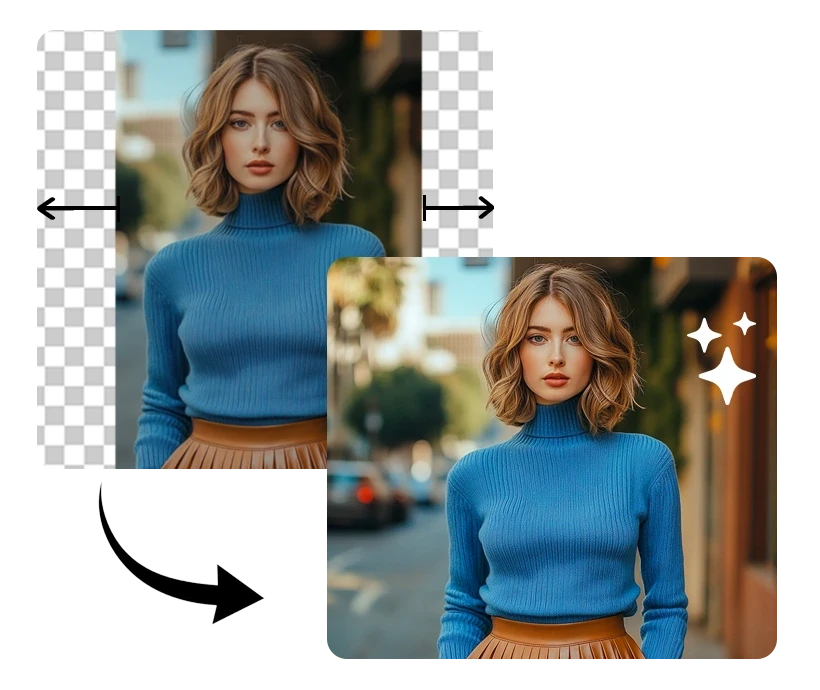
Have you ever taken a photo that was almost perfect, but you wished you could just capture a little more of the scene? Maybe it was a breathtaking landscape, and you wanted to include more of the sky or the surrounding beauty. This is where the magic of AI expand image technology comes into play. AI has revolutionized many aspects of our lives, and image processing is no exception. With AI expand image tools, you can effortlessly extend the boundaries of your photos, creating stunning visuals that capture every detail you desire.
I remember a time when I was on vacation, standing at the edge of a cliff with a panoramic view of the ocean. I snapped a picture, but later realized that the edges of the photo didn't quite capture the vastness of the scene. That's when I discovered AI expand image tools, and it was a game-changer. In this blog, we'll explore how AI expand image technology works, the tools available, best practices, and the future of AI in image processing.
Understanding AI Expand Image
What is AI Expand Image?
AI expand image refers to the use of artificial intelligence to extend the boundaries of an image beyond its original frame. This process, also known as AI outpainting, involves generating new content that seamlessly blends with the existing image. The technology leverages deep learning algorithms to understand the context and style of the original image, allowing it to create realistic extensions. Related terms include image extender AI, which is often used interchangeably with AI expand image.
How Does AI Expand Image Work?
The magic behind AI expand image lies in sophisticated algorithms and neural networks. These systems analyze the existing image, learning its patterns, textures, and colors. For instance, tools like DALL-E, developed by OpenAI, use a variant of the GPT-3 model to generate new image content. This AI image generator can create new sections of an image that are indistinguishable from the original. The process involves training on vast datasets, enabling the AI to predict and generate plausible extensions.
Why Use AI to Expand Images?
The benefits of using AI for image expansion are numerous. Firstly, it saves time and effort compared to manual editing. AI can generate high-quality extensions in seconds, which would take hours for a human editor. Additionally, AI expand image tools can enhance creativity by providing new perspectives and compositions. A case study involving Adobe's Photoshop demonstrates how AI-powered tools have transformed the way photographers and designers work, allowing them to focus more on creativity rather than technical adjustments.
Tools and Platforms for AI Expand Image
Popular AI Image Generators
Several AI image generators have gained popularity for their capabilities in expanding images. DALL-E by OpenAI is renowned for its ability to create imaginative and realistic image extensions. Another tool, RunwayML, offers a user-friendly interface and integrates with various creative software, making it a favorite among designers. These tools provide features like style transfer, object removal, and, of course, image expansion, making them versatile assets for any creative project.
Free vs. Paid AI Image Extenders
When it comes to choosing between free and paid AI image extenders, there are several factors to consider. Free tools like DeepArt.io offer basic functionalities and are great for casual users or those on a budget. However, they may have limitations in terms of resolution and processing speed. On the other hand, paid tools like Adobe Photoshop's AI features provide advanced capabilities, higher quality outputs, and dedicated support. The choice ultimately depends on your needs and budget.
How to Choose the Right Tool
Selecting the right AI image extender involves considering factors such as ease of use, output quality, and integration with existing workflows. For beginners, tools with intuitive interfaces and tutorials are ideal. Professionals might prioritize tools that offer high-resolution outputs and seamless integration with software like Adobe Creative Suite. Personal recommendations include starting with free trials of paid tools to assess their suitability before committing to a purchase.
Best Practices for Using AI Expand Image
Preparing Your Image for Expansion
Before expanding an image, it's crucial to select the right photo. High-quality images with good resolution yield the best results. Ensure that the image is well-lit and free from excessive noise, as these factors can affect the AI's ability to generate accurate extensions. A personal tip is to use images with clear focal points and minimal clutter, as this helps the AI maintain the image's integrity during expansion.
Setting Parameters for Optimal Results
Adjusting the settings of your AI tool can significantly impact the outcome. Experiment with different parameters such as the expansion size and blending modes to achieve the desired effect. For example, increasing the blending strength can create smoother transitions between the original and extended parts of the image. Tools like RunwayML allow users to preview changes in real-time, making it easier to fine-tune settings.
Reviewing and Editing Expanded Images
Once the image is expanded, reviewing and editing are essential steps. Check for any inconsistencies or artifacts that may have been introduced during the process. Tools like Adobe Lightroom offer advanced editing features to refine the expanded image further. Techniques such as color correction and sharpening can enhance the final output, ensuring it meets professional standards.
Challenges and Solutions in AI Image Expansion
Common Challenges Faced
Despite the advancements in AI technology, users may encounter challenges such as distortion or unnatural extensions. These issues often arise when the AI struggles to interpret complex scenes or when the original image lacks sufficient detail. I once faced a challenge where the AI-generated sky in a landscape photo appeared overly smooth, lacking the natural texture of clouds.
Solutions and Workarounds
To overcome common problems, it's essential to experiment with different tools and settings. If distortion occurs, try reducing the expansion size or using a different AI model. A case study involving a professional photographer showed how switching from a free tool to a paid one with advanced algorithms resolved issues of unnatural textures. Additionally, manual touch-ups using editing software can correct minor imperfections.
Staying Updated with AI Technology
AI technology is constantly evolving, and staying informed about the latest developments is crucial. Subscribing to industry newsletters, following AI research publications, and participating in online forums can provide valuable insights. Resources like AI conferences and workshops offer opportunities to learn from experts and discover new tools and techniques.
Conclusion
AI expand image technology offers exciting opportunities for enhancing photos and unleashing creativity. By understanding how AI works, choosing the right tools, and following best practices, users can achieve stunning results. Experiment with AI expand image tools and explore the endless possibilities they offer. Share your experiences and thoughts, and let's continue to learn and grow in this ever-evolving field.

























Sign in to leave a comment.