

When you can turn on a webcam and see your face change immediately, a fair question follows: why record a video first and send it to an AI face-swap tool afterward?
For anyone building these tools, this is also a product decision. Real-time processing cuts the wait to see a result. It does not remove a creator’s need to select footage, make changes, and try again before publishing a finished video.
A finished video still needs room for edits and another attempt
A short video does not have to keep every moment of a recording. You can cut an awkward shot, rearrange the sequence, and focus on the footage that will make the final edit. Face swapping can happen after that selection.
With the footage fixed, you know exactly what to inspect. Does the face change abruptly during a turn? Do the edges look unnatural when a hand passes in front of it? Do adjacent shots look consistent? If the result is not right, you can change the source footage or the settings the tool offers, then review another result. How much you can adjust still depends on the tool.
Real-time output can also be saved with a suitable recording setup. But that recording already contains the effect produced at the time. If it is the only version you keep, redoing the face swap is usually less convenient than starting with the original footage. Saving the output does not automatically give you the same freedom to edit it later.
For a finished video, recording first and swapping faces afterward makes it easier to check the effect and reprocess troublesome footage. More processing time does not guarantee a better result, though: the model, source material, and tool’s capabilities still matter.
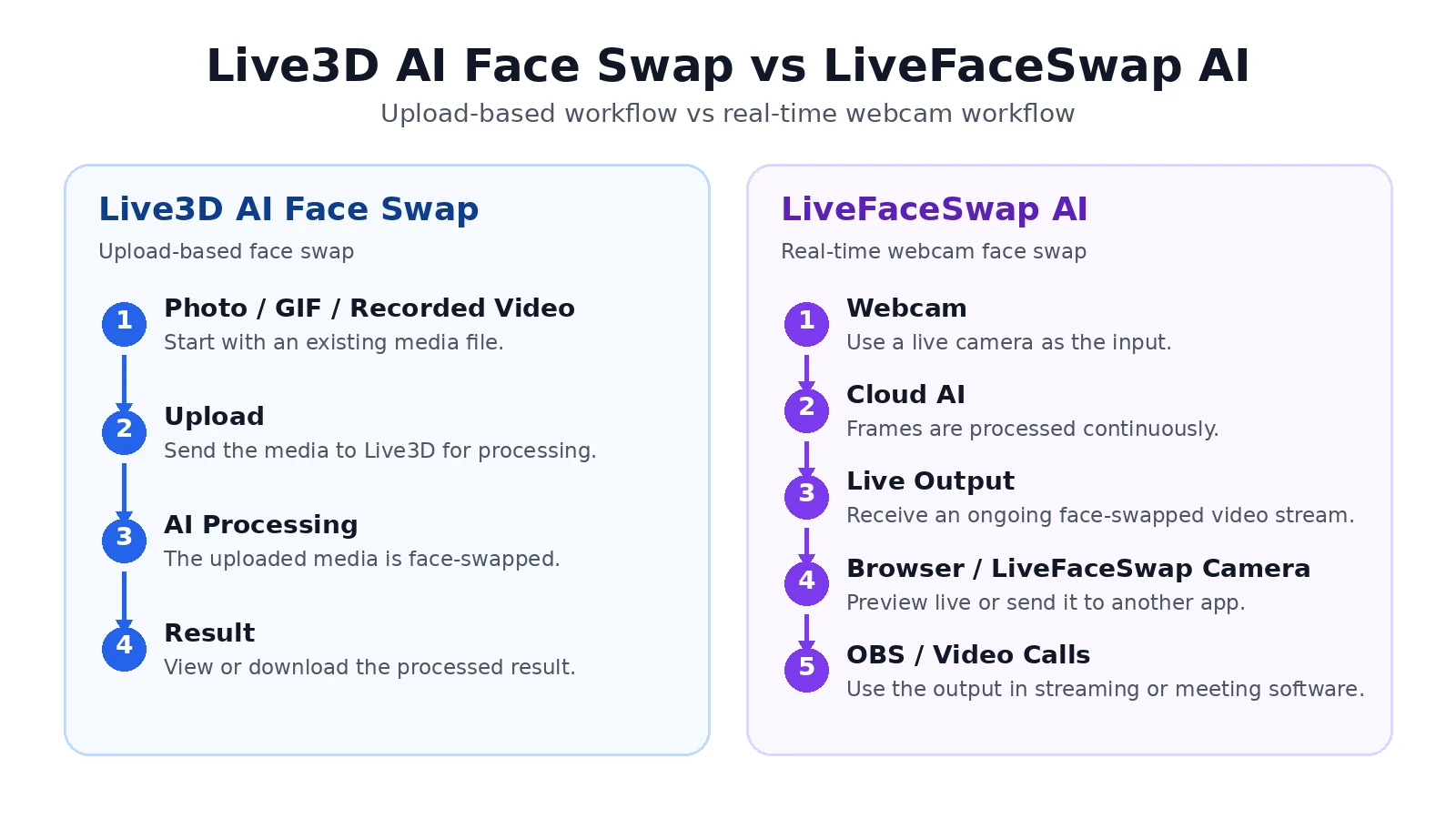
Two workflow examples: recorded footage can be processed again, while live processing has to keep up with new movements as they happen.
Real-time face swap serves live interaction, so both workflows have a place
Someone asks an unexpected question during a livestream, and you react with a facial expression. That response was not prerecorded. It cannot wait for post-production and still belong to the conversation happening now. Here, continuous output matters more than selecting a particular frame afterward.
LiveFaceSwap AI’s real-time webcam experience fits this continuous-input workflow: the browser version previews the live result, while the desktop version provides virtual-camera output for compatible apps. It serves the interaction happening in front of the camera; it does not make post-production tools unnecessary for recorded footage.
For an improvised character livestream, the priorities are responsive movement, continuous output, and a receiving app that works with the feed. For a carefully edited short video, they are control over the footage, the ability to redo problem sections, and a result you can use in your edit. The same creator can choose different tools for different jobs.
For a tool developer, the useful starting question is what the creator needs to deliver. Producing a finished clip they are happy with and letting someone see their actions right now call for different features.












Sign in to leave a comment.