
Modern businesses depend on IT infrastructure to manage applications, store information, support employees and deliver services. However, traditional IT environments often require organisations to invest in multiple physical servers, storage systems and networking equipment. Managing these resources can increase infrastructure costs, create operational complexity and make business expansion more challenging.
This is where virtualization in cloud computing becomes important. It allows organisations to use physical IT resources more efficiently by creating virtual versions of servers, storage, networks and other computing components. Instead of depending entirely on separate physical machines, businesses can run multiple independent virtual environments using shared hardware.
Today, virtualization in cloud computing plays an important role in enterprise infrastructure, cloud adoption and digital transformation. It helps businesses improve resource utilisation, simplify IT management and build infrastructure that can adapt to changing operational requirements.
In this guide, we explore how virtualization in cloud computing works, its different types, practical applications, benefits and challenges, and how organisations can choose the right virtualization strategy.
What Is Virtualization in Cloud Computing?
Virtualization in cloud computing is the process of creating virtual versions of physical computing resources, such as servers, storage devices, operating systems and network components.
It uses software to separate physical hardware from the operating environments running on it. As a result, one physical server can support multiple virtual machines (VMs), each operating independently with its own operating system, applications and allocated resources.
For example, consider a business with three separate physical servers. One server runs its accounting application, another hosts its database and the third supports internal business applications.
Instead of maintaining three underutilised machines, the organisation could consolidate these workloads onto a powerful physical server using virtualization technology.
Each workload operates inside its own virtual environment while sharing the underlying hardware.
In cloud computing, this approach allows providers and enterprises to allocate computing resources dynamically, improve infrastructure utilisation and support multiple workloads without requiring separate physical hardware for every application.
In simple terms: Virtualization in cloud computing allows multiple virtual computing environments to operate on shared physical infrastructure, making IT resources more flexible and efficient.
How Does Virtualization in Cloud Computing Work?
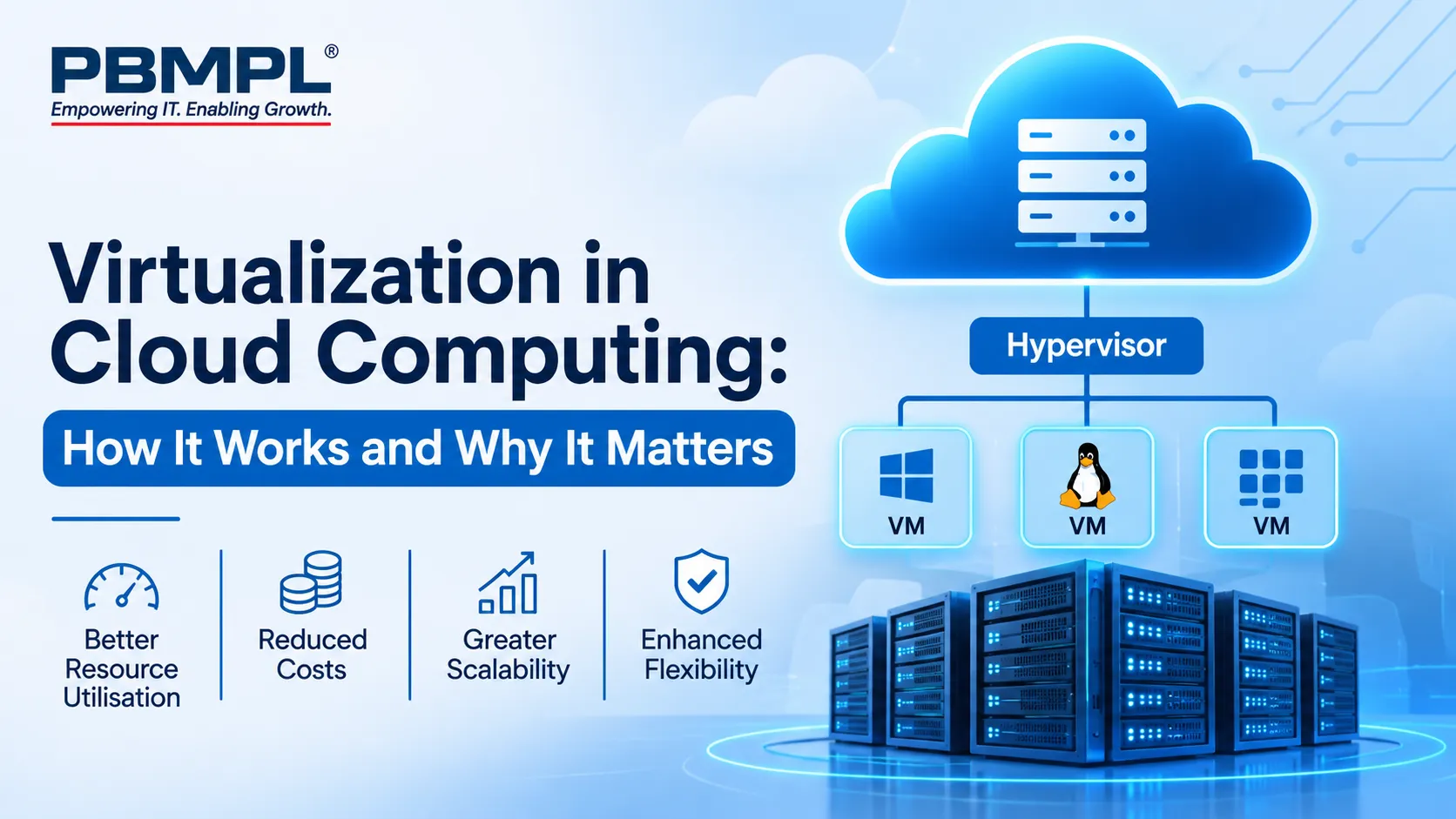
To understand how virtualization in cloud computing works, it is important to understand the relationship between physical hardware, virtualization software and virtual machines.
The process generally involves the following components.
1. Physical Hardware
The physical infrastructure provides the foundation for virtualization. It includes:
- Physical servers and processors.
- Random Access Memory (RAM).
- Storage devices and disk systems.
- Network interface cards.
- Networking and connectivity equipment.
These resources provide the processing power, memory, storage and connectivity required to operate virtual environments.
2. Hypervisor
A hypervisor is the software layer that enables virtualization. It manages physical hardware resources and distributes them among multiple virtual machines.
It allows different virtual machines to operate independently while sharing the same physical infrastructure.
For example, a hypervisor can allocate four processor cores and 8 GB of RAM to one virtual machine while assigning other resources to another VM.
It also helps manage resource allocation, workload isolation and virtual machine operations.
3. Virtual Machines
A virtual machine is a software-based computer that behaves like a physical computer.
Each VM receives allocated computing resources and can run its own operating system and applications.
For example, an organisation can run:
- A Windows-based virtual machine for business applications.
- A Linux-based virtual machine for database workloads.
- Another virtual machine for development and testing.
Although these environments share the same physical server, they operate separately.
4. Resource Allocation and Management
The hypervisor manages how computing resources are distributed across virtual machines.
When workload requirements change, administrators can adjust CPU, memory and storage allocations according to application needs and available infrastructure capacity.
Consequently, businesses can manage their computing environments more efficiently without purchasing additional physical hardware every time requirements change.
What Is a Hypervisor? Understanding Its Types
A hypervisor is one of the most important components of virtualization in cloud computing. It creates and manages virtual machines by controlling access to the underlying physical hardware.
There are two primary types of hypervisors.
Type 1: Bare-Metal Hypervisor
A Type 1 hypervisor runs directly on the physical server hardware without requiring a separate host operating system.
It manages hardware resources and provides virtual machines with the resources they need.
Key characteristics:
- Runs directly on physical hardware.
- Offers efficient resource management.
- Provides strong isolation between virtual machines.
- Commonly used in enterprise data centres and cloud environments.
- Supports large-scale server virtualization.
Examples include VMware ESXi, Microsoft Hyper-V Server deployments and Xen-based hypervisor environments.
Type 1 hypervisors are generally suitable for organisations that need reliable, scalable and performance-focused virtualization infrastructure.
Type 2: Hosted Hypervisor
A Type 2 hypervisor runs as an application on an existing operating system, such as Windows, Linux or macOS.
It allows users to create and operate virtual machines without installing a hypervisor directly on the physical hardware.
Key characteristics:
- Runs on top of a host operating system.
- Easier to install and configure.
- Suitable for testing and development.
- Useful for learning and experimenting with different operating systems.
Examples include Oracle VirtualBox and VMware Workstation.
While Type 2 hypervisors are useful for individual users and development environments, enterprises generally prefer Type 1 hypervisors for production infrastructure.
Different Types of Virtualization in Cloud Computing
Virtualization in cloud computing covers several technology areas. Each type addresses a different infrastructure requirement.
1. Server Virtualization
Server virtualization divides the computing resources of one physical server into multiple virtual servers.
Each virtual server operates independently and can run different operating systems and applications.
For example, a company can host its email application, database and internal business software on separate virtual machines using shared physical infrastructure.
Benefits include:
- Better server utilisation.
- Reduced hardware requirements.
- Simplified server management.
- Improved workload isolation.
- Easier infrastructure scaling.
Server virtualization in cloud computing is particularly useful for organisations managing multiple business applications.
2. Storage Virtualization
Storage virtualization combines storage resources from multiple physical devices into a single logical storage pool.
Administrators can manage storage centrally without depending on the physical location of individual storage devices.
For example, a business can combine storage capacity from different systems and allocate it to applications based on operational requirements.
This approach simplifies storage administration and helps organisations manage growing data volumes.
3. Network Virtualization
Network virtualization creates software-based network resources that operate independently of the underlying physical network hardware.
It allows administrators to configure virtual networks, manage traffic and create logical network segments.
For enterprises, this can improve network flexibility, workload isolation and security management.
4. Desktop Virtualization
Desktop virtualization allows users to access desktop environments hosted on centralised infrastructure.
Instead of depending entirely on locally installed applications and individual desktop hardware, employees can access virtual desktops through supported devices.
Virtual Desktop Infrastructure (VDI) is a common example.
It is particularly useful for organisations with remote employees, multiple office locations and centralised IT management requirements.
5. Application Virtualization
Application virtualization allows software applications to run in isolated environments without requiring traditional installation directly on every user's operating system.
This can simplify application deployment, reduce compatibility issues and support centralised software management.
For organisations managing large numbers of employee devices, application virtualization can make software administration more consistent.
Virtual Machines vs Containers: What Is the Difference?
Although both technologies support workload isolation, virtual machines and containers work differently.
A virtual machine virtualizes hardware resources and typically includes its own guest operating system. A container, on the other hand, shares the host operating system's kernel while keeping its application and dependencies isolated.
Here is a simple comparison:
| Comparison Factor | Virtual Machines | Containers |
|---|---|---|
| Architecture | Virtual hardware | Operating-system-level virtualization |
| Operating System | Separate guest OS | Shares host OS kernel |
| Resource Usage | Generally higher | Generally lower |
| Startup Time | Usually slower | Usually faster |
| Isolation | Strong isolation at VM level | Process-level isolation |
| Portability | Portable across compatible hypervisors | Portable across compatible container platforms |
| Common Uses | Enterprise applications and legacy workloads | Microservices and modern application development |
For example, an enterprise may use virtual machines to run different operating systems and business applications. Meanwhile, its development team may use containers to deploy individual application components quickly.
Technologies such as Docker and Kubernetes support container-based application development and orchestration.
Importantly, containers do not replace all virtual machines. Many organisations use both technologies together to create flexible application environments.
Key Benefits of Virtualization in Cloud Computing
Virtualization in cloud computing offers several operational and technical advantages. However, its actual value depends on infrastructure design, workload requirements and effective management.
1. Better Resource Utilisation
Traditional physical servers may remain underutilised because each machine supports only a limited number of assigned workloads.
Virtualization allows multiple virtual machines to share the same physical resources.
This improves hardware utilisation and helps organisations get more value from their existing infrastructure.
2. Reduced Infrastructure Costs
Virtualization can reduce the number of physical servers an organisation needs to purchase, operate and maintain.
Fewer physical machines can also mean lower power consumption, reduced cooling requirements and less data centre space.
However, businesses should consider licensing, virtualization software, hardware capacity and ongoing management costs when calculating overall savings.
3. Improved Scalability
Business requirements change over time. Organisations may need additional computing capacity when launching new applications, expanding operations or handling seasonal demand.
Virtualization in cloud computing makes it easier to provision additional virtual machines and adjust resource allocations.
This allows IT teams to respond to changing requirements without always purchasing new physical servers.
4. Greater Flexibility
Virtualized environments support multiple operating systems and applications on shared hardware.
Businesses can create separate environments for development, testing, production and other operational requirements.
This flexibility also supports different infrastructure strategies, including private cloud and hybrid cloud deployments.
5. Improved Business Continuity
Virtualization can support business continuity through virtual machine replication, snapshots and migration capabilities.
For example, administrators may move a virtual machine between compatible physical hosts to support maintenance or respond to infrastructure issues.
When combined with reliable backup and disaster recovery planning, virtualization can help organisations improve recovery readiness.
However, virtualization alone does not guarantee business continuity. Proper backup policies, redundancy and regular recovery testing remain essential.
6. Simplified IT Management
Centralised virtualization management tools allow administrators to monitor virtual machines, allocate resources and manage workloads from a common interface.
This can reduce repetitive administrative tasks and make infrastructure operations more organised.
Consequently, internal IT teams can spend more time on performance optimisation, security and business technology improvements.
Real-World Applications of Virtualization in Cloud Computing
Virtualization in cloud computing supports several business operations across different industries.
Here are some practical examples.
Banking and Financial Services: Financial organisations can use virtualized environments to support business applications, databases, testing environments and internal systems. Appropriate security controls and compliance requirements remain essential.
Education: Schools, colleges and universities can use desktop virtualization to provide students and faculty with centralised access to applications and learning resources.
Healthcare: Healthcare organisations can use virtualized infrastructure to support administrative applications, data management and selected clinical systems, subject to security and regulatory requirements.
Manufacturing: Manufacturing businesses can consolidate application workloads and support enterprise resource planning (ERP), monitoring and operational management systems.
IT and Software Development: Development teams can create isolated environments for testing, application development and deployment without requiring separate physical machines for every project.
These examples demonstrate how virtualization in cloud computing can support different operational needs while improving infrastructure flexibility.
Challenges and Considerations of Virtualization
Despite its benefits, virtualization in cloud computing requires careful planning and ongoing management.
Organisations should evaluate the following challenges before implementation.
1. Initial Infrastructure Investment
Although virtualization can reduce long-term hardware requirements, businesses may need to invest in powerful servers, storage systems, networking equipment and virtualization software.
A proper assessment helps determine the required capacity and avoid unnecessary spending.
2. Performance Management
When several virtual machines share the same physical server, excessive resource consumption by one workload can affect others.
Administrators should monitor CPU, memory, storage and network utilisation to prevent resource contention.
3. Security Risks
Virtualized environments introduce additional management layers, including hypervisors, virtual networks and administrative interfaces.
Poor configurations or excessive access privileges can create security vulnerabilities.
Businesses should implement access controls, regular patching, network segmentation and continuous monitoring.
4. Management Complexity
Large virtualized environments can become difficult to manage without proper documentation, monitoring tools and skilled technical teams.
Organisations should establish clear policies for VM provisioning, resource allocation, software updates and lifecycle management.
5. Backup and Disaster Recovery
Virtual machines still depend on the availability and integrity of their underlying data.
Businesses should implement regular backups, replication strategies and tested recovery procedures to protect critical workloads.
How to Choose the Right Virtualization Strategy for Your Business
Not every organisation needs the same virtualization architecture. The right approach depends on business objectives, existing infrastructure, workload requirements and available resources.
Consider these factors before implementation:
- Evaluate existing infrastructure: Review current servers, storage systems, networking equipment and application dependencies.
- Identify workload requirements: Determine which applications need dedicated resources, high availability or specific operating systems.
- Assess scalability: Estimate future computing, storage and network requirements based on expected business growth.
- Review security requirements: Consider data sensitivity, user access, regulatory obligations and infrastructure protection.
- Compare total cost of ownership: Evaluate hardware, licensing, maintenance, staffing, migration and operational expenses.
- Plan migration carefully: Move workloads in phases, beginning with suitable applications and testing performance before expanding.
- Establish ongoing management: Define monitoring, backup, patching, capacity planning and disaster recovery processes.
A structured assessment helps businesses implement virtualization in cloud computing without introducing unnecessary operational complexity.
How PBMPL Supports Cloud Computing and Virtualization Requirements
Implementing virtualization requires more than selecting a hypervisor or purchasing new hardware. Businesses need an infrastructure strategy that considers application requirements, workload performance, security, scalability and long-term management.
PACE Business Machines Pvt. Ltd. (PBMPL) provides IT infrastructure, cloud and virtualization solutions to organisations across enterprise, government, PSU and education sectors.
With over 30 years of experience and 6,000+ projects delivered, PBMPL helps businesses assess, design, implement and manage technology environments based on their operational requirements.
Its cloud computing and virtualization services cover:
- Cloud Assessment: Evaluating existing IT infrastructure and identifying suitable cloud and virtualization opportunities.
- Implementation and Migration: Supporting workload migration to private, public and hybrid cloud environments.
- Virtualization Services: Designing and managing virtualized server, storage and network environments.
- Cloud Operations Management: Supporting ongoing infrastructure monitoring, management and optimisation.
- Lifecycle Management: Assisting organisations throughout infrastructure implementation and modernisation.
Businesses can also explore PBMPL's IT infrastructure solutions to understand how servers, storage, networking and related infrastructure components support reliable IT operations.
For organisations evaluating flexible infrastructure models, PBMPL also works with technologies such as HPE GreenLake and Nutanix to support modern enterprise environments.
Explore PBMPL's cloud computing and virtualization solutions to understand how a structured infrastructure approach can support your organisation's technology requirements.
Frequently Asked Questions About Virtualization in Cloud Computing
1. What is virtualization in cloud computing in simple terms?
Virtualization in cloud computing is the process of creating virtual versions of physical IT resources. It allows multiple virtual machines, storage environments or networks to operate using shared physical infrastructure.
2. What is the main purpose of virtualization?
The main purpose of virtualization is to improve IT resource utilisation, reduce dependence on physical hardware and make infrastructure easier to manage, scale and maintain.
3. What are the four main types of virtualization?
The four commonly discussed types are server virtualization, storage virtualization, network virtualization and desktop virtualization. Application virtualization is another important category used in modern IT environments.
4. What is a hypervisor in virtualization?
A hypervisor is software that creates and manages virtual machines by allocating physical hardware resources such as CPU, memory and storage. It allows multiple virtual machines to operate independently on one physical server.
5. What is the difference between cloud computing and virtualization?
Virtualization is a technology that creates virtual computing resources from physical hardware. Cloud computing is a service delivery model that provides access to computing resources such as servers, storage, databases and applications on demand. Virtualization is one of the technologies that helps enable cloud computing.
6. Is virtualization the same as cloud computing?
No. They are related but different concepts. Virtualization creates logical versions of computing resources, while cloud computing provides on-demand access to IT resources through a service model. Not every virtualized environment is a cloud, and cloud services can use technologies beyond virtualization.
7. Is virtualization suitable for small businesses?
Yes. Small businesses can use virtualization to consolidate servers, reduce hardware requirements and simplify IT management. The implementation should match their workload requirements, technical capabilities and budget.
8. How does virtualization improve cloud infrastructure?
Virtualization helps cloud infrastructure distribute physical computing resources across multiple virtual environments. This supports resource sharing, workload isolation, flexible provisioning and more efficient infrastructure management.
Conclusion
Virtualization has become an important part of modern IT infrastructure because it helps organisations use computing resources more efficiently while supporting changing business requirements.
From server and storage virtualization to virtual networks and desktops, these technologies offer practical ways to simplify infrastructure management, improve flexibility and support cloud adoption.
However, successful implementation requires careful planning, suitable hardware, appropriate security controls and continuous performance monitoring.
By understanding how virtualization in cloud computing works and evaluating the right architecture, businesses can build IT environments that support their current operations and future growth.
For organisations planning infrastructure modernisation, working with an experienced technology partner can make the implementation process more structured and manageable. PBMPL helps businesses evaluate and implement cloud and virtualization solutions aligned with their infrastructure and operational needs.
























Sign in to leave a comment.