
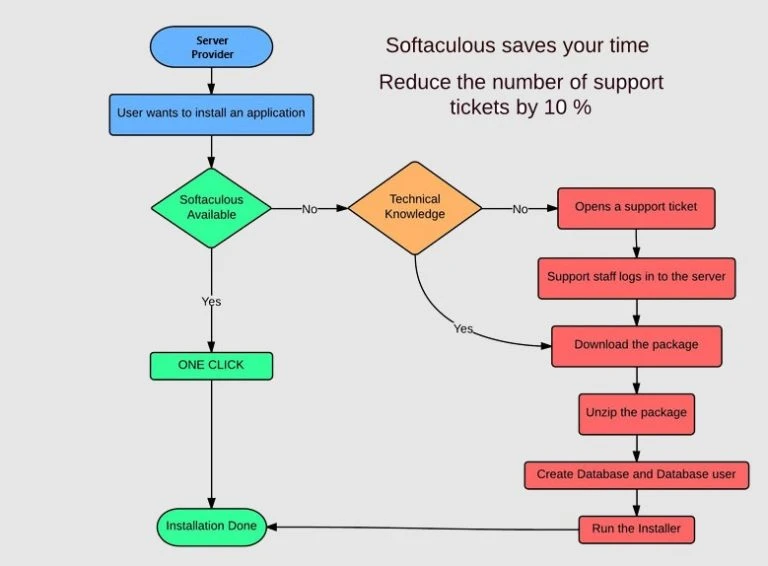
The installation is almost immediate and takes place in a matter of a few steps unlike a manual installation which is complicated and time-consuming. Here comes Softaculous. Softaculous is a one-click auto-installer that allows the installation of web applications via scripts and PHP classes.
In this article we are going to take a look at Softaculous: what it is,features, why we need it, and how to use it. We’ll see how it can simplify your website operating experience, by allowing you to install CMS and other applications for creating and managing your website.
What Is Softaculous?
Softaculous is an automatic installer. It is compatible with multiple control panels such as cPanel, Plesk and DirectAdmin. This can also work with customized panels, for which Softaculous was specially designed. In addition, it can take over the installations of other auto-installers. Softaculous also has an easy-to-use backup feature, allowing the backup of installations at any time.
Features Of Softaculous
- It offers a wide range of applications and a vast library of scripts covering a wide range of categories including blogging platforms, e-commerce solutions, content management systems, social networking scripts, and more.
- It was designed to be easy to use and user-friendly, allowing users having less technical knowledge to easily install, update, and manage web applications.
- It provides options for automatic updates of applications, ensuring that web applications are always kept up-to-date with the latest features and security updates.
- Often includes features for backing up and restoring installations, which is important for data protection and recovery.
- All necessary applications for your web business are available in one place.
- It saves users’ time to download and upload zip files without any installation failed issues.
- Users can Install the scripts in over 50 languages and save the translation packages.
- Ratings, reviews, demos, and other information of scripts. All are continuously updated to the latest stable versions.
- It allows you to test changes by website clone before installing it on the live website.
Applications In Softaculous
Through Softaculous you can install the most used CMSs such as WordPress, Joomla or Drupal along with a whole series of applications designed for forums, blogs, social networks, and much more. Here are some of these scripts.
WordPress
WordPress is one of the most widely used CMS for creating websites and blogs, it is a free and open-source project supported by a community always working towards updating and further development.
Drupal
Drupal is a platform for designing dynamic websites based on the PHP language.It is also free and Open Source just like wordpress.
phpBB
This is one of the most used CMS to manage a forum. It is Open Source and equipped with a management panel that allows you to manage and insert new functions through a graphical interface, even without knowing coding.
WHMCS
It is one of the most popular platforms used by web server providers and server resellers, it allows you to manage and automate billing, support tickets and so on.
PrestaShop
It is an Open Source CMS specifically designed for ecommerce websites, can be customized with the choice of themes available and you can add new features through modules. With Softaculous you can install PrestaShop in a few clicks and start creating your online shop right away.
Why Do We Need Softaculous?
- Softaculous makes the installation process simple because it guides you through the process step by step with an easy-to-use graphical interface.
- During the installation, you can activate the WordPress Multisite feature that allows you to manage multiple sites from a single admin panel and with a single installation of WordPress.
- The purpose of Softaculous is to simplify the installation and configuration of hundreds of scripts such as WordPress, Joomla, PrestaShop or Drupal with just a few clicks.
- In addition to installing scripts, you can manage installations indeed. it is possible to update installations to the latest available version and create a copy of an installation.
- Softaculous allows you to create a staging of the website so that you can perform tests on a test environment before making the changes effective on the live site.
Softaculous Free vs. Premium
- Softaculous is available in a Free version with a free license and a Premium version with paid plans on a monthly or yearly basis.
- The Free version offers a single licence per server and includes 59 scripts, which you can check out in this list whereas the Premium version contains more than 400 scripts.
If you’re not sure about purchasing a premium version of Softaculous, you can sign up for one month of free trial and make that decision down the line.
How Do I Use Softaculous In Wordpress?
If your web server provider supports Softaculous, you can make use of its built-in feature called WordPress Manager to simplify your website management.
How to Use Softaculous in cPanel
Here are the steps to use Softaculous in cPanel:
- Log in to cPanel
Login to your cPanel account using your cPanel username and password to log in.
- Navigate to Softaculous App Installer
In the cPanel dashboard, scroll down to the “Software” or “Services” section. Look for the Softaculous Apps Installer icon.
- Choose an Application
Once inside Softaculous, you’ll see a list of popular applications on the left sidebar. You can also use the search bar to find a specific application.
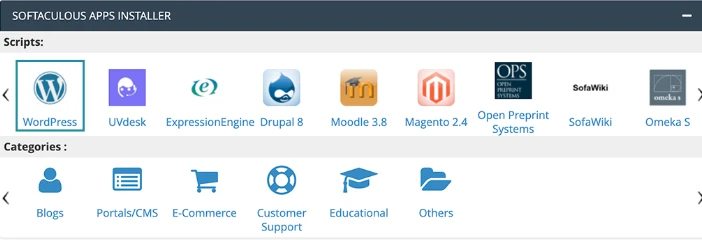
- Click on the application that you want to install.
- Configure Installation Settings
After selecting an application, you’ll be taken to the installation settings page. Here, you can configure various options, including:
- Choose the protocol (HTTP or HTTPS) for your website.
- Select the domain on which you want to install the application if you have multiple domains.
- Specify the directory where you want to install the application. Leave it blank to install in the root directory (e.g., public_html).
- Enter a username and password for the admin account.
- Provide an email address for admin notifications.
- Customize any additional settings specific to the application.
- Install the Application
- After configuring the settings, click the “Install” or “Submit” button. Softaculous will begin the auto installation process.
- Wait for Installation Confirmation- Softaculous will display an installation progress bar, and once the installation is complete, you’ll see a success message.
- Access Your Application
You can now access your newly installed application by going to your website using the domain or directory you specified during installation.
Conclusion
This is all about Softaculous we have covered. In conclusion, Softaculous is popular in shared server environments where users seek convenience and efficiency in managing web applications. Its integration with cPanel, DirectAdmin and other control panels makes managing web applications accessible to a broad range of users, from beginners to advanced webmasters.
If you have any questions feel free to contact us. our team of cpanel experts is ready to help you 24/7.









Sign in to leave a comment.