

Many SAP BASIS beginners hear the term client copy but don’t fully understand what happens during the process. It sounds simple—copy data from one client to another—but behind the scenes, it’s a deeply technical and structured task. If done wrong, it can mess up configurations, duplicate users, or crash the system.
In Noida, many companies are shifting from ECC to S/4HANA. Admin teams here are expected to handle complex system management tasks. Client copy is one of them. Training institutes offering the SAP BASIS Online Course in Noida are adding more labs on client copy, because live environments need admins who can do this without breaking anything.
Let’s go deeper into what actually happens during a client copy, how it works, what tools are used, and why it’s critical.
What is Client Copy?
A client in SAP is like a separate workspace. One system may have several clients—like one for testing, one for training, one for real business use. Each has its own data. Sometimes, you need to copy data from one client to another. This happens during testing, training setups, or migrations.
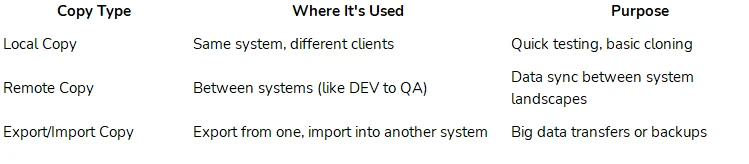
There are three main types of client copies:
● Local client copy – Done within the same system.
● Remote client copy – Between two different systems.
● Export/import client copy – Exports data from one system, then imports it into another.
Each copy can include different sets of data depending on what profile you choose.
Here’s a short table that explains these types and their common use cases:
How the Client Copy Process Works
Client copy profiles define what gets copied. SAP_CUST is used for configuration data only. SAP_ALL copies everything—users, data, roles. SAP_USER is only for user-related data. Choosing the wrong profile is one of the biggest mistakes admins make.
Let’s now understand what really happens when you start a client copy. You run a transaction like SCCL (for local copy) or SCC9 (for remote copy). Once it begins, SAP prepares by checking open jobs, locking users, and getting ready to transfer data. It checks table sizes and validates configurations.
The system then picks the tables based on the profile. For SAP_ALL, it fetches hundreds of tables. If it’s a remote copy, data travels over RFC (Remote Function Call). If it’s an export/import, data is written into transport files first, then moved.
After copying, the system builds indexes again to make data searchable. It also cleans up or updates certain system entries. Then comes BDLS (logical system conversion), a step that changes system names in tables to match the new client’s name. This is crucial for system integrity.
During the process, SAP logs every step. You can check SCC3 to see which tables failed or skipped. Errors can happen due to locked tables, low memory, or mismatched versions.
The Role of SAP Basis Training
Many learners who take SAP Basis Training in Noida get hands-on practice with these issues. Instructors here make them troubleshoot errors like user mismatch, RFC issues, and missing table permissions. Because in Noida’s ERP job market, theory is not enough. Admins must handle live environment issues.
Sometimes, people confuse client copy with client refresh. A refresh is when you overwrite a client, usually QA, with production data. This is riskier because it wipes existing data. For refresh, you often use export/import or remote copy with full profiles. The steps include more validations and checks.
Common Mistakes During Client Copy
Client copy is also used in project scenarios. Like setting up training for a new team, testing new features without breaking the live system, or preparing a sandbox environment. Admins also use it to verify integration between SAP and other tools before going live.
Some of the common mistakes that new admins make include:
● Forgetting to change logical systems after copy
● Using SAP_ALL when only user data was needed
● Running copies during peak hours
● Not checking background jobs before starting
● Skipping post-copy clean-up
To avoid these, learners are now trained in using monitoring tools. They check system performance, background jobs, and logs during and after the copy. Some even create alert logs in Solution Manager for better control.
Sum up,
The SAP Future Scope also includes more use of role-based clients. Businesses may want to create multiple clients for sales, finance, or HR—each with different access levels. This increases the need for careful, partial client copies, where only specific modules are moved.
The process will also include HANA-specific changes. For example, table structures and index rebuilding are different in HANA than in traditional databases. Admins need to know how to handle this while doing copies from ECC to HANA-based clients.


























Sign in to leave a comment.