
WhatsApp Marketing Strategies to Boost sales in 2024
Did you know that WhatsApp has over 2 billion active users worldwide? That\'s a huge audience you can reach out to every day.
Many businesses struggle to connect with their customers. Emails often go unread, and social media posts can get lost in the noise. It\'s hard to make sure your message gets seen and even harder to get a response.
This is where WhatsApp marketing comes in. WhatsApp lets you talk to your customers directly, just like you would with friends and family. It\'s fast, personal, and effective. Plus, with the WhatsApp Business API, you can automate and manage these conversations on a large scale.
In this post, we\'ll explore different WhatsApp marketing strategies to help you boost your sales. We\'ll also look at how the WhatsApp Business API can take your marketing efforts to sales growth.
Why WhatsApp Marketing?
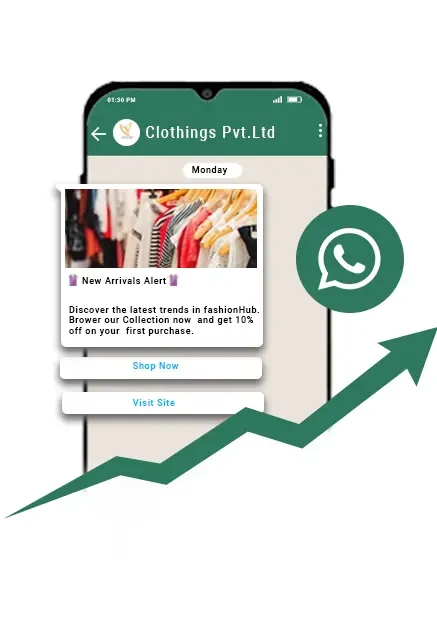
WhatsApp\'s Popularity:
WhatsApp is one of the most popular messaging apps in the world. With over 2 billion users, it\'s likely that your customers are already using it. People check their WhatsApp messages more often than emails or other notifications, making it a great way to reach them.
Benefits of WhatsApp Marketing:
Direct and Personal Communication: WhatsApp lets you send messages directly to your customers\' phones. It feels more personal and friendly compared to other forms of communication.
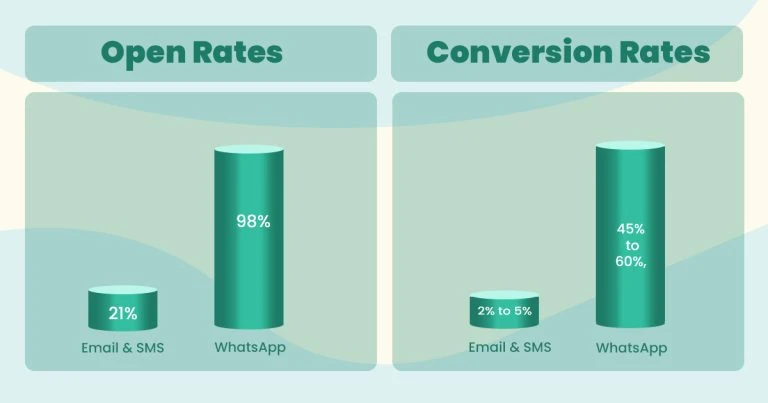
High Open and Response Rates: Messages sent on WhatsApp are more likely to be opened and responded to. People tend to read and reply to WhatsApp messages quickly, which can speed up your sales process.
Cost-Effective Marketing Channel: Using WhatsApp for marketing can save you money. It\'s cheaper than many traditional marketing methods, and you can reach a large number of people without spending a lot.
Introduction to WhatsApp Business API
The WhatsApp Business API is a powerful tool for businesses. It allows you to send automated messages, manage large volumes of messages, and integrate WhatsApp with other systems like your CRM.
This means you can provide better customer service, send updates and promotions, and keep track of your conversations all in one place. The API makes it easier to handle all your customer interactions efficiently and professionally.
Setting Up WhatsApp Business for Marketing
Creating a Business Profile:
Step-by-Step Guide on Setting Up a WhatsApp Business Account:
Download the App: First, download the WhatsApp Business app from the App Store or Google Play Store.
Register Your Number: Open the app and register your business phone number. Make sure this number is separate from your personal WhatsApp.
Set Up Your Profile: Fill in your business name, and choose the right category for your business.
Complete Your Profile: Add important details like your business address, description, email, and website. This makes it easy for customers to know more about your business.
Importance of a Complete and Professional Profile:
Having a complete and professional profile helps build trust with your customers. They can quickly see who you are, what you do, and how to contact you. It makes your business look more credible and reliable.
Using WhatsApp Business Tools:
Labels for Organizing Contacts:
Labels help you keep your contacts organized. You can create labels like "New Customer," "Pending Order," or "VIP Customer." This way, you can easily find and manage your conversations based on their status or importance.
Quick Replies to Save Time:
Quick replies are pre-written messages that you can use to answer common questions. For example, you can set up a quick reply for your business hours or for thanking customers for their orders. This saves you time and ensures your responses are consistent.
Automated Messages for Efficiency:
Automated messages help you stay responsive, even when you\'re busy. You can set up greeting messages to welcome new customers, away messages to let them know when you\'re not available, and quick replies for FAQs. This ensures your customers always get a prompt response, improving their experience with your business.
Effective WhatsApp Marketing Strategies
Building a Quality Contact List:
Importance of Obtaining Consent:
Before you start messaging people, make sure they want to hear from you. Always get their permission first. This builds trust and ensures you\'re not bothering anyone with unwanted messages.
Techniques for Collecting Phone Numbers:
Website Forms: Add a sign-up form on your website where visitors can provide their phone numbers to receive updates or special offers.
In-Store Promotions: If you have a physical store, ask customers to sign up for WhatsApp updates at checkout. You can offer a small discount or a freebie as an incentive.
Crafting Personalized Messages:
Tips for Writing Engaging and Personalized Messages:
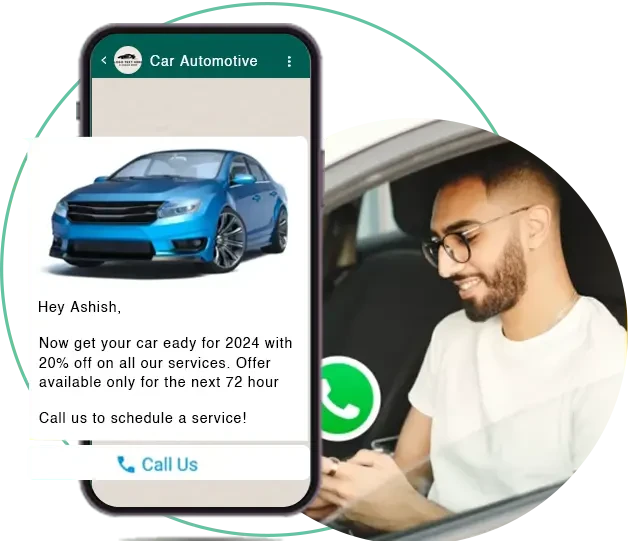
Use Their Name: Start your messages by addressing the customer by their name. It makes the interaction feel more personal.
Be Friendly and Conversational: Write your messages as if you\'re talking to a friend. Keep it light and engaging.
Add Value: Make sure your messages provide some value to the customer, whether it\'s useful information, a special offer, or a helpful tip.
Examples of Effective Message Templates:
"Hi [Customer\'s Name], thanks for your recent purchase! Let us know if you have any questions."
"Hey [Customer\'s Name], we have a special offer just for you! Get 10% off your next order with this code: SAVE10."
Leveraging WhatsApp Status:
How to Use WhatsApp Status for Marketing:
WhatsApp Status is like a mini-story that lasts for 24 hours. You can use it to share updates, promotions, and behind-the-scenes content.
Ideas for Engaging Content:
Promotions: Announce special deals and discounts.
Behind-the-Scenes: Share a peek into your daily operations or how your products are made.
Customer Testimonials: Post stories from happy customers.
Utilizing Rich Media:
Benefits of Using Images, Videos, and Documents:
Rich media makes your messages more attractive and engaging. Images, videos, and documents can help you showcase your products better than text alone.
Best Practices for Creating and Sharing Rich Media Content:
High-Quality Images: Use clear, professional photos of your products.
Short Videos: Create brief videos to demonstrate product features or share customer reviews.
Documents: Share helpful documents like product manuals, brochures, or FAQs.
Segmenting Your Audience:
Importance of Audience Segmentation:
Segmenting your audience allows you to send more relevant messages to different groups of customers. This increases the chances of your messages being well-received and acted upon.
How to Segment Contacts Using Labels and Tags:
Use labels and tags to group your contacts based on their interests, purchase history, or any other criteria.
For example, you can have labels like "Frequent Buyers," "Newsletter Subscribers," or "Interested in New Products."
Providing Exceptional Customer Service:
Using WhatsApp for Customer Support:
WhatsApp is a great tool for customer support. Customers can reach out to you easily with their questions or issues, and you can respond quickly.
Benefits of Real-Time Communication:
Real-time communication helps you solve problems faster and build a better relationship with your customers. Quick responses show that you care about their experience and are there to help when needed.
Advanced Strategies with WhatsApp Business API
How to Set Up and Use Automated Messages for Common Queries and Customer Engagement:
Automated messages can save you a lot of time and help you stay connected with your customers. Here’s how you can set them up:
- Greeting Message: Set up a welcome message that greets new customers when they first message you. For example, "Hi! Thanks for reaching out to [Your Business Name]. How can we help you today?"
- Alway Message: Use an away message to let customers know when you’re not available. For example, "Thanks for your message! We’re currently away, but we’ll get back to you soon."
- Quick Replies: Create quick replies for common questions like your business hours, product details, or shipping information. This way, you can respond instantly without typing the same message repeatedly.
Integrating with CRM Systems:
Benefits of CRM Integration: Integrating WhatsApp Business API with your CRM system can streamline your customer interactions. It helps you keep all customer information in one place, making it easier to manage and track conversations.
How to Integrate WhatsApp Business API with Your CRM:
- Choose a CRM: Select a CRM system that supports WhatsApp Business API integration.
- Set Up the Integration: Follow the instructions provided by your CRM to connect it with your WhatsApp Business API. This usually involves configuring settings and linking accounts.
- Sync Contacts: Make sure your contacts are synced between WhatsApp and your CRM so that you have up-to-date information on all your customers.
Conclusion
We covered a lot of ground in this post. You now know some great strategies for boosting sales using the WhatsApp Business API Service.
We talked about using it to send personalized messages, offer customer support, and run marketing campaigns. You also learned how to integrate it with your existing systems to make everything run smoothly.
Adding WhatsApp marketing to your overall strategy is really important. It\'s a powerful tool that can help you connect with your customers in a more personal and direct way. Remember, people are using WhatsApp every day, so it makes sense to reach them where they already are.
Now it’s your turn. Start using the WhatsApp Business API to boost your sales. It’s easy to get started, and the benefits can be huge.












Sign in to leave a comment.