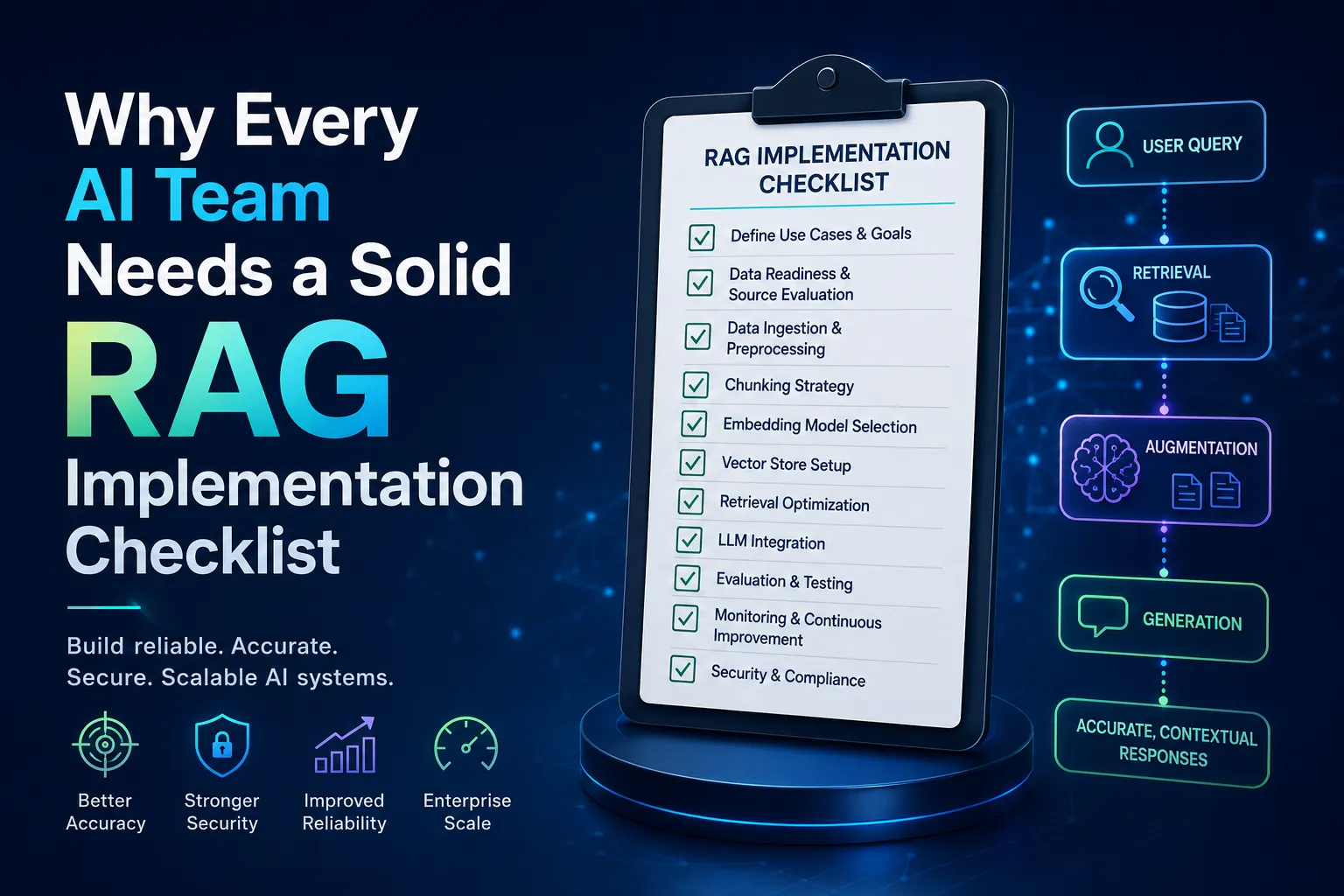

If you've spent any time around AI projects in the last couple of years, you've probably heard the term "RAG" tossed around in nearly every meeting. Retrieval-Augmented Generation has quietly become one of the most practical ways to make large language models actually useful for real business problems, instead of just impressive demo toys. But here's the thing nobody tells you upfront: building a RAG system that works reliably in production is a lot harder than the tutorials make it look.
That gap between "cool proof of concept" and "system people actually trust" is exactly where a structured rag implementation checklist earns its keep. It's not about following a rigid formula — it's about making sure you don't skip the unglamorous steps that quietly determine whether your system succeeds or quietly falls apart three weeks after launch.
What RAG Actually Solves (and What It Doesn't)
Large language models are trained on a fixed snapshot of data. Ask them about something that happened last week, or about your company's internal policy document, and they'll either admit they don't know or, worse, confidently make something up. RAG fixes this by pairing the model with a retrieval system — think of it as giving the model a librarian who fetches the right pages before it starts writing an answer.
That said, RAG isn't magic. It doesn't fix a poorly organized knowledge base, and it won't compensate for messy, duplicate, or outdated documents sitting in your data store. In fact, a badly implemented RAG pipeline can be more convincing in its wrongness than a plain language model, because it looks like it's citing sources. This is one of the reasons organizations researching generative AI risk have started paying closer attention to how retrieval systems are grounded and validated before deployment.
Start With the Data, Not the Model
Teams often obsess over which embedding model or vector database to use, when the real bottleneck is almost always data quality. Before writing a single line of retrieval code, ask yourself:
- Is the source content accurate and current?
- Are there conflicting versions of the same document floating around?
- Is sensitive information properly tagged and access-controlled?
- What format is the data in, and how much cleanup does it need?
Skipping this step is like building a beautiful house on a cracked foundation. It'll look fine in the demo, then start showing cracks the moment real users start asking real questions.
Chunking Strategy: The Quiet Make-or-Break Decision
Chunking splitting documents into smaller pieces before embedding them sounds like a minor technical detail, but it has an outsized effect on retrieval quality. Chunks that are too small lose context; chunks that are too large dilute relevance and increase the odds that noise gets tacked onto the right answer.
A few practical guidelines that tend to hold up across projects:
- Keep chunks semantically coherent (don't split mid-thought or mid-table).
- Add overlap between chunks so context isn't abruptly cut off.
- Test different chunk sizes against real user queries rather than guessing.
- Preserve metadata (source, date, section) alongside each chunk for traceability.
This is one of those areas where a documented checklist approach genuinely saves time, because it forces teams to test assumptions instead of shipping whatever configuration happened to work in a quick experiment.
Choosing and Tuning the Retrieval Layer
Vector search gets most of the attention, but hybrid retrieval combining keyword search with semantic embeddings often outperforms pure vector approaches, especially for domain-specific terminology, product codes, or legal language where exact matches matter. Don't assume the fanciest embedding model automatically wins; benchmark it against your actual use case.
It's also worth revisiting retrieval evaluation metrics regularly rather than treating them as a one-time setup task. Precision and recall on retrieved passages, along with downstream answer accuracy, should be tracked as living metrics, not a launch-day checkbox.
Grounding, Citations, and Reducing Hallucination
One of RAG's biggest selling points is that answers can be traced back to source documents. But that only works if the system is actually designed to surface citations clearly and refuse to answer when retrieval confidence is low. A well-built system should be comfortable saying "I couldn't find a reliable answer to that" rather than stitching together a plausible-sounding guess.
This is closely tied to broader conversations happening around responsible AI deployment. The NIST AI Risk Management Framework outlines governance and measurement practices that are directly applicable to retrieval-based systems, particularly around transparency and minimizing harmful or misleading outputs. Teams building RAG pipelines for regulated industries especially benefit from mapping their evaluation process against frameworks like this one rather than inventing their own from scratch.
Security is another piece that often gets bolted on too late. Retrieval systems that pull from internal databases need the same access control discipline as any other data pipeline — a RAG system is only as trustworthy as the permissions governing what it's allowed to retrieve. Resources from the NIST Computer Security Resource Center offer useful reference material on access control and information security practices that translate well into retrieval architecture decisions, especially when sensitive or regulated data is involved.
Testing Beyond the Happy Path
It's easy to test a RAG system with the queries you expect users to ask. It's much harder and much more important to test it with the queries you don't expect: ambiguous phrasing, multi-part questions, queries with typos, or questions that have no good answer in the knowledge base at all. A system that gracefully handles "I don't know" scenarios is far more trustworthy than one that always produces a confident-sounding response.
For teams looking for a more structured breakdown of these evaluation stages, this rag implementation checklist walks through practical testing scenarios that go beyond basic functional checks, which can be a helpful reference point when building out your own QA process.
Monitoring After Launch
Launch day is not the finish line it's closer to the starting gun. Retrieval systems drift over time as source documents change, user behavior shifts, and edge cases accumulate. Ongoing monitoring should track:
- Retrieval accuracy over time, not just at launch
- User feedback signals (thumbs up/down, follow-up questions)
- Latency and cost per query as usage scales
- Content freshness stale documents quietly degrading answer quality
Teams that treat RAG as a "set it and forget it" system tend to see performance quietly erode within a few months, often without anyone noticing until a user complains.
Common Pitfalls Worth Avoiding
A few mistakes show up again and again across implementations:
- Over-indexing on model choice while under-investing in data hygiene
- Ignoring chunk overlap, leading to context loss
- No fallback behavior when retrieval confidence is low
- Treating evaluation as a one-time task instead of continuous monitoring
- Underestimating the compute and storage costs of scaling vector indexes
None of these are exotic problems. They're the same operational discipline issues that show up in most software systems, just wearing an AI costume.
Bringing It All Together
Retrieval-Augmented Generation isn't a single technology decision it's an ongoing system design practice that touches data engineering, security, evaluation, and user experience all at once. Teams that approach it piecemeal usually end up patching problems after the fact. Teams that work through a structured checklist, testing assumptions at each stage rather than assuming the defaults will work, tend to ship systems that actually hold up once real users start relying on them.
Whether you're building your first prototype or refining a system that's already in production, treating each stage data quality, chunking, retrieval tuning, grounding, security, and monitoring as its own checkpoint rather than an afterthought is what separates a genuinely useful AI tool from one that just looks impressive in a demo.


























Sign in to leave a comment.